` | Ask about New API | Get help on New API deployment, configuration, API call formats, and more |
## Installation & Configuration
### Install newapi-skills
One-line installation via `npx`:
```bash
npx skills add https://github.com/QuantumNous/skills --skill newapi
```
This pulls the latest Skill definition from the GitHub repository and installs it into your editor environment.
### Set Environment Variables
newapi-skills requires three environment variables to connect to your New API instance. Add them to your shell profile:
```bash
# ~/.bashrc or ~/.zshrc
export NEWAPI_BASE_URL=https://
export NEWAPI_ACCESS_TOKEN=your-access-token
export NEWAPI_USER_ID=1
```
| Variable | Description | Example |
| --------------------- | -------------------------- | ------------------------------------------------------------------- |
| `NEWAPI_BASE_URL` | New API service URL | `https://api.example.com` |
| `NEWAPI_ACCESS_TOKEN` | Admin or user access token | From "Personal Settings → Account → Security → System Access Token" |
| `NEWAPI_USER_ID` | User ID | `1` (admin default is 1) |
You can also create a `.env` file in your project root. Make sure `.env` is listed in `.gitignore` to prevent key leaks.
### Start Using
Once installed, type `/newapi` commands in any Skills-compatible AI editor. For example:
* Type `/newapi models` to list available models
* Type `/newapi balance` to check your current balance
* Type `/newapi create-token my-app` to create a new token named `my-app`
* Type `/newapi help how do I configure groups and tokens?` to ask New API usage questions directly
* In OpenClaw, you can also run `/newapi models`, `/newapi balance`, and token commands directly in your agent workflow
## Runtime Requirements
newapi-skills requires one of the following JavaScript runtimes (auto-detected at startup):
| Runtime | Version | Recommendation |
| ----------- | ------- | --------------------- |
| **Bun** | Latest | Recommended (fastest) |
| **Node.js** | >= 18 | Widely supported |
| **Deno** | Latest | Optional |
## Security
newapi-skills has multiple layers of security built in to protect your API keys:
* Token listings only show **masked keys** (e.g. `sk-reHR**********OspA`) — real keys never appear in terminal output
* `copy-token` copies the key to the system clipboard only, never displaying it in any output
* `apply-token` uses placeholder replacement to inject keys, never exposing raw key content
* All `sk-` prefixed key values are strictly protected throughout the entire execution flow
## Learn More
newapi-skills is under active development — commands and features may change with updates. Refer to the repository README for the latest information and changelog:
* GitHub Repository: [github.com/QuantumNous/skills](https://github.com/QuantumNous/skills)
* New API Website: [www.newapi.ai](https://www.newapi.ai)
* New API GitHub: [github.com/QuantumNous/new-api](https://github.com/QuantumNous/new-api)
# Buy Us a Coffee
## 💝 Why We Need Your Support
New API is a completely free and open-source project, and we always adhere to:
* 🆓 Permanently free to use
* 💻 Completely open-source code
* 🤝 Continuous updates and maintenance
* 👥 Community co-construction
It is precisely because of the support and encouragement from users like you that we can continue to maintain and improve this project. Every bit of your support is our motivation to move forward.
## 🌟 Your Support Will Help Us
* Maintain and upgrade servers
* Develop new features
* Optimize user experience
* Provide better documentation
* Build a better community
## 🎁 How to Sponsor
If you find New API helpful, feel free to buy us a coffee, allowing us to dedicate more effort to making the project even better!
[☕ Support Us on AfDian](https://afdian.com/a/new-api)
## 💌 Acknowledgments
Thank you to every supporter; your generosity enables this project to continue its development. We promise to:
* Work harder to maintain and improve the project
* Seriously consider every user's feedback
* Allocate every sponsorship contribution to project development
* Maintain the open-source and free nature of the project
!!! quote "A Message"
The development of open-source projects is inseparable from the power of the community. Every bit of your support is our motivation to move forward and the best interpretation of the open-source spirit.
Thank you for being willing to contribute to open-source projects! ❤️
# Community Interaction
Welcome to the New API open-source community! Here, you can exchange experiences and share ideas with other developers.
## 📜 Group Rules
To maintain a positive community atmosphere, please observe the following rules:
Violation of these rules may result in removal from the chat group. All members are requested to read and comply carefully.
1. Group administrators and owners are under no obligation to provide you with any technical support. If you have questions, please submit an [issue](/en/docs/support/feedback-issues)
2. The group chat prohibits the posting of any account selling or buying information. Group nicknames are prohibited from containing any purchase guidance or buying-related information.
3. This group does not sell any API products. Please do not trust or purchase API products from anyone (including administrators).
4. New API adopts the GNU AGPLv3 open-source license. It can be used for free as long as the open-source license is complied with. For details, please see [Project Introduction](/en/docs/guide/wiki/basic-concepts/project-introduction)
5. This project must be used in compliance with relevant laws and regulations. Discussion of any illegal topics is prohibited.
If you have any feature suggestions or bug feedback, it is recommended to submit an issue directly on GitHub, which allows for better tracking and resolution of problems.
## 🤝 Join Our QQ Communication Group
After carefully reading the group rules above, please complete the following questionnaire for verification. The QQ group information will only be displayed if all questions are answered correctly.
# FAQ
import { Accordions, Accordion } from 'fumadocs-ui/components/accordion';
## 💰 Quota-Related Issues
The quota calculation formula is as follows:
```
Quota = Group Ratio * Model Ratio * (Prompt Token Count + Completion Token Count * Completion Ratio)
```
**Completion Ratio Explanation:**
* GPT3.5: Fixed at 1.33
* GPT4: Fixed at 2 (consistent with official)
**Notes:**
* In non-streaming mode, the official API returns the total tokens consumed, but the consumption ratios for prompt and completion are different.
* The default ratio of New API is consistent with the official ratio and has been adjusted.
This is because token quota and account quota are separate:
* Token quota is only used to set the maximum usage limit.
* Users can freely set the token quota.
* Please check if your token quota is sufficient.
## 🔧 Channel Configuration Issues
Weight and Priority are two important parameters that control the order and distribution of channel usage:
* **Priority**: A larger number indicates higher priority; channels with higher priority will be used first.
* **Weight**: Among channels with the same priority, requests are distributed according to the weight ratio.
**For example:**
* Channels with priority 2 will be used before channels with priority 1.
* For two channels with the same priority 1, if the weight ratio is 2:1, requests will be distributed in a 2:1 ratio.
Please check the following settings:
1. User Group Settings
2. Channel Group Settings
3. Channel Model Settings
This error indicates that the return value is not valid JSON, but an HTML page.
The most likely reason is: Your deployment site's IP or proxy node has been blocked by CloudFlare.
Please check if the ratio or price has been configured in "System Settings - Operation Settings - Model Ratio Settings".
Or enable "Self-use Mode" in "System Settings - Operation Settings".
## 🌐 Deployment and Connection Issues
Please check the following:
1. Do not set `BASE_URL` during deployment.
2. Confirm that the API address and API Key are filled in correctly.
3. Check if HTTPS is enabled (browsers will block HTTP requests under HTTPS domains).
This indicates that an upstream channel encountered a 429 error (Too Many Requests).
## 📦 Database and Upgrade Issues
It varies depending on the database type:
* **MySQL**: Data will not be lost.
* **SQLite**: You need to mount a volume according to the deployment command to persist the `one-api.db` database file, otherwise data will be lost after the container restarts.
Generally, no. The system will automatically adjust during initialization.
If special handling is required, it will be explained in the update log and corresponding scripts will be provided.
This error indicates that invalid channel ID records were detected in the `ability` table. Common reasons:
* Invalid channels in the `ability` table were not cleaned up synchronously when deleting `channel` table records.
* Each model supported by a channel needs to have a corresponding record in the `ability` table.
## ❓ Can't find your question?
If your question is not answered here, you are welcome to:
1. Check the [Installation and Deployment Documentation](/en/docs/installation)
2. [Submit an issue on GitHub](/en/docs/support/feedback-issues)
3. Join the [QQ communication group for help](/en/docs/support/community-interaction)
# Feedback
Your feedback is highly valued and crucial for the project's improvement. If you encounter any issues during use, please report them to us via GitHub Issues.
## 📝 How to Submit an Issue
Please visit our GitHub Issues page: [New API Issues](https://github.com/Calcium-Ion/new-api/issues)
Before submitting a new issue, we recommend that you:
1. Search to see if a similar issue already exists
2. Ensure you are using the latest version
3. Check if there are relevant answers in the [FAQ document](/en/docs/support/faq)
 ## 💡 Issue Feedback Templates
### Format for Reporting Issues
```markdown
**例行检查**
[//]: # '方框内删除已有的空格,填 x 号'
- [ ] 我已确认目前没有类似 issue
- [ ] 我已确认我已升级到最新版本
- [ ] 我已完整查看过项目 README,尤其是常见问题部分
- [ ] 我理解并愿意跟进此 issue,协助测试和提供反馈
- [ ] 我理解并认可上述内容,并理解项目维护者精力有限,**不遵循规则的 issue 可能会被无视或直接关闭**
**问题描述**
**复现步骤**
**预期结果**
**相关截图**
如果没有的话,请删除此节。
```
### Format for Feature Requests
```markdown
**例行检查**
[//]: # '方框内删除已有的空格,填 x 号'
- [ ] 我已确认目前没有类似 issue
- [ ] 我已确认我已升级到最新版本
- [ ] 我已完整查看过项目 README,已确定现有版本无法满足需求
- [ ] 我理解并愿意跟进此 issue,协助测试和提供反馈
- [ ] 我理解并认可上述内容,并理解项目维护者精力有限,**不遵循规则的 issue 可能会被无视或直接关闭**
**功能描述**
**应用场景**
```
* Please strictly follow the template format when submitting issues - Please
use a clear title to facilitate searching for other users - Please pay
attention to and reply to your submitted issues in a timely manner - Issues
that do not meet the specifications may be closed directly - If the issue is
resolved, please close it promptly
# Help & Support
import { Card, Cards } from 'fumadocs-ui/components/card';
import { HelpCircle, MessageCircle, Bug, Coffee } from 'lucide-react';
## Overview
Having issues? Need help? We provide multiple support channels to help you solve various problems during use.
## Get Help
} title="FAQ" description="Check answers to frequently asked questions for quick problem resolution." href="/en/docs/support/faq" />
} title="Community" description="Join the community to exchange experiences and tips with other users." href="/en/docs/support/community-interaction" />
} title="Feedback" description="Found a bug or have a feature suggestion? Let us know!" href="/en/docs/support/feedback-issues" />
} title="Sponsor" description="If New API has been helpful to you, feel free to buy us a coffee." href="/en/docs/support/buy-us-a-coffee" />
# Authentication System Description (Auth)
## Description
Backend management interfaces adopt a multi-level authentication mechanism, commonly: **Public**, **User**, **Admin**, **Root**.
## Authentication Methods (Choose One)
### Session
Obtain Session via the login interface:
* `POST /api/user/login`
### Access Token (Recommended)
Carry in the request header:
```text
Authorization: Bearer {token}
```
Tokens can be generated in "Personal Settings - Security Settings - System Access Tokens".
## Required Request Headers
Some interfaces require carrying a user identification request header:
```text
New-Api-User: {user_id}
```
Where `{user_id}` must match the currently logged-in user.
## Permission Levels
* **Public**: No authentication required
* **User**: Requires login or Access Token
* **Admin**: Requires administrator privileges
* **Root**: Highest privilege
# API Tokens
Here you can view, edit, and add tokens.
## View Tokens
## Add Tokens
## 💡 Issue Feedback Templates
### Format for Reporting Issues
```markdown
**例行检查**
[//]: # '方框内删除已有的空格,填 x 号'
- [ ] 我已确认目前没有类似 issue
- [ ] 我已确认我已升级到最新版本
- [ ] 我已完整查看过项目 README,尤其是常见问题部分
- [ ] 我理解并愿意跟进此 issue,协助测试和提供反馈
- [ ] 我理解并认可上述内容,并理解项目维护者精力有限,**不遵循规则的 issue 可能会被无视或直接关闭**
**问题描述**
**复现步骤**
**预期结果**
**相关截图**
如果没有的话,请删除此节。
```
### Format for Feature Requests
```markdown
**例行检查**
[//]: # '方框内删除已有的空格,填 x 号'
- [ ] 我已确认目前没有类似 issue
- [ ] 我已确认我已升级到最新版本
- [ ] 我已完整查看过项目 README,已确定现有版本无法满足需求
- [ ] 我理解并愿意跟进此 issue,协助测试和提供反馈
- [ ] 我理解并认可上述内容,并理解项目维护者精力有限,**不遵循规则的 issue 可能会被无视或直接关闭**
**功能描述**
**应用场景**
```
* Please strictly follow the template format when submitting issues - Please
use a clear title to facilitate searching for other users - Please pay
attention to and reply to your submitted issues in a timely manner - Issues
that do not meet the specifications may be closed directly - If the issue is
resolved, please close it promptly
# Help & Support
import { Card, Cards } from 'fumadocs-ui/components/card';
import { HelpCircle, MessageCircle, Bug, Coffee } from 'lucide-react';
## Overview
Having issues? Need help? We provide multiple support channels to help you solve various problems during use.
## Get Help
} title="FAQ" description="Check answers to frequently asked questions for quick problem resolution." href="/en/docs/support/faq" />
} title="Community" description="Join the community to exchange experiences and tips with other users." href="/en/docs/support/community-interaction" />
} title="Feedback" description="Found a bug or have a feature suggestion? Let us know!" href="/en/docs/support/feedback-issues" />
} title="Sponsor" description="If New API has been helpful to you, feel free to buy us a coffee." href="/en/docs/support/buy-us-a-coffee" />
# Authentication System Description (Auth)
## Description
Backend management interfaces adopt a multi-level authentication mechanism, commonly: **Public**, **User**, **Admin**, **Root**.
## Authentication Methods (Choose One)
### Session
Obtain Session via the login interface:
* `POST /api/user/login`
### Access Token (Recommended)
Carry in the request header:
```text
Authorization: Bearer {token}
```
Tokens can be generated in "Personal Settings - Security Settings - System Access Tokens".
## Required Request Headers
Some interfaces require carrying a user identification request header:
```text
New-Api-User: {user_id}
```
Where `{user_id}` must match the currently logged-in user.
## Permission Levels
* **Public**: No authentication required
* **User**: Requires login or Access Token
* **Admin**: Requires administrator privileges
* **Root**: Highest privilege
# API Tokens
Here you can view, edit, and add tokens.
## View Tokens
## Add Tokens
 # Channels
Here you can manage NewAPI's upstream Channels.
## Channel Creation/Editing Page
# Channels
Here you can manage NewAPI's upstream Channels.
## Channel Creation/Editing Page

 # Parameter Override Settings Documentation
## Overview
The parameter override system supports two modes: simple override mode (backward compatible) and advanced operation mode. Complex dynamic parameter adjustments can be achieved through flexible conditional judgments and operation types.
## Usage
### Simple Override Mode
Backward compatible, directly specify the fields and values to be overridden, and the system will merge these fields into the original request.
```json
{
"temperature": 0.8,
"max_tokens": 2000,
"model": "gpt-4"
}
```
### Advanced Operation Mode
Define complex parameter operations through the `operations` array, supporting advanced features such as conditional judgments, array operations, string concatenation, and string normalization.
#### Basic Structure
```json
{
"operations": [
{
"path": "temperature",
"mode": "set",
"value": 0.8,
"conditions": [...],
"logic": "AND"
}
]
}
```
**Field Description (fill as needed):**
* `mode`: Required
* `path`: Applicable to `set` / `delete` / `append` / `prepend` / `trim_prefix` / `trim_suffix` / `ensure_prefix` / `ensure_suffix` / `trim_space` / `to_lower` / `to_upper` / `replace` / `regex_replace`
* `value`: Commonly used in `set` / `append` / `prepend` / `trim_prefix` / `trim_suffix` / `ensure_prefix` / `ensure_suffix`
* `from` / `to`: Applicable to `move` / `copy` / `replace` / `regex_replace`
* `keep_origin`: Used for `set` (skips if value already exists) and for `append` / `prepend` during object merging.
## Operation Modes (mode)
### 1. set - Set Value
Sets the value at the specified path.
```json
{
"path": "temperature",
"mode": "set",
"value": 0.8,
"keep_origin": false
}
```
**Parameter Description:**
* `keep_origin`: When `true`, if the target path already has a value, setting is skipped.
### 2. delete - Delete Field
Deletes the field at the specified path.
```json
{
"path": "messages.0",
"mode": "delete"
}
```
### 3. move - Move Field
Moves the value of one field to another location.
```json
{
"mode": "move",
"from": "messages.0.content",
"to": "system"
}
```
### 4. append - Append Content
Appends new content after existing content.
```json
{
"path": "messages.0.content",
"mode": "append",
"value": "\n\n请用中文回答。"
}
```
**Supported Data Types:**
* **String**: Appends to the end of the original string.
* **Array**: Adds elements to the end of the array (supports adding single elements or arrays).
* **Object**: Merges object properties.
### 5. prepend - Prepend Content
Adds new content before existing content.
```json
{
"path": "messages.0.content",
"mode": "prepend",
"value": "重要提示:请仔细阅读以下内容。\n\n"
}
```
**Supported Data Types:**
* **String**: Prepends to the beginning of the original string.
* **Array**: Adds elements to the beginning of the array (supports adding single elements or arrays).
* **Object**: Merges object properties.
### 6. copy - Copy Field
Copies the value from the path specified by `from` to the path specified by `to` (does not delete the source field).
```json
{
"mode": "copy",
"from": "model",
"to": "original_model"
}
```
**Parameter Requirements:**
* `from` / `to`: Required
* An error will be reported if the source path does not exist.
### 7. trim\_prefix - Trim Prefix
Removes the specified prefix from a string field (if it doesn't match, it remains unchanged).
```json
{
"path": "model",
"mode": "trim_prefix",
"value": "openai/"
}
```
**Parameter Requirements:**
* `value`: Required
### 8. trim\_suffix - Trim Suffix
Removes the specified suffix from a string field (if it doesn't match, it remains unchanged).
```json
{
"path": "model",
"mode": "trim_suffix",
"value": "-latest"
}
```
**Parameter Requirements:**
* `value`: Required
### 9. ensure\_prefix - Ensure Prefix
Ensures a string field starts with the specified prefix (if it already exists, it remains unchanged).
```json
{
"path": "model",
"mode": "ensure_prefix",
"value": "openai/"
}
```
**Parameter Requirements:**
* `value`: Required and cannot be an empty string.
### 10. ensure\_suffix - Ensure Suffix
Ensures a string field ends with the specified suffix (if it already exists, it remains unchanged).
```json
{
"path": "model",
"mode": "ensure_suffix",
"value": "-latest"
}
```
**Parameter Requirements:**
* `value`: Required and cannot be an empty string.
### 11. trim\_space - Trim Leading/Trailing Whitespace
Performs `TrimSpace` on a string field (spaces, newlines, tabs, etc., will be removed).
```json
{
"path": "model",
"mode": "trim_space"
}
```
### 12. to\_lower - Convert to Lowercase
Converts a string field to lowercase.
```json
{
"path": "model",
"mode": "to_lower"
}
```
### 13. to\_upper - Convert to Uppercase
Converts a string field to uppercase.
```json
{
"path": "model",
"mode": "to_upper"
}
```
### 14. replace - String Replace
Performs substring replacement on a string field.
```json
{
"path": "model",
"mode": "replace",
"from": "openai/",
"to": ""
}
```
**Parameter Requirements:**
* `from`: Required and cannot be an empty string.
* `to`: Optional, equivalent to an empty string if omitted.
### 15. regex\_replace - Regex Replace
Performs regular expression matching and replacement on a string field.
```json
{
"path": "model",
"mode": "regex_replace",
"from": "^gpt-",
"to": "openai/gpt-"
}
```
**Parameter Requirements:**
* `from`: Required (regular expression, Go regexp syntax).
* `to`: Optional, equivalent to an empty string if omitted.
## Conditional Judgment
Set the conditions for operation execution using the `conditions` array; the corresponding operation will only be executed when the conditions are met.
### Condition Structure
```json
{
"conditions": [
{
"path": "model",
"mode": "contains",
"value": "gpt-4",
"invert": false,
"pass_missing_key": false
}
],
"logic": "AND"
}
```
### Condition Matching Modes
* `full`: Exact match (default)
* `prefix`: Prefix match
* `suffix`: Suffix match
* `contains`: Contains match
* `gt`: Greater than (numeric types only)
* `gte`: Greater than or equal to (numeric types only)
* `lt`: Less than (numeric types only)
* `lte`: Less than or equal to (numeric types only)
* Note:
- Numeric comparisons can only be used for numeric types.
- String operations (prefix, suffix, contains) will convert values to strings for comparison.
### Condition Parameter Description
* `invert`: Invert function, `true` means negate the result.
* `pass_missing_key`: Behavior when the specified path does not exist.
* `true`: Condition passes if path does not exist.
* `false`: Condition does not pass if path does not exist (default).
### Logical Relationship (logic)
* `AND`: All conditions must be met.
* `OR`: Any condition met is sufficient (default).
## Path Syntax
Use JSON path syntax to access nested fields:
* `temperature` - Root-level field
* `messages.0.content` - The content field of the first element in the array.
* `messages.-1.content` - The content field of the last element in the array.
* `metadata.user.name` - Nested object field.
Additionally, `path` supports the following built-in variables (no need to explicitly exist in the request body), which can be directly used for conditional judgments:
| Variable | Meaning | Typical Use |
| -------------------------- | ------------------------------- | ---------------------------------------------------------------------- |
| `model` / `upstream_model` | Target model after redirection | Conditional matching based on the actual upstream model called |
| `original_model` | Target model before redirection | Conditional matching based on the original model requested by the user |
## Practical Examples
### 1. Dynamically Adjust Model Parameters
Dynamically adjust the temperature parameter based on message content:
```json
{
"operations": [
{
"path": "temperature",
"mode": "set",
"value": 0.3,
"conditions": [
{
"path": "messages.0.content",
"mode": "contains",
"value": "代码"
}
]
},
{
"path": "temperature",
"mode": "set",
"value": 0.9,
"conditions": [
{
"path": "messages.0.content",
"mode": "contains",
"value": "创意"
}
]
}
]
}
```
### 2. Add System Prompt
Add a system message at the beginning of the message array:
```json
{
"operations": [
{
"path": "messages",
"mode": "prepend",
"value": [
{
"role": "system",
"content": "你是一个专业的AI助手,请始终保持礼貌和专业。"
}
]
}
]
}
```
### 3. Adjust Parameters Based on Model Type
Set different max\_tokens based on different models:
```json
{
"operations": [
{
"path": "max_tokens",
"mode": "set",
"value": 4000,
"conditions": [
{
"path": "model",
"mode": "prefix",
"value": "gpt-4"
}
]
},
{
"path": "max_tokens",
"mode": "set",
"value": 2000,
"conditions": [
{
"path": "model",
"mode": "prefix",
"value": "gpt-3.5"
}
]
}
]
}
```
### 4. Multiple Condition Combination (AND Logic)
Execute the operation only when multiple conditions are met simultaneously:
```json
{
"operations": [
{
"path": "stream",
"mode": "set",
"value": false,
"conditions": [
{
"path": "model",
"mode": "contains",
"value": "claude"
},
{
"path": "messages.0.content",
"mode": "contains",
"value": "长文"
}
],
"logic": "AND"
}
]
}
```
### 5. Numeric Comparison Conditions
Perform conditional judgment based on numerical size:
```json
{
"operations": [
{
"path": "temperature",
"mode": "set",
"value": 0.1,
"conditions": [
{
"path": "max_tokens",
"mode": "gt",
"value": 1000
}
]
}
]
}
```
### 6. Invert Condition
Use `invert` to implement inverse logic:
```json
{
"operations": [
{
"path": "stream",
"mode": "set",
"value": true,
"conditions": [
{
"path": "model",
"mode": "contains",
"value": "gpt-3.5",
"invert": true
}
]
}
]
}
```
### 7. Handle Missing Fields
Use `pass_missing_key` to handle potentially missing fields:
```json
{
"operations": [
{
"path": "temperature",
"mode": "set",
"value": 0.7,
"conditions": [
{
"path": "custom_field",
"mode": "full",
"value": "special",
"pass_missing_key": true
}
]
}
]
}
```
### 8. String Concatenation Example
Append instructions after the user message:
```json
{
"operations": [
{
"path": "messages.-1.content",
"mode": "append",
"value": "\n\n请详细解释你的思考过程。"
}
]
}
```
## Important Notes
**Execution Order**: Operations are executed sequentially according to their order in the `operations` array; earlier operations may affect subsequent operations.
# Chat
New API provides quick access to several AI chat applications, making them convenient for testing or use.
## Import Configuration
You can import configurations into chat applications with one click on the Console -> API Tokens page.
## ChatGPT Next Web
Deployment is currently paused.
## Lobe Chat
Lobe Chat is an open-source multimodal conversational application that
supports various large language models (LLMs) and plugin extensions. It not
only enables text conversations but also supports multimodal interactions such
as images and audio, making it suitable for various scenarios like personal
assistants, knowledge Q\&A, and content creation. Lobe Chat features a clean
and intuitive interface, supports multi-device synchronization, and allows
users to customize models and plugins as needed to flexibly extend
conversational capabilities. Both developers and general users can easily get
started and enjoy the efficient experience brought by intelligent
conversations.
Lobe Chat currently does not support one-click import of configurations from
New API; manual entry is required.
Configuration Entry
## AI as Workspace
AI as Workspace is an innovative approach that integrates artificial
intelligence capabilities into the workspace. By deeply combining AI
assistants with daily office tasks, collaboration, knowledge management, and
other scenarios, users can process information more efficiently, automate
repetitive tasks, and receive intelligent suggestions, thereby enhancing
overall work efficiency and experience.
Supports one-click configuration import from New API
## AMA 问天
AMA 问天 is an intelligent Q\&A assistant provided by NewAPI, supporting
multi-turn conversations and complex problem-solving. Users can interact with
AMA 问天 using natural language to obtain knowledge, technical support, or
business consultations, enhancing communication efficiency and experience.
The AMA 问天 app needs to be installed first.
## OpenCat
OpenCat is an open-source, multi-platform AI chat client that supports
integration with various large language models. Users can engage in natural
language conversations with AI through a clean interface, suitable for daily
communication, knowledge Q\&A, and content creation across multiple scenarios.
OpenCat supports multi-device synchronization and flexible configuration,
making it suitable for both individuals and teams.
The OpenCat app needs to be installed first.
# Dashboard
Here you can view NewAPI's overall statistics.
# Drawing Log
```
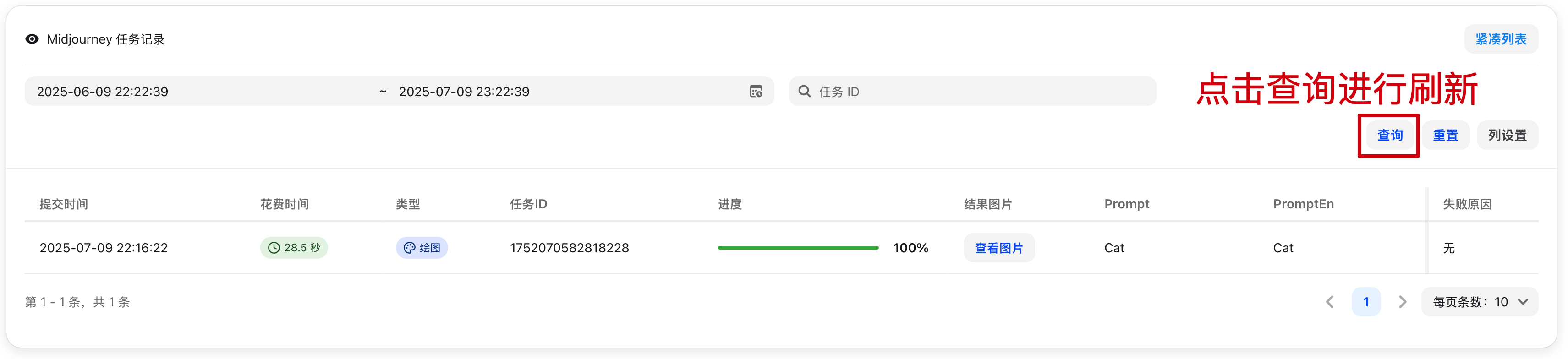
Here you can view Midjourney task records
```
# Playground
Here you can quickly engage in AI chat, facilitating testing and use.
# Personal Settings
Here you can view account information, manage account bindings, perform security settings, and more.
## View Available Models
Here you can view the models available to your current account. Click on a model name to copy it.
## Account Binding
Here you can perform account binding operations.
## Security Settings
Here you can change your password, reset your API key, and perform other related operations.
## Other Settings
### Notification Settings
Here you can configure how you receive notifications. Currently, email and Webhook are supported.
# Parameter Override Settings Documentation
## Overview
The parameter override system supports two modes: simple override mode (backward compatible) and advanced operation mode. Complex dynamic parameter adjustments can be achieved through flexible conditional judgments and operation types.
## Usage
### Simple Override Mode
Backward compatible, directly specify the fields and values to be overridden, and the system will merge these fields into the original request.
```json
{
"temperature": 0.8,
"max_tokens": 2000,
"model": "gpt-4"
}
```
### Advanced Operation Mode
Define complex parameter operations through the `operations` array, supporting advanced features such as conditional judgments, array operations, string concatenation, and string normalization.
#### Basic Structure
```json
{
"operations": [
{
"path": "temperature",
"mode": "set",
"value": 0.8,
"conditions": [...],
"logic": "AND"
}
]
}
```
**Field Description (fill as needed):**
* `mode`: Required
* `path`: Applicable to `set` / `delete` / `append` / `prepend` / `trim_prefix` / `trim_suffix` / `ensure_prefix` / `ensure_suffix` / `trim_space` / `to_lower` / `to_upper` / `replace` / `regex_replace`
* `value`: Commonly used in `set` / `append` / `prepend` / `trim_prefix` / `trim_suffix` / `ensure_prefix` / `ensure_suffix`
* `from` / `to`: Applicable to `move` / `copy` / `replace` / `regex_replace`
* `keep_origin`: Used for `set` (skips if value already exists) and for `append` / `prepend` during object merging.
## Operation Modes (mode)
### 1. set - Set Value
Sets the value at the specified path.
```json
{
"path": "temperature",
"mode": "set",
"value": 0.8,
"keep_origin": false
}
```
**Parameter Description:**
* `keep_origin`: When `true`, if the target path already has a value, setting is skipped.
### 2. delete - Delete Field
Deletes the field at the specified path.
```json
{
"path": "messages.0",
"mode": "delete"
}
```
### 3. move - Move Field
Moves the value of one field to another location.
```json
{
"mode": "move",
"from": "messages.0.content",
"to": "system"
}
```
### 4. append - Append Content
Appends new content after existing content.
```json
{
"path": "messages.0.content",
"mode": "append",
"value": "\n\n请用中文回答。"
}
```
**Supported Data Types:**
* **String**: Appends to the end of the original string.
* **Array**: Adds elements to the end of the array (supports adding single elements or arrays).
* **Object**: Merges object properties.
### 5. prepend - Prepend Content
Adds new content before existing content.
```json
{
"path": "messages.0.content",
"mode": "prepend",
"value": "重要提示:请仔细阅读以下内容。\n\n"
}
```
**Supported Data Types:**
* **String**: Prepends to the beginning of the original string.
* **Array**: Adds elements to the beginning of the array (supports adding single elements or arrays).
* **Object**: Merges object properties.
### 6. copy - Copy Field
Copies the value from the path specified by `from` to the path specified by `to` (does not delete the source field).
```json
{
"mode": "copy",
"from": "model",
"to": "original_model"
}
```
**Parameter Requirements:**
* `from` / `to`: Required
* An error will be reported if the source path does not exist.
### 7. trim\_prefix - Trim Prefix
Removes the specified prefix from a string field (if it doesn't match, it remains unchanged).
```json
{
"path": "model",
"mode": "trim_prefix",
"value": "openai/"
}
```
**Parameter Requirements:**
* `value`: Required
### 8. trim\_suffix - Trim Suffix
Removes the specified suffix from a string field (if it doesn't match, it remains unchanged).
```json
{
"path": "model",
"mode": "trim_suffix",
"value": "-latest"
}
```
**Parameter Requirements:**
* `value`: Required
### 9. ensure\_prefix - Ensure Prefix
Ensures a string field starts with the specified prefix (if it already exists, it remains unchanged).
```json
{
"path": "model",
"mode": "ensure_prefix",
"value": "openai/"
}
```
**Parameter Requirements:**
* `value`: Required and cannot be an empty string.
### 10. ensure\_suffix - Ensure Suffix
Ensures a string field ends with the specified suffix (if it already exists, it remains unchanged).
```json
{
"path": "model",
"mode": "ensure_suffix",
"value": "-latest"
}
```
**Parameter Requirements:**
* `value`: Required and cannot be an empty string.
### 11. trim\_space - Trim Leading/Trailing Whitespace
Performs `TrimSpace` on a string field (spaces, newlines, tabs, etc., will be removed).
```json
{
"path": "model",
"mode": "trim_space"
}
```
### 12. to\_lower - Convert to Lowercase
Converts a string field to lowercase.
```json
{
"path": "model",
"mode": "to_lower"
}
```
### 13. to\_upper - Convert to Uppercase
Converts a string field to uppercase.
```json
{
"path": "model",
"mode": "to_upper"
}
```
### 14. replace - String Replace
Performs substring replacement on a string field.
```json
{
"path": "model",
"mode": "replace",
"from": "openai/",
"to": ""
}
```
**Parameter Requirements:**
* `from`: Required and cannot be an empty string.
* `to`: Optional, equivalent to an empty string if omitted.
### 15. regex\_replace - Regex Replace
Performs regular expression matching and replacement on a string field.
```json
{
"path": "model",
"mode": "regex_replace",
"from": "^gpt-",
"to": "openai/gpt-"
}
```
**Parameter Requirements:**
* `from`: Required (regular expression, Go regexp syntax).
* `to`: Optional, equivalent to an empty string if omitted.
## Conditional Judgment
Set the conditions for operation execution using the `conditions` array; the corresponding operation will only be executed when the conditions are met.
### Condition Structure
```json
{
"conditions": [
{
"path": "model",
"mode": "contains",
"value": "gpt-4",
"invert": false,
"pass_missing_key": false
}
],
"logic": "AND"
}
```
### Condition Matching Modes
* `full`: Exact match (default)
* `prefix`: Prefix match
* `suffix`: Suffix match
* `contains`: Contains match
* `gt`: Greater than (numeric types only)
* `gte`: Greater than or equal to (numeric types only)
* `lt`: Less than (numeric types only)
* `lte`: Less than or equal to (numeric types only)
* Note:
- Numeric comparisons can only be used for numeric types.
- String operations (prefix, suffix, contains) will convert values to strings for comparison.
### Condition Parameter Description
* `invert`: Invert function, `true` means negate the result.
* `pass_missing_key`: Behavior when the specified path does not exist.
* `true`: Condition passes if path does not exist.
* `false`: Condition does not pass if path does not exist (default).
### Logical Relationship (logic)
* `AND`: All conditions must be met.
* `OR`: Any condition met is sufficient (default).
## Path Syntax
Use JSON path syntax to access nested fields:
* `temperature` - Root-level field
* `messages.0.content` - The content field of the first element in the array.
* `messages.-1.content` - The content field of the last element in the array.
* `metadata.user.name` - Nested object field.
Additionally, `path` supports the following built-in variables (no need to explicitly exist in the request body), which can be directly used for conditional judgments:
| Variable | Meaning | Typical Use |
| -------------------------- | ------------------------------- | ---------------------------------------------------------------------- |
| `model` / `upstream_model` | Target model after redirection | Conditional matching based on the actual upstream model called |
| `original_model` | Target model before redirection | Conditional matching based on the original model requested by the user |
## Practical Examples
### 1. Dynamically Adjust Model Parameters
Dynamically adjust the temperature parameter based on message content:
```json
{
"operations": [
{
"path": "temperature",
"mode": "set",
"value": 0.3,
"conditions": [
{
"path": "messages.0.content",
"mode": "contains",
"value": "代码"
}
]
},
{
"path": "temperature",
"mode": "set",
"value": 0.9,
"conditions": [
{
"path": "messages.0.content",
"mode": "contains",
"value": "创意"
}
]
}
]
}
```
### 2. Add System Prompt
Add a system message at the beginning of the message array:
```json
{
"operations": [
{
"path": "messages",
"mode": "prepend",
"value": [
{
"role": "system",
"content": "你是一个专业的AI助手,请始终保持礼貌和专业。"
}
]
}
]
}
```
### 3. Adjust Parameters Based on Model Type
Set different max\_tokens based on different models:
```json
{
"operations": [
{
"path": "max_tokens",
"mode": "set",
"value": 4000,
"conditions": [
{
"path": "model",
"mode": "prefix",
"value": "gpt-4"
}
]
},
{
"path": "max_tokens",
"mode": "set",
"value": 2000,
"conditions": [
{
"path": "model",
"mode": "prefix",
"value": "gpt-3.5"
}
]
}
]
}
```
### 4. Multiple Condition Combination (AND Logic)
Execute the operation only when multiple conditions are met simultaneously:
```json
{
"operations": [
{
"path": "stream",
"mode": "set",
"value": false,
"conditions": [
{
"path": "model",
"mode": "contains",
"value": "claude"
},
{
"path": "messages.0.content",
"mode": "contains",
"value": "长文"
}
],
"logic": "AND"
}
]
}
```
### 5. Numeric Comparison Conditions
Perform conditional judgment based on numerical size:
```json
{
"operations": [
{
"path": "temperature",
"mode": "set",
"value": 0.1,
"conditions": [
{
"path": "max_tokens",
"mode": "gt",
"value": 1000
}
]
}
]
}
```
### 6. Invert Condition
Use `invert` to implement inverse logic:
```json
{
"operations": [
{
"path": "stream",
"mode": "set",
"value": true,
"conditions": [
{
"path": "model",
"mode": "contains",
"value": "gpt-3.5",
"invert": true
}
]
}
]
}
```
### 7. Handle Missing Fields
Use `pass_missing_key` to handle potentially missing fields:
```json
{
"operations": [
{
"path": "temperature",
"mode": "set",
"value": 0.7,
"conditions": [
{
"path": "custom_field",
"mode": "full",
"value": "special",
"pass_missing_key": true
}
]
}
]
}
```
### 8. String Concatenation Example
Append instructions after the user message:
```json
{
"operations": [
{
"path": "messages.-1.content",
"mode": "append",
"value": "\n\n请详细解释你的思考过程。"
}
]
}
```
## Important Notes
**Execution Order**: Operations are executed sequentially according to their order in the `operations` array; earlier operations may affect subsequent operations.
# Chat
New API provides quick access to several AI chat applications, making them convenient for testing or use.
## Import Configuration
You can import configurations into chat applications with one click on the Console -> API Tokens page.
## ChatGPT Next Web
Deployment is currently paused.
## Lobe Chat
Lobe Chat is an open-source multimodal conversational application that
supports various large language models (LLMs) and plugin extensions. It not
only enables text conversations but also supports multimodal interactions such
as images and audio, making it suitable for various scenarios like personal
assistants, knowledge Q\&A, and content creation. Lobe Chat features a clean
and intuitive interface, supports multi-device synchronization, and allows
users to customize models and plugins as needed to flexibly extend
conversational capabilities. Both developers and general users can easily get
started and enjoy the efficient experience brought by intelligent
conversations.
Lobe Chat currently does not support one-click import of configurations from
New API; manual entry is required.
Configuration Entry
## AI as Workspace
AI as Workspace is an innovative approach that integrates artificial
intelligence capabilities into the workspace. By deeply combining AI
assistants with daily office tasks, collaboration, knowledge management, and
other scenarios, users can process information more efficiently, automate
repetitive tasks, and receive intelligent suggestions, thereby enhancing
overall work efficiency and experience.
Supports one-click configuration import from New API
## AMA 问天
AMA 问天 is an intelligent Q\&A assistant provided by NewAPI, supporting
multi-turn conversations and complex problem-solving. Users can interact with
AMA 问天 using natural language to obtain knowledge, technical support, or
business consultations, enhancing communication efficiency and experience.
The AMA 问天 app needs to be installed first.
## OpenCat
OpenCat is an open-source, multi-platform AI chat client that supports
integration with various large language models. Users can engage in natural
language conversations with AI through a clean interface, suitable for daily
communication, knowledge Q\&A, and content creation across multiple scenarios.
OpenCat supports multi-device synchronization and flexible configuration,
making it suitable for both individuals and teams.
The OpenCat app needs to be installed first.
# Dashboard
Here you can view NewAPI's overall statistics.
# Drawing Log
```
Here you can view Midjourney task records

```
# Playground
Here you can quickly engage in AI chat, facilitating testing and use.
# Personal Settings
Here you can view account information, manage account bindings, perform security settings, and more.
## View Available Models
Here you can view the models available to your current account. Click on a model name to copy it.
## Account Binding
Here you can perform account binding operations.
## Security Settings
Here you can change your password, reset your API key, and perform other related operations.
## Other Settings
### Notification Settings
Here you can configure how you receive notifications. Currently, email and Webhook are supported.
 ### Price Settings
Here you can set whether to accept models without a configured price.
### Price Settings
Here you can set whether to accept models without a configured price.
 ### IP Logging
Here you can choose to enable IP logging. If enabled, IP addresses will be displayed in the logs.
### IP Logging
Here you can choose to enable IP logging. If enabled, IP addresses will be displayed in the logs.
 # Redemption Code
Here you can manage NewAPI's redemption codes.
# Task Logs
Suno task logs can be viewed here.
# Usage Logs
Here you can view the logs of API calls, and see the Token Group, model, and cost used. Regular users can view their own logs, while administrators can view other users' logs.
# User Management
Here you can manage registered users of NewAPI.
# Wallet
Here you can top up, redeem redemption codes, and view AFF invitation links. Payment methods are configured by the administrator in System Settings -> Payment Settings.
# Changelog
import { Callout } from 'fumadocs-ui/components/callout';
To view all historical versions, please visit the [GitHub Releases page](https://github.com/QuantumNous/new-api/releases). This page automatically fetches the latest update information from that page.
## v0.12.14
### Improvements
* Improved user-visible management and top-up logs with a cleaner display, preserved row expansion, and clearer handling of legacy records.
***
**Full Changelog**: [https://github.com/QuantumNous/new-api/compare/v0.12.13...v0.12.14](https://github.com/QuantumNous/new-api/compare/v0.12.13...v0.12.14)
**Download Resources**
***
## v0.12.13
This release improves admin workflows for top-ups and makes account status changes apply more consistently.
#### Bug Fixes
* Disabling a user now takes effect immediately instead of being delayed by stale cached account data.
#### Improvements
* Top-up logs now include additional admin-only audit details to make review and troubleshooting easier.
#### Breaking Changes
* Top-up searches are now limited to a maximum 30-day date range to keep queries responsive and reliable.
***
**Full Changelog**: [https://github.com/QuantumNous/new-api/compare/v0.12.12...v0.12.13](https://github.com/QuantumNous/new-api/compare/v0.12.12...v0.12.13)
**Download Resources**
***
## v0.12.12
This release adds support for Claude Opus 4.7, expanding the set of available models in the API.
### New Features
* Added support for the Claude Opus 4.7 model, making it available through the API alongside existing model options (#4293).
***
### What's Changed
* feat: support claude-opus-4-7 by @prnake in [https://github.com/QuantumNous/new-api/pull/4293](https://github.com/QuantumNous/new-api/pull/4293)
* chore(deps): bump github.com/jackc/pgx/v5 from 5.7.1 to 5.9.0 by @dependabot\[bot] in [https://github.com/QuantumNous/new-api/pull/4294](https://github.com/QuantumNous/new-api/pull/4294)
**Full Changelog**: [https://github.com/QuantumNous/new-api/compare/v0.12.11...v0.12.12](https://github.com/QuantumNous/new-api/compare/v0.12.11...v0.12.12)
**Download Resources**
***
## v0.12.11
#### New Features
* Added payment method tracking and validation for top-ups.
#### Bug Fixes
* Improved handling of empty string content during OpenAI to Claude message conversion.
***
**Full Changelog**: [https://github.com/QuantumNous/new-api/compare/v0.12.10...v0.12.11](https://github.com/QuantumNous/new-api/compare/v0.12.10...v0.12.11)
**Download Resources**
***
## v0.12.10
### New Features
* Added passthrough support for Claude `cache_control` and `speed` options, giving you more control over request behavior when using Claude models (#4247).
### Bug Fixes
* Fixed OpenAI Responses API compatibility issues when `instructions` contain structured content instead of plain text (#4260).
### Improvements
* Improved Stripe payment processing to better handle asynchronous webhook events, making delayed payment confirmations more reliable.
* Quota adjustment logs now record the acting admin username, making administrative audit trails easier to follow (#4216).
***
### What's Changed
* fix: use json.RawMessage for Instructions field in OpenAIResponsesResponse by @linbin524 in [https://github.com/QuantumNous/new-api/pull/4260](https://github.com/QuantumNous/new-api/pull/4260)
* fix(channel): 修复多密钥管理弹窗索引显示,将索引值调整为从1开始 by @wans10 in [https://github.com/QuantumNous/new-api/pull/4231](https://github.com/QuantumNous/new-api/pull/4231)
* feat(claude): add cache\_control and speed passthrough controls by @seefs001 in [https://github.com/QuantumNous/new-api/pull/4247](https://github.com/QuantumNous/new-api/pull/4247)
* feat: include admin username in quota adjustment logs by @feitianbubu in [https://github.com/QuantumNous/new-api/pull/4216](https://github.com/QuantumNous/new-api/pull/4216)
### New Contributors
* @linbin524 made their first contribution in [https://github.com/QuantumNous/new-api/pull/4260](https://github.com/QuantumNous/new-api/pull/4260)
**Full Changelog**: [https://github.com/QuantumNous/new-api/compare/v0.12.9...v0.12.10](https://github.com/QuantumNous/new-api/compare/v0.12.9...v0.12.10)
**Download Resources**
***
## v0.12.9
### New Features
* Subscription cards now show the next quota reset time, making it easier to see when usage limits will refresh (#4181).
### Bug Fixes
* Claude requests are now more reliable by avoiding incompatible Top P settings when needed.
* Azure channels now correctly support the `/v1/responses/compact` route (#4149).
* Editing values in GroupTable no longer forces the cursor to jump to the end on each keystroke (#4208).
### Improvements
* Dashboard charts have been refined to present rankings and chart sizing more clearly for easier monitoring.
***
### What's Changed
* fix(GroupTable): prevent Input cursor jumping to end on keystroke by @Xbang0222 in [https://github.com/QuantumNous/new-api/pull/4208](https://github.com/QuantumNous/new-api/pull/4208)
* feat: display next quota reset time in subscription card by @ShengM97 in [https://github.com/QuantumNous/new-api/pull/4181](https://github.com/QuantumNous/new-api/pull/4181)
* fix: add Azure channel support for /v1/responses/compact URL routing by @woan1136 in [https://github.com/QuantumNous/new-api/pull/4149](https://github.com/QuantumNous/new-api/pull/4149)
### New Contributors
* @Xbang0222 made their first contribution in [https://github.com/QuantumNous/new-api/pull/4208](https://github.com/QuantumNous/new-api/pull/4208)
* @ShengM97 made their first contribution in [https://github.com/QuantumNous/new-api/pull/4181](https://github.com/QuantumNous/new-api/pull/4181)
* @woan1136 made their first contribution in [https://github.com/QuantumNous/new-api/pull/4149](https://github.com/QuantumNous/new-api/pull/4149)
**Full Changelog**: [https://github.com/QuantumNous/new-api/compare/v0.12.8...v0.12.9](https://github.com/QuantumNous/new-api/compare/v0.12.8...v0.12.9)
**Download Resources**
***
## v0.12.8
#### Bug Fixes
* Correctly report the stream status in error logs instead of defaulting to false (#4195).
***
### What's Changed
* fix: isStream status in error logs instead of hardcoded false by @feitianbubu in [https://github.com/QuantumNous/new-api/pull/4195](https://github.com/QuantumNous/new-api/pull/4195)
* chore(deps): bump axios from 1.13.5 to 1.15.0 in /web by @dependabot\[bot] in [https://github.com/QuantumNous/new-api/pull/4201](https://github.com/QuantumNous/new-api/pull/4201)
**Full Changelog**: [https://github.com/QuantumNous/new-api/compare/v0.12.7...v0.12.8](https://github.com/QuantumNous/new-api/compare/v0.12.7...v0.12.8)
**Download Resources**
***
## v0.12.7
### Improvements
* Quota management now uses an amount-first input flow and applies changes atomically, making balance adjustments simpler and more reliable.
* Model pricing errors now use cleaner, role-aware messages so it is easier to understand and resolve failed pricing actions.
***
**Full Changelog**: [https://github.com/QuantumNous/new-api/compare/v0.12.6...v0.12.7](https://github.com/QuantumNous/new-api/compare/v0.12.6...v0.12.7)
**Download Resources**
***
## v0.12.6
#### New Features
* Fill in custom fields for vllm-omini (#4154)
#### Bug Fixes
* Accept string usage values in Alibaba task polling (#4155)
* Use correct endpoint for coding plan image generation in Zhipu 4V (#4146)
* Prefer explicit pricing for compact models (#4156)
* Fix document rendering (#4153)
#### Improvements
* Refine PR template and add PR submission checks (#4076)
***
### What's Changed
* fix(zhipu\_4v): use correct endpoint for coding plan image generation by @NyaMisty in [https://github.com/QuantumNous/new-api/pull/4146](https://github.com/QuantumNous/new-api/pull/4146)
* fix: prefer explicit pricing for compact models by @seefs001 in [https://github.com/QuantumNous/new-api/pull/4156](https://github.com/QuantumNous/new-api/pull/4156)
* fix(ali): accept string usage values in task polling by @seefs001 in [https://github.com/QuantumNous/new-api/pull/4155](https://github.com/QuantumNous/new-api/pull/4155)
* feat: fill in some custom fields for vllm-omini by @seefs001 in [https://github.com/QuantumNous/new-api/pull/4154](https://github.com/QuantumNous/new-api/pull/4154)
* fix: document render by @seefs001 in [https://github.com/QuantumNous/new-api/pull/4153](https://github.com/QuantumNous/new-api/pull/4153)
* ci: refine PR template and add PR submission checks by @seefs001 in [https://github.com/QuantumNous/new-api/pull/4076](https://github.com/QuantumNous/new-api/pull/4076)
### New Contributors
* @NyaMisty made their first contribution in [https://github.com/QuantumNous/new-api/pull/4146](https://github.com/QuantumNous/new-api/pull/4146)
**Full Changelog**: [https://github.com/QuantumNous/new-api/compare/v0.12.5...v0.12.6](https://github.com/QuantumNous/new-api/compare/v0.12.5...v0.12.6)
**Download Resources**
***
## nightly-20260409-4d2993e
#### Highlights / 重点更新
This release introduces comprehensive support for **tiered billing (阶梯计费)**. It allows for flexible pricing expressions, detailed tool call quota calculations, and channel test support for tiered models.
本次发布重点增加了对**阶梯计费**的全面支持,支持灵活的计费表达式解析、自定义工具调用额度计算,并完善了UI配置项和渠道测试支持。
**Docker image:** `calciumion/new-api:nightly`
**Docker 镜像:** `calciumion/new-api:nightly`
# Redemption Code
Here you can manage NewAPI's redemption codes.
# Task Logs
Suno task logs can be viewed here.
# Usage Logs
Here you can view the logs of API calls, and see the Token Group, model, and cost used. Regular users can view their own logs, while administrators can view other users' logs.
# User Management
Here you can manage registered users of NewAPI.
# Wallet
Here you can top up, redeem redemption codes, and view AFF invitation links. Payment methods are configured by the administrator in System Settings -> Payment Settings.
# Changelog
import { Callout } from 'fumadocs-ui/components/callout';
To view all historical versions, please visit the [GitHub Releases page](https://github.com/QuantumNous/new-api/releases). This page automatically fetches the latest update information from that page.
## v0.12.14
### Improvements
* Improved user-visible management and top-up logs with a cleaner display, preserved row expansion, and clearer handling of legacy records.
***
**Full Changelog**: [https://github.com/QuantumNous/new-api/compare/v0.12.13...v0.12.14](https://github.com/QuantumNous/new-api/compare/v0.12.13...v0.12.14)
**Download Resources**
***
## v0.12.13
This release improves admin workflows for top-ups and makes account status changes apply more consistently.
#### Bug Fixes
* Disabling a user now takes effect immediately instead of being delayed by stale cached account data.
#### Improvements
* Top-up logs now include additional admin-only audit details to make review and troubleshooting easier.
#### Breaking Changes
* Top-up searches are now limited to a maximum 30-day date range to keep queries responsive and reliable.
***
**Full Changelog**: [https://github.com/QuantumNous/new-api/compare/v0.12.12...v0.12.13](https://github.com/QuantumNous/new-api/compare/v0.12.12...v0.12.13)
**Download Resources**
***
## v0.12.12
This release adds support for Claude Opus 4.7, expanding the set of available models in the API.
### New Features
* Added support for the Claude Opus 4.7 model, making it available through the API alongside existing model options (#4293).
***
### What's Changed
* feat: support claude-opus-4-7 by @prnake in [https://github.com/QuantumNous/new-api/pull/4293](https://github.com/QuantumNous/new-api/pull/4293)
* chore(deps): bump github.com/jackc/pgx/v5 from 5.7.1 to 5.9.0 by @dependabot\[bot] in [https://github.com/QuantumNous/new-api/pull/4294](https://github.com/QuantumNous/new-api/pull/4294)
**Full Changelog**: [https://github.com/QuantumNous/new-api/compare/v0.12.11...v0.12.12](https://github.com/QuantumNous/new-api/compare/v0.12.11...v0.12.12)
**Download Resources**
***
## v0.12.11
#### New Features
* Added payment method tracking and validation for top-ups.
#### Bug Fixes
* Improved handling of empty string content during OpenAI to Claude message conversion.
***
**Full Changelog**: [https://github.com/QuantumNous/new-api/compare/v0.12.10...v0.12.11](https://github.com/QuantumNous/new-api/compare/v0.12.10...v0.12.11)
**Download Resources**
***
## v0.12.10
### New Features
* Added passthrough support for Claude `cache_control` and `speed` options, giving you more control over request behavior when using Claude models (#4247).
### Bug Fixes
* Fixed OpenAI Responses API compatibility issues when `instructions` contain structured content instead of plain text (#4260).
### Improvements
* Improved Stripe payment processing to better handle asynchronous webhook events, making delayed payment confirmations more reliable.
* Quota adjustment logs now record the acting admin username, making administrative audit trails easier to follow (#4216).
***
### What's Changed
* fix: use json.RawMessage for Instructions field in OpenAIResponsesResponse by @linbin524 in [https://github.com/QuantumNous/new-api/pull/4260](https://github.com/QuantumNous/new-api/pull/4260)
* fix(channel): 修复多密钥管理弹窗索引显示,将索引值调整为从1开始 by @wans10 in [https://github.com/QuantumNous/new-api/pull/4231](https://github.com/QuantumNous/new-api/pull/4231)
* feat(claude): add cache\_control and speed passthrough controls by @seefs001 in [https://github.com/QuantumNous/new-api/pull/4247](https://github.com/QuantumNous/new-api/pull/4247)
* feat: include admin username in quota adjustment logs by @feitianbubu in [https://github.com/QuantumNous/new-api/pull/4216](https://github.com/QuantumNous/new-api/pull/4216)
### New Contributors
* @linbin524 made their first contribution in [https://github.com/QuantumNous/new-api/pull/4260](https://github.com/QuantumNous/new-api/pull/4260)
**Full Changelog**: [https://github.com/QuantumNous/new-api/compare/v0.12.9...v0.12.10](https://github.com/QuantumNous/new-api/compare/v0.12.9...v0.12.10)
**Download Resources**
***
## v0.12.9
### New Features
* Subscription cards now show the next quota reset time, making it easier to see when usage limits will refresh (#4181).
### Bug Fixes
* Claude requests are now more reliable by avoiding incompatible Top P settings when needed.
* Azure channels now correctly support the `/v1/responses/compact` route (#4149).
* Editing values in GroupTable no longer forces the cursor to jump to the end on each keystroke (#4208).
### Improvements
* Dashboard charts have been refined to present rankings and chart sizing more clearly for easier monitoring.
***
### What's Changed
* fix(GroupTable): prevent Input cursor jumping to end on keystroke by @Xbang0222 in [https://github.com/QuantumNous/new-api/pull/4208](https://github.com/QuantumNous/new-api/pull/4208)
* feat: display next quota reset time in subscription card by @ShengM97 in [https://github.com/QuantumNous/new-api/pull/4181](https://github.com/QuantumNous/new-api/pull/4181)
* fix: add Azure channel support for /v1/responses/compact URL routing by @woan1136 in [https://github.com/QuantumNous/new-api/pull/4149](https://github.com/QuantumNous/new-api/pull/4149)
### New Contributors
* @Xbang0222 made their first contribution in [https://github.com/QuantumNous/new-api/pull/4208](https://github.com/QuantumNous/new-api/pull/4208)
* @ShengM97 made their first contribution in [https://github.com/QuantumNous/new-api/pull/4181](https://github.com/QuantumNous/new-api/pull/4181)
* @woan1136 made their first contribution in [https://github.com/QuantumNous/new-api/pull/4149](https://github.com/QuantumNous/new-api/pull/4149)
**Full Changelog**: [https://github.com/QuantumNous/new-api/compare/v0.12.8...v0.12.9](https://github.com/QuantumNous/new-api/compare/v0.12.8...v0.12.9)
**Download Resources**
***
## v0.12.8
#### Bug Fixes
* Correctly report the stream status in error logs instead of defaulting to false (#4195).
***
### What's Changed
* fix: isStream status in error logs instead of hardcoded false by @feitianbubu in [https://github.com/QuantumNous/new-api/pull/4195](https://github.com/QuantumNous/new-api/pull/4195)
* chore(deps): bump axios from 1.13.5 to 1.15.0 in /web by @dependabot\[bot] in [https://github.com/QuantumNous/new-api/pull/4201](https://github.com/QuantumNous/new-api/pull/4201)
**Full Changelog**: [https://github.com/QuantumNous/new-api/compare/v0.12.7...v0.12.8](https://github.com/QuantumNous/new-api/compare/v0.12.7...v0.12.8)
**Download Resources**
***
## v0.12.7
### Improvements
* Quota management now uses an amount-first input flow and applies changes atomically, making balance adjustments simpler and more reliable.
* Model pricing errors now use cleaner, role-aware messages so it is easier to understand and resolve failed pricing actions.
***
**Full Changelog**: [https://github.com/QuantumNous/new-api/compare/v0.12.6...v0.12.7](https://github.com/QuantumNous/new-api/compare/v0.12.6...v0.12.7)
**Download Resources**
***
## v0.12.6
#### New Features
* Fill in custom fields for vllm-omini (#4154)
#### Bug Fixes
* Accept string usage values in Alibaba task polling (#4155)
* Use correct endpoint for coding plan image generation in Zhipu 4V (#4146)
* Prefer explicit pricing for compact models (#4156)
* Fix document rendering (#4153)
#### Improvements
* Refine PR template and add PR submission checks (#4076)
***
### What's Changed
* fix(zhipu\_4v): use correct endpoint for coding plan image generation by @NyaMisty in [https://github.com/QuantumNous/new-api/pull/4146](https://github.com/QuantumNous/new-api/pull/4146)
* fix: prefer explicit pricing for compact models by @seefs001 in [https://github.com/QuantumNous/new-api/pull/4156](https://github.com/QuantumNous/new-api/pull/4156)
* fix(ali): accept string usage values in task polling by @seefs001 in [https://github.com/QuantumNous/new-api/pull/4155](https://github.com/QuantumNous/new-api/pull/4155)
* feat: fill in some custom fields for vllm-omini by @seefs001 in [https://github.com/QuantumNous/new-api/pull/4154](https://github.com/QuantumNous/new-api/pull/4154)
* fix: document render by @seefs001 in [https://github.com/QuantumNous/new-api/pull/4153](https://github.com/QuantumNous/new-api/pull/4153)
* ci: refine PR template and add PR submission checks by @seefs001 in [https://github.com/QuantumNous/new-api/pull/4076](https://github.com/QuantumNous/new-api/pull/4076)
### New Contributors
* @NyaMisty made their first contribution in [https://github.com/QuantumNous/new-api/pull/4146](https://github.com/QuantumNous/new-api/pull/4146)
**Full Changelog**: [https://github.com/QuantumNous/new-api/compare/v0.12.5...v0.12.6](https://github.com/QuantumNous/new-api/compare/v0.12.5...v0.12.6)
**Download Resources**
***
## nightly-20260409-4d2993e
#### Highlights / 重点更新
This release introduces comprehensive support for **tiered billing (阶梯计费)**. It allows for flexible pricing expressions, detailed tool call quota calculations, and channel test support for tiered models.
本次发布重点增加了对**阶梯计费**的全面支持,支持灵活的计费表达式解析、自定义工具调用额度计算,并完善了UI配置项和渠道测试支持。
**Docker image:** `calciumion/new-api:nightly`
**Docker 镜像:** `calciumion/new-api:nightly`
 #### New Features
* Added comprehensive support for tiered billing, including flexible expression evaluation, tool pricing settings UI, and channel test support (#4145).
* Added custom fields support for vllm-omini models (#4154).
#### Bug Fixes
* Fixed an issue in Alibaba Cloud task polling to correctly accept string usage values (#4155).
* Fixed the endpoint for Zhipu 4v coding plan image generation (#4146).
* Fixed pricing calculation to prefer explicit pricing for compact models (#4156).
#### Improvements
* Improved UI layout consistency by replacing card components with divs.
* Added nightly branch trigger to Docker image CI workflows.
* Refined PR templates and added PR submission checks (#4076).
***
### What's Changed
* fix(zhipu\_4v): use correct endpoint for coding plan image generation by @NyaMisty in [https://github.com/QuantumNous/new-api/pull/4146](https://github.com/QuantumNous/new-api/pull/4146)
* fix: prefer explicit pricing for compact models by @seefs001 in [https://github.com/QuantumNous/new-api/pull/4156](https://github.com/QuantumNous/new-api/pull/4156)
* fix(ali): accept string usage values in task polling by @seefs001 in [https://github.com/QuantumNous/new-api/pull/4155](https://github.com/QuantumNous/new-api/pull/4155)
* feat: fill in some custom fields for vllm-omini by @seefs001 in [https://github.com/QuantumNous/new-api/pull/4154](https://github.com/QuantumNous/new-api/pull/4154)
* fix: document render by @seefs001 in [https://github.com/QuantumNous/new-api/pull/4153](https://github.com/QuantumNous/new-api/pull/4153)
* ci: refine PR template and add PR submission checks by @seefs001 in [https://github.com/QuantumNous/new-api/pull/4076](https://github.com/QuantumNous/new-api/pull/4076)
* fix(channel-test): support tiered billing model tests by @yyhhyyyyyy in [https://github.com/QuantumNous/new-api/pull/4145](https://github.com/QuantumNous/new-api/pull/4145)
### New Contributors
* @NyaMisty made their first contribution in [https://github.com/QuantumNous/new-api/pull/4146](https://github.com/QuantumNous/new-api/pull/4146)
**Full Changelog**: [https://github.com/QuantumNous/new-api/compare/v0.12.5...nightly-20260409](https://github.com/QuantumNous/new-api/compare/v0.12.5...nightly-20260409)
**Download Resources**
***
## v0.12.5
#### New Features
* Add support for Minimax image generation relay (#4103).
#### Improvements
* Redesign group ratio rules with a collapsible layout for better usability.
* Enhance dashboard chart axes and sorting logic.
* Add a convenient copy button next to the API link in the dashboard info panel.
#### Bug Fixes
* Resolve email delivery issues for Outlook and similar providers (#4112).
#### New Features
* Added comprehensive support for tiered billing, including flexible expression evaluation, tool pricing settings UI, and channel test support (#4145).
* Added custom fields support for vllm-omini models (#4154).
#### Bug Fixes
* Fixed an issue in Alibaba Cloud task polling to correctly accept string usage values (#4155).
* Fixed the endpoint for Zhipu 4v coding plan image generation (#4146).
* Fixed pricing calculation to prefer explicit pricing for compact models (#4156).
#### Improvements
* Improved UI layout consistency by replacing card components with divs.
* Added nightly branch trigger to Docker image CI workflows.
* Refined PR templates and added PR submission checks (#4076).
***
### What's Changed
* fix(zhipu\_4v): use correct endpoint for coding plan image generation by @NyaMisty in [https://github.com/QuantumNous/new-api/pull/4146](https://github.com/QuantumNous/new-api/pull/4146)
* fix: prefer explicit pricing for compact models by @seefs001 in [https://github.com/QuantumNous/new-api/pull/4156](https://github.com/QuantumNous/new-api/pull/4156)
* fix(ali): accept string usage values in task polling by @seefs001 in [https://github.com/QuantumNous/new-api/pull/4155](https://github.com/QuantumNous/new-api/pull/4155)
* feat: fill in some custom fields for vllm-omini by @seefs001 in [https://github.com/QuantumNous/new-api/pull/4154](https://github.com/QuantumNous/new-api/pull/4154)
* fix: document render by @seefs001 in [https://github.com/QuantumNous/new-api/pull/4153](https://github.com/QuantumNous/new-api/pull/4153)
* ci: refine PR template and add PR submission checks by @seefs001 in [https://github.com/QuantumNous/new-api/pull/4076](https://github.com/QuantumNous/new-api/pull/4076)
* fix(channel-test): support tiered billing model tests by @yyhhyyyyyy in [https://github.com/QuantumNous/new-api/pull/4145](https://github.com/QuantumNous/new-api/pull/4145)
### New Contributors
* @NyaMisty made their first contribution in [https://github.com/QuantumNous/new-api/pull/4146](https://github.com/QuantumNous/new-api/pull/4146)
**Full Changelog**: [https://github.com/QuantumNous/new-api/compare/v0.12.5...nightly-20260409](https://github.com/QuantumNous/new-api/compare/v0.12.5...nightly-20260409)
**Download Resources**
***
## v0.12.5
#### New Features
* Add support for Minimax image generation relay (#4103).
#### Improvements
* Redesign group ratio rules with a collapsible layout for better usability.
* Enhance dashboard chart axes and sorting logic.
* Add a convenient copy button next to the API link in the dashboard info panel.
#### Bug Fixes
* Resolve email delivery issues for Outlook and similar providers (#4112).
 ***
### What's Changed
* feat: 支持强制使用 AUTH LOGIN 以解决 outlook 等邮箱的发件问题 by @Hoshino-Yumetsuki in [https://github.com/QuantumNous/new-api/pull/4112](https://github.com/QuantumNous/new-api/pull/4112)
* feat(minimax): add image generation relay support by @forsakenyang in [https://github.com/QuantumNous/new-api/pull/4103](https://github.com/QuantumNous/new-api/pull/4103)
### New Contributors
* @Hoshino-Yumetsuki made their first contribution in [https://github.com/QuantumNous/new-api/pull/4112](https://github.com/QuantumNous/new-api/pull/4112)
* @forsakenyang made their first contribution in [https://github.com/QuantumNous/new-api/pull/4103](https://github.com/QuantumNous/new-api/pull/4103)
**Full Changelog**: [https://github.com/QuantumNous/new-api/compare/v0.12.4...v0.12.5](https://github.com/QuantumNous/new-api/compare/v0.12.4...v0.12.5)
**Download Resources**
***
## v0.12.4
### New Features
* Added an `IncludeModelName` option to channel affinity rules for per-model affinity tracking (#3488)
* Added an ErrorBoundary component to the web UI to prevent full-page crashes (#3350)
* Added support for `Duration` in `TaskSubmitReq` (#4068)
* Added admin user analytics to the dashboard
### Bug Fixes
* Fixed pricing filtering based on usable groups (#4123)
* Fixed an issue where Claude streaming interruptions incorrectly overwrote usage data instead of preserving cache billing fields (#4128)
* Fixed an issue where the "do not retry after failure" configuration was incorrectly overwritten in memory (#4142)
### Improvements
* Added support for enabling error logging via environment variables (#4131)
* Wrapped scope tag labels with `t()` for better i18n support
* Fixed chart labels on the dashboard
***
### What's Changed
* feat: add IncludeModelName option to channel affinity rules by @clansty in [https://github.com/QuantumNous/new-api/pull/3488](https://github.com/QuantumNous/new-api/pull/3488)
* feat: add ErrorBoundary to prevent full-page crashes by @goodmorning10 in [https://github.com/QuantumNous/new-api/pull/3350](https://github.com/QuantumNous/new-api/pull/3350)
* fix: Claude 流式断流时不再整份覆盖 usage,保留 cache 计费字段 by @zuiho-kai in [https://github.com/QuantumNous/new-api/pull/4128](https://github.com/QuantumNous/new-api/pull/4128)
* fix(pricing): add filtering for pricing based on usable groups by @bbbugg in [https://github.com/QuantumNous/new-api/pull/4123](https://github.com/QuantumNous/new-api/pull/4123)
* chore(deps): bump github.com/aws/aws-sdk-go-v2/service/bedrockruntime from 1.50.0 to 1.50.4 by @dependabot\[bot] in [https://github.com/QuantumNous/new-api/pull/4136](https://github.com/QuantumNous/new-api/pull/4136)
* add 添加 启用错误日志记录到env配置中 by @binorxin in [https://github.com/QuantumNous/new-api/pull/4131](https://github.com/QuantumNous/new-api/pull/4131)
* Seedance support duration by @feitianbubu in [https://github.com/QuantumNous/new-api/pull/4068](https://github.com/QuantumNous/new-api/pull/4068)
* fix: 修复 失败后不重试 配置项写到内存被覆盖 by @seefs001 in [https://github.com/QuantumNous/new-api/pull/4142](https://github.com/QuantumNous/new-api/pull/4142)
### New Contributors
* @clansty made their first contribution in [https://github.com/QuantumNous/new-api/pull/3488](https://github.com/QuantumNous/new-api/pull/3488)
* @goodmorning10 made their first contribution in [https://github.com/QuantumNous/new-api/pull/3350](https://github.com/QuantumNous/new-api/pull/3350)
* @zuiho-kai made their first contribution in [https://github.com/QuantumNous/new-api/pull/4128](https://github.com/QuantumNous/new-api/pull/4128)
* @bbbugg made their first contribution in [https://github.com/QuantumNous/new-api/pull/4123](https://github.com/QuantumNous/new-api/pull/4123)
**Full Changelog**: [https://github.com/QuantumNous/new-api/compare/v0.12.3...v0.12.4](https://github.com/QuantumNous/new-api/compare/v0.12.3...v0.12.4)
**Download Resources**
***
## v0.12.3
This is a small polish release focused on making configuration easier to navigate by simplifying the settings layout and consolidating model pricing controls.
### Improvements
* Refined the settings interface with a unified model pricing view and a cleaner tab structure to make configuration easier to navigate.
***
### What's Changed
* feat(token): add batch API for fetching token keys by @RedwindA in [https://github.com/QuantumNous/new-api/pull/4114](https://github.com/QuantumNous/new-api/pull/4114)
**Full Changelog**: [https://github.com/QuantumNous/new-api/compare/v0.12.2...v0.12.3](https://github.com/QuantumNous/new-api/compare/v0.12.2...v0.12.3)
**Download Resources**
***
## v0.12.2
#### New Features
* Add support for PDF conversion between OpenAI and Claude APIs.
* Support differential billing for Seedance 2.0 based on video vs. no-video input.
* Enhance max\_tokens handling and input sanitization in the playground (#4106).
* Enhance stream status display with error tooltips in usage logs.
#### Bug Fixes
* Fix usage calculation issues when converting between Claude and OpenAI APIs by emitting `message_delta` for the final stream chunk (#4090).
* Fix Gemini stream detection by checking the `:streamGenerateContent` URL path (#4087).
* Fix Claude request requirements by properly setting TopP to nil.
#### Improvements
* Unify file source creation and enhance caching mechanisms.
***
### What's Changed
* fix(gemini): detect streaming from URL path :streamGenerateContent by @D26FORWARD in [https://github.com/QuantumNous/new-api/pull/4087](https://github.com/QuantumNous/new-api/pull/4087)
* fix: emit claude message\_delta for usage-only final stream chunk by @seefs001 in [https://github.com/QuantumNous/new-api/pull/4090](https://github.com/QuantumNous/new-api/pull/4090)
* chore(deps-dev): bump electron from 35.7.5 to 39.8.5 in /electron by @dependabot\[bot] in [https://github.com/QuantumNous/new-api/pull/4080](https://github.com/QuantumNous/new-api/pull/4080)
* chore(deps-dev): bump @xmldom/xmldom from 0.8.11 to 0.8.12 in /electron by @dependabot\[bot] in [https://github.com/QuantumNous/new-api/pull/3523](https://github.com/QuantumNous/new-api/pull/3523)
* chore(deps-dev): bump lodash from 4.17.23 to 4.18.1 in /electron by @dependabot\[bot] in [https://github.com/QuantumNous/new-api/pull/4097](https://github.com/QuantumNous/new-api/pull/4097)
* feat(playground): enhance max\_tokens handling and input sanitization by @HynoR in [https://github.com/QuantumNous/new-api/pull/4106](https://github.com/QuantumNous/new-api/pull/4106)
### New Contributors
* @D26FORWARD made their first contribution in [https://github.com/QuantumNous/new-api/pull/4087](https://github.com/QuantumNous/new-api/pull/4087)
**Full Changelog**: [https://github.com/QuantumNous/new-api/compare/v0.12.1...v0.12.2](https://github.com/QuantumNous/new-api/compare/v0.12.1...v0.12.2)
**Download Resources**
***
## v0.12.1
This release adds Seedance 2.0 video support and broadens media compatibility across providers. It also makes failures easier to understand with clearer Seedance and performance-related error messages.
### New Features
* Added Seedance 2.0 video generation API support with duration control in seconds, clearer failure reporting, and better prompt handling for single-text requests (#4042).
* Added HEIC/HEIF image support, including Gemini channel compatibility and more reliable handling of HEIF images (#4049).
* Added basic inline file support for Claude relay so compatible requests can include media directly (#3505).
### Improvements
* Improved performance-related error messages to make request failures easier to understand.
***
### What's Changed
* fix: add basic inline file support for Claude relay by @seefs001 in [https://github.com/QuantumNous/new-api/pull/3505](https://github.com/QuantumNous/new-api/pull/3505)
* 新增seedance2.0视频接口支持 by @feitianbubu in [https://github.com/QuantumNous/new-api/pull/4042](https://github.com/QuantumNous/new-api/pull/4042)
* feat: add HEIC/HEIF image format support for Gemini channel by @RedwindA in [https://github.com/QuantumNous/new-api/pull/4049](https://github.com/QuantumNous/new-api/pull/4049)
**Full Changelog**: [https://github.com/QuantumNous/new-api/compare/v0.12.0...v0.12.1](https://github.com/QuantumNous/new-api/compare/v0.12.0...v0.12.1)
**Download Resources**
***
## v0.12.0
v0.12.0 adds Wan 2.7 image generation support and streamlines channel setup in the admin UI. It also improves billing accuracy and fixes several model and dashboard issues.
### New Features
* Added support for Wan 2.7 image generation, including control over how many images are generated per request (#3526).
### Bug Fixes
* Fixed image-generation billing and usage statistics so request counts and costs are reported more accurately without double-counting (#3512).
* Fixed a UI issue that caused the consumption distribution chart to make the page scrollbar flicker on hover (#3474).
* Fixed xAI Grok-3-mini compatibility when no completion token limit is set, reducing failed requests.
### Improvements
* Made channel setup faster and smoother by letting you create a channel from a copied token, remembering advanced settings in the edit dialog, and improving clipboard handling.
***
### What's Changed
* fix(dashboard): 修复消耗分布图表悬浮时滚动条闪烁 by @wans10 in [https://github.com/QuantumNous/new-api/pull/3474](https://github.com/QuantumNous/new-api/pull/3474)
* docs(zh-TW): fix missing content and add partner logo by @DaZuiZui in [https://github.com/QuantumNous/new-api/pull/3462](https://github.com/QuantumNous/new-api/pull/3462)
* chore(deps-dev): bump picomatch from 4.0.3 to 4.0.4 in /electron by @dependabot\[bot] in [https://github.com/QuantumNous/new-api/pull/3450](https://github.com/QuantumNous/new-api/pull/3450)
* fix: prevent double-counting of image count n in billing by @imlhb in [https://github.com/QuantumNous/new-api/pull/3512](https://github.com/QuantumNous/new-api/pull/3512)
* 支持wan2.7生图-wan2.7-image by @feitianbubu in [https://github.com/QuantumNous/new-api/pull/3526](https://github.com/QuantumNous/new-api/pull/3526)
### New Contributors
* @DaZuiZui made their first contribution in [https://github.com/QuantumNous/new-api/pull/3462](https://github.com/QuantumNous/new-api/pull/3462)
* @imlhb made their first contribution in [https://github.com/QuantumNous/new-api/pull/3512](https://github.com/QuantumNous/new-api/pull/3512)
**Full Changelog**: [https://github.com/QuantumNous/new-api/compare/v0.11.9...v0.12.0](https://github.com/QuantumNous/new-api/compare/v0.11.9...v0.12.0)
**Download Resources**
***
## v0.12.0-alpha.2
### Release Highlights
This release includes minor improvements to the `EditChannelModal` component to enhance clipboard handling reliability.
### Bug Fixes
* **EditChannelModal:** Enhance clipboard handling with error checks (`670abee`)
***
**Full Changelog**: [https://github.com/QuantumNous/new-api/compare/v0.12.0-alpha.1...v0.12.0-alpha.2](https://github.com/QuantumNous/new-api/compare/v0.12.0-alpha.1...v0.12.0-alpha.2)
**Download Resources**
***
## v0.12.0-alpha.1
### Highlights
This release introduces a new clipboard magic string feature for quick channel creation and includes important security and UI improvements.
### New Features
* Add clipboard magic string for quick channel creation from token copy
### Bug Fixes
* 修复消耗分布图表悬浮时滚动条闪烁 (Fix dashboard scrollbar flickering) (#3474)
* Fix xAI MaxTokens mapping for grok-3-mini model
### Improvements
* Security improvements
* Enhance footer layout and styling
* Update Traditional Chinese README with missing content and partner logo (#3462)
* Refactor account binding endpoints to use POST and normalize reset responses
***
### What's Changed
* fix(dashboard): 修复消耗分布图表悬浮时滚动条闪烁 by @wans10 in [https://github.com/QuantumNous/new-api/pull/3474](https://github.com/QuantumNous/new-api/pull/3474)
* docs(zh-TW): fix missing content and add partner logo by @DaZuiZui in [https://github.com/QuantumNous/new-api/pull/3462](https://github.com/QuantumNous/new-api/pull/3462)
### New Contributors
* @DaZuiZui made their first contribution in [https://github.com/QuantumNous/new-api/pull/3462](https://github.com/QuantumNous/new-api/pull/3462)
**Full Changelog**: [https://github.com/QuantumNous/new-api/compare/v0.11.9...v0.12.0-alpha.1](https://github.com/QuantumNous/new-api/compare/v0.11.9...v0.12.0-alpha.1)
**Download Resources**
***
## v0.11.9
### Release Notes for v0.11.9
#### New Features
* Add slide-in animations and update translations for new UI elements
* Prevent metadata from overriding model fields (#3461)
* Record stream interruption reasons via StreamStatus
* Expose i18n instance to the global window object for easier access
#### Bug Fixes
* Restore pre-3400 OpenRouter billing semantics (#3438)
* Restore doubao coding plan deprecation and regex ignored models lost during conflict resolution
* Preserve cache usage in openai-to-claude response conversion
#### Improvements
* Expose skip-retry option and show it in the rules list (#3440)
* Harden Docker and release CI workflows to improve security
***
### What's Changed
* fix: restore pre-3400 OpenRouter billing semantics by @seefs001 in [https://github.com/QuantumNous/new-api/pull/3438](https://github.com/QuantumNous/new-api/pull/3438)
* refactor: expose skip-retry option and show it in rules list by @seefs001 in [https://github.com/QuantumNous/new-api/pull/3440](https://github.com/QuantumNous/new-api/pull/3440)
* feat: prevent metadata from overriding model fields by @feitianbubu in [https://github.com/QuantumNous/new-api/pull/3461](https://github.com/QuantumNous/new-api/pull/3461)
* chore(deps): bump golang.org/x/image from 0.23.0 to 0.38.0 by @dependabot\[bot] in [https://github.com/QuantumNous/new-api/pull/3507](https://github.com/QuantumNous/new-api/pull/3507)
**Full Changelog**: [https://github.com/QuantumNous/new-api/compare/v0.11.9-alpha.1...v0.11.9](https://github.com/QuantumNous/new-api/compare/v0.11.9-alpha.1...v0.11.9)
**Download Resources**
***
## v0.11.9-alpha.1
### What's Changed
* fix: disable doubao coding plan selection by @seefs001 in [https://github.com/QuantumNous/new-api/pull/3379](https://github.com/QuantumNous/new-api/pull/3379)
* fix: oauth bind callback handling by @seefs001 in [https://github.com/QuantumNous/new-api/pull/3393](https://github.com/QuantumNous/new-api/pull/3393)
* feat: support regex-prefixed ignored upstream models by @seefs001 in [https://github.com/QuantumNous/new-api/pull/3381](https://github.com/QuantumNous/new-api/pull/3381)
* adjuct default settings by @seefs001 in [https://github.com/QuantumNous/new-api/pull/3335](https://github.com/QuantumNous/new-api/pull/3335)
* fix: honor channel affinity skip-retry when channel is disabled by @seefs001 in [https://github.com/QuantumNous/new-api/pull/3333](https://github.com/QuantumNous/new-api/pull/3333)
* fix: apply forced beta query at final upstream URL stage by @seefs001 in [https://github.com/QuantumNous/new-api/pull/3331](https://github.com/QuantumNous/new-api/pull/3331)
* Refactor/codex usage by @seefs001 in [https://github.com/QuantumNous/new-api/pull/3399](https://github.com/QuantumNous/new-api/pull/3399)
* refactor: optimize billing flow for OpenAI-to-Anthropic convert by @seefs001 in [https://github.com/QuantumNous/new-api/pull/3400](https://github.com/QuantumNous/new-api/pull/3400)
* fix: the "detail" field is empty, an empty field was sent to upstream by @seefs001 in [https://github.com/QuantumNous/new-api/pull/3401](https://github.com/QuantumNous/new-api/pull/3401)
**Full Changelog**: [https://github.com/QuantumNous/new-api/compare/v0.11.8...v0.11.9-alpha.1](https://github.com/QuantumNous/new-api/compare/v0.11.8...v0.11.9-alpha.1)
**Download Resources**
***
## v0.11.8
### What's Changed
* fix: normalize generic oauth bearer token type by @seefs001 in [https://github.com/QuantumNous/new-api/pull/3359](https://github.com/QuantumNous/new-api/pull/3359)
* feat: add server log file management to performance settings by @RedwindA in [https://github.com/QuantumNous/new-api/pull/3369](https://github.com/QuantumNous/new-api/pull/3369)
* feat: Add support for counting cache-hit tokens in llama.cpp by @wenyifancc in [https://github.com/QuantumNous/new-api/pull/3357](https://github.com/QuantumNous/new-api/pull/3357)
* docs: 完善宝塔面板部署教程并修复链接错误 by @lcq225 in [https://github.com/QuantumNous/new-api/pull/3360](https://github.com/QuantumNous/new-api/pull/3360)
### New Contributors
* @wenyifancc made their first contribution in [https://github.com/QuantumNous/new-api/pull/3357](https://github.com/QuantumNous/new-api/pull/3357)
* @lcq225 made their first contribution in [https://github.com/QuantumNous/new-api/pull/3360](https://github.com/QuantumNous/new-api/pull/3360)
**Full Changelog**: [https://github.com/QuantumNous/new-api/compare/v0.11.7...v0.11.8](https://github.com/QuantumNous/new-api/compare/v0.11.7...v0.11.8)
**Download Resources**
***
## v0.11.7
### What's Changed
* chore: refine PR template by @seefs001 in [https://github.com/QuantumNous/new-api/pull/3287](https://github.com/QuantumNous/new-api/pull/3287)
* feat: 支持通过环境变量配置搜索接口限流参数 by @ywandy in [https://github.com/QuantumNous/new-api/pull/3313](https://github.com/QuantumNous/new-api/pull/3313)
* fix: 修正 Codex free 账号用量显示到每周窗口 by @Honghurumeng in [https://github.com/QuantumNous/new-api/pull/3316](https://github.com/QuantumNous/new-api/pull/3316)
* feat(waffo): Waffo payment gateway integration by @zhongyuanzhao-alt in [https://github.com/QuantumNous/new-api/pull/3293](https://github.com/QuantumNous/new-api/pull/3293)
* fix: redirect OAuth login in current page by @seefs001 in [https://github.com/QuantumNous/new-api/pull/3329](https://github.com/QuantumNous/new-api/pull/3329)
### New Contributors
* @ywandy made their first contribution in [https://github.com/QuantumNous/new-api/pull/3313](https://github.com/QuantumNous/new-api/pull/3313)
* @Honghurumeng made their first contribution in [https://github.com/QuantumNous/new-api/pull/3316](https://github.com/QuantumNous/new-api/pull/3316)
* @zhongyuanzhao-alt made their first contribution in [https://github.com/QuantumNous/new-api/pull/3293](https://github.com/QuantumNous/new-api/pull/3293)
**Full Changelog**: [https://github.com/QuantumNous/new-api/compare/v0.11.6...v0.11.7](https://github.com/QuantumNous/new-api/compare/v0.11.6...v0.11.7)
**Download Resources**
***
## v0.11.6-patch.1
**Download Resources**
***
## v0.11.6
参数覆盖记录到日志
错误日志恢复tooltip显示
### What's Changed
* feat: params override log by @seefs001 in [https://github.com/QuantumNous/new-api/pull/3285](https://github.com/QuantumNous/new-api/pull/3285)
**Full Changelog**: [https://github.com/QuantumNous/new-api/compare/v0.11.5...v0.11.6](https://github.com/QuantumNous/new-api/compare/v0.11.5...v0.11.6)
**Download Resources**
***
## nightly-20260317
feat: implement tiered billing expression evaluation
Docker image: calciumion/new-api:nightly
**Download Resources**
***
## v0.11.5
### What's Changed
* Round remaining balance by @KiGamji in [https://github.com/QuantumNous/new-api/pull/3233](https://github.com/QuantumNous/new-api/pull/3233)
* enhance channel key viewing by @seefs001 in [https://github.com/QuantumNous/new-api/pull/3257](https://github.com/QuantumNous/new-api/pull/3257)
**Full Changelog**: [https://github.com/QuantumNous/new-api/compare/v0.11.4...v0.11.5](https://github.com/QuantumNous/new-api/compare/v0.11.4...v0.11.5)
**Download Resources**
***
## v0.11.4-patch.1
**Full Changelog**: [https://github.com/QuantumNous/new-api/compare/v0.11.4...v0.11.4-patch.1](https://github.com/QuantumNous/new-api/compare/v0.11.4...v0.11.4-patch.1)
**Download Resources**
***
## v0.11.4
### What's Changed
* Feature/param override wildcard path by @seefs001 in [https://github.com/QuantumNous/new-api/pull/3129](https://github.com/QuantumNous/new-api/pull/3129)
* fix: fetch model add header passthrough rule key check by @feitianbubu in [https://github.com/QuantumNous/new-api/pull/3130](https://github.com/QuantumNous/new-api/pull/3130)
* feats: repair the thinking of claude to openrouter convert by @nekohy in [https://github.com/QuantumNous/new-api/pull/3120](https://github.com/QuantumNous/new-api/pull/3120)
* feat: kling cost quota support use FinalUnitDeduction as totalToken by @feitianbubu in [https://github.com/QuantumNous/new-api/pull/2769](https://github.com/QuantumNous/new-api/pull/2769)
* fix: If top\_p is not provided, ignore it by @seefs001 in [https://github.com/QuantumNous/new-api/pull/3141](https://github.com/QuantumNous/new-api/pull/3141)
* fix(relay): skip retries for bad response body errors by @seefs001 in [https://github.com/QuantumNous/new-api/pull/3151](https://github.com/QuantumNous/new-api/pull/3151)
* 为渠道参数覆盖可视化规则提供拖拽排序支持 by @somnifex in [https://github.com/QuantumNous/new-api/pull/3166](https://github.com/QuantumNous/new-api/pull/3166)
* fix: kling risk fail return openAIVideo error by @feitianbubu in [https://github.com/QuantumNous/new-api/pull/3148](https://github.com/QuantumNous/new-api/pull/3148)
* fix: add explicit docker-compose networks by @pigletfly in [https://github.com/QuantumNous/new-api/pull/3147](https://github.com/QuantumNous/new-api/pull/3147)
* feat:support $keep\_only\_declared and deduped $append for header override by @seefs001 in [https://github.com/QuantumNous/new-api/pull/3182](https://github.com/QuantumNous/new-api/pull/3182)
* chore: update model lists for frequently used channels by @RedwindA in [https://github.com/QuantumNous/new-api/pull/3221](https://github.com/QuantumNous/new-api/pull/3221)
### New Contributors
* @pigletfly made their first contribution in [https://github.com/QuantumNous/new-api/pull/3147](https://github.com/QuantumNous/new-api/pull/3147)
**Full Changelog**: [https://github.com/QuantumNous/new-api/compare/v0.11.2...v0.11.4](https://github.com/QuantumNous/new-api/compare/v0.11.2...v0.11.4)
**Download Resources**
***
## v0.11.4-alpha.5
请求头覆盖新增追加功能
### What's Changed
* fix: kling risk fail return openAIVideo error by @feitianbubu in [https://github.com/QuantumNous/new-api/pull/3148](https://github.com/QuantumNous/new-api/pull/3148)
* fix: add explicit docker-compose networks by @pigletfly in [https://github.com/QuantumNous/new-api/pull/3147](https://github.com/QuantumNous/new-api/pull/3147)
* feat:support $keep\_only\_declared and deduped $append for header override by @seefs001 in [https://github.com/QuantumNous/new-api/pull/3182](https://github.com/QuantumNous/new-api/pull/3182)
### New Contributors
* @pigletfly made their first contribution in [https://github.com/QuantumNous/new-api/pull/3147](https://github.com/QuantumNous/new-api/pull/3147)
**Full Changelog**: [https://github.com/QuantumNous/new-api/compare/v0.11.4-alpha.4...v0.11.4-alpha.5](https://github.com/QuantumNous/new-api/compare/v0.11.4-alpha.4...v0.11.4-alpha.5)
**Download Resources**
***
## v0.11.4-alpha.4
为渠道参数覆盖可视化规则提供拖拽排序支持
后端Token相关API变更
### What's Changed
* 为渠道参数覆盖可视化规则提供拖拽排序支持 by @somnifex in [https://github.com/QuantumNous/new-api/pull/3166](https://github.com/QuantumNous/new-api/pull/3166)
**Full Changelog**: [https://github.com/QuantumNous/new-api/compare/v0.11.4-alpha.3...v0.11.4-alpha.4](https://github.com/QuantumNous/new-api/compare/v0.11.4-alpha.3...v0.11.4-alpha.4)
**Download Resources**
***
# Special Thanks
import { Callout } from 'fumadocs-ui/components/callout';
The development of New API would not be possible without the support and contributions of the community. We would like to express our special gratitude to all individuals and organizations who have helped with this project.
## ❤️ Sponsors
Below are all the sponsors who have provided financial support for the project. Thank you for their generous donations that allow the project to continue developing!
The following sponsor data is automatically retrieved from the Afdian platform. Based on the cumulative sponsorship amount, they are divided into three levels: Gold, Silver, and Bronze. If you would also like to provide financial support for the project, you are welcome to make a donation on the [Afdian](https://afdian.com/a/new-api) platform.
### 🥇 Gold Sponsors
Thank you to the following gold sponsors (sponsorship amount ≥ ¥10,001) for their generous support!
***
### What's Changed
* feat: 支持强制使用 AUTH LOGIN 以解决 outlook 等邮箱的发件问题 by @Hoshino-Yumetsuki in [https://github.com/QuantumNous/new-api/pull/4112](https://github.com/QuantumNous/new-api/pull/4112)
* feat(minimax): add image generation relay support by @forsakenyang in [https://github.com/QuantumNous/new-api/pull/4103](https://github.com/QuantumNous/new-api/pull/4103)
### New Contributors
* @Hoshino-Yumetsuki made their first contribution in [https://github.com/QuantumNous/new-api/pull/4112](https://github.com/QuantumNous/new-api/pull/4112)
* @forsakenyang made their first contribution in [https://github.com/QuantumNous/new-api/pull/4103](https://github.com/QuantumNous/new-api/pull/4103)
**Full Changelog**: [https://github.com/QuantumNous/new-api/compare/v0.12.4...v0.12.5](https://github.com/QuantumNous/new-api/compare/v0.12.4...v0.12.5)
**Download Resources**
***
## v0.12.4
### New Features
* Added an `IncludeModelName` option to channel affinity rules for per-model affinity tracking (#3488)
* Added an ErrorBoundary component to the web UI to prevent full-page crashes (#3350)
* Added support for `Duration` in `TaskSubmitReq` (#4068)
* Added admin user analytics to the dashboard
### Bug Fixes
* Fixed pricing filtering based on usable groups (#4123)
* Fixed an issue where Claude streaming interruptions incorrectly overwrote usage data instead of preserving cache billing fields (#4128)
* Fixed an issue where the "do not retry after failure" configuration was incorrectly overwritten in memory (#4142)
### Improvements
* Added support for enabling error logging via environment variables (#4131)
* Wrapped scope tag labels with `t()` for better i18n support
* Fixed chart labels on the dashboard
***
### What's Changed
* feat: add IncludeModelName option to channel affinity rules by @clansty in [https://github.com/QuantumNous/new-api/pull/3488](https://github.com/QuantumNous/new-api/pull/3488)
* feat: add ErrorBoundary to prevent full-page crashes by @goodmorning10 in [https://github.com/QuantumNous/new-api/pull/3350](https://github.com/QuantumNous/new-api/pull/3350)
* fix: Claude 流式断流时不再整份覆盖 usage,保留 cache 计费字段 by @zuiho-kai in [https://github.com/QuantumNous/new-api/pull/4128](https://github.com/QuantumNous/new-api/pull/4128)
* fix(pricing): add filtering for pricing based on usable groups by @bbbugg in [https://github.com/QuantumNous/new-api/pull/4123](https://github.com/QuantumNous/new-api/pull/4123)
* chore(deps): bump github.com/aws/aws-sdk-go-v2/service/bedrockruntime from 1.50.0 to 1.50.4 by @dependabot\[bot] in [https://github.com/QuantumNous/new-api/pull/4136](https://github.com/QuantumNous/new-api/pull/4136)
* add 添加 启用错误日志记录到env配置中 by @binorxin in [https://github.com/QuantumNous/new-api/pull/4131](https://github.com/QuantumNous/new-api/pull/4131)
* Seedance support duration by @feitianbubu in [https://github.com/QuantumNous/new-api/pull/4068](https://github.com/QuantumNous/new-api/pull/4068)
* fix: 修复 失败后不重试 配置项写到内存被覆盖 by @seefs001 in [https://github.com/QuantumNous/new-api/pull/4142](https://github.com/QuantumNous/new-api/pull/4142)
### New Contributors
* @clansty made their first contribution in [https://github.com/QuantumNous/new-api/pull/3488](https://github.com/QuantumNous/new-api/pull/3488)
* @goodmorning10 made their first contribution in [https://github.com/QuantumNous/new-api/pull/3350](https://github.com/QuantumNous/new-api/pull/3350)
* @zuiho-kai made their first contribution in [https://github.com/QuantumNous/new-api/pull/4128](https://github.com/QuantumNous/new-api/pull/4128)
* @bbbugg made their first contribution in [https://github.com/QuantumNous/new-api/pull/4123](https://github.com/QuantumNous/new-api/pull/4123)
**Full Changelog**: [https://github.com/QuantumNous/new-api/compare/v0.12.3...v0.12.4](https://github.com/QuantumNous/new-api/compare/v0.12.3...v0.12.4)
**Download Resources**
***
## v0.12.3
This is a small polish release focused on making configuration easier to navigate by simplifying the settings layout and consolidating model pricing controls.
### Improvements
* Refined the settings interface with a unified model pricing view and a cleaner tab structure to make configuration easier to navigate.
***
### What's Changed
* feat(token): add batch API for fetching token keys by @RedwindA in [https://github.com/QuantumNous/new-api/pull/4114](https://github.com/QuantumNous/new-api/pull/4114)
**Full Changelog**: [https://github.com/QuantumNous/new-api/compare/v0.12.2...v0.12.3](https://github.com/QuantumNous/new-api/compare/v0.12.2...v0.12.3)
**Download Resources**
***
## v0.12.2
#### New Features
* Add support for PDF conversion between OpenAI and Claude APIs.
* Support differential billing for Seedance 2.0 based on video vs. no-video input.
* Enhance max\_tokens handling and input sanitization in the playground (#4106).
* Enhance stream status display with error tooltips in usage logs.
#### Bug Fixes
* Fix usage calculation issues when converting between Claude and OpenAI APIs by emitting `message_delta` for the final stream chunk (#4090).
* Fix Gemini stream detection by checking the `:streamGenerateContent` URL path (#4087).
* Fix Claude request requirements by properly setting TopP to nil.
#### Improvements
* Unify file source creation and enhance caching mechanisms.
***
### What's Changed
* fix(gemini): detect streaming from URL path :streamGenerateContent by @D26FORWARD in [https://github.com/QuantumNous/new-api/pull/4087](https://github.com/QuantumNous/new-api/pull/4087)
* fix: emit claude message\_delta for usage-only final stream chunk by @seefs001 in [https://github.com/QuantumNous/new-api/pull/4090](https://github.com/QuantumNous/new-api/pull/4090)
* chore(deps-dev): bump electron from 35.7.5 to 39.8.5 in /electron by @dependabot\[bot] in [https://github.com/QuantumNous/new-api/pull/4080](https://github.com/QuantumNous/new-api/pull/4080)
* chore(deps-dev): bump @xmldom/xmldom from 0.8.11 to 0.8.12 in /electron by @dependabot\[bot] in [https://github.com/QuantumNous/new-api/pull/3523](https://github.com/QuantumNous/new-api/pull/3523)
* chore(deps-dev): bump lodash from 4.17.23 to 4.18.1 in /electron by @dependabot\[bot] in [https://github.com/QuantumNous/new-api/pull/4097](https://github.com/QuantumNous/new-api/pull/4097)
* feat(playground): enhance max\_tokens handling and input sanitization by @HynoR in [https://github.com/QuantumNous/new-api/pull/4106](https://github.com/QuantumNous/new-api/pull/4106)
### New Contributors
* @D26FORWARD made their first contribution in [https://github.com/QuantumNous/new-api/pull/4087](https://github.com/QuantumNous/new-api/pull/4087)
**Full Changelog**: [https://github.com/QuantumNous/new-api/compare/v0.12.1...v0.12.2](https://github.com/QuantumNous/new-api/compare/v0.12.1...v0.12.2)
**Download Resources**
***
## v0.12.1
This release adds Seedance 2.0 video support and broadens media compatibility across providers. It also makes failures easier to understand with clearer Seedance and performance-related error messages.
### New Features
* Added Seedance 2.0 video generation API support with duration control in seconds, clearer failure reporting, and better prompt handling for single-text requests (#4042).
* Added HEIC/HEIF image support, including Gemini channel compatibility and more reliable handling of HEIF images (#4049).
* Added basic inline file support for Claude relay so compatible requests can include media directly (#3505).
### Improvements
* Improved performance-related error messages to make request failures easier to understand.
***
### What's Changed
* fix: add basic inline file support for Claude relay by @seefs001 in [https://github.com/QuantumNous/new-api/pull/3505](https://github.com/QuantumNous/new-api/pull/3505)
* 新增seedance2.0视频接口支持 by @feitianbubu in [https://github.com/QuantumNous/new-api/pull/4042](https://github.com/QuantumNous/new-api/pull/4042)
* feat: add HEIC/HEIF image format support for Gemini channel by @RedwindA in [https://github.com/QuantumNous/new-api/pull/4049](https://github.com/QuantumNous/new-api/pull/4049)
**Full Changelog**: [https://github.com/QuantumNous/new-api/compare/v0.12.0...v0.12.1](https://github.com/QuantumNous/new-api/compare/v0.12.0...v0.12.1)
**Download Resources**
***
## v0.12.0
v0.12.0 adds Wan 2.7 image generation support and streamlines channel setup in the admin UI. It also improves billing accuracy and fixes several model and dashboard issues.
### New Features
* Added support for Wan 2.7 image generation, including control over how many images are generated per request (#3526).
### Bug Fixes
* Fixed image-generation billing and usage statistics so request counts and costs are reported more accurately without double-counting (#3512).
* Fixed a UI issue that caused the consumption distribution chart to make the page scrollbar flicker on hover (#3474).
* Fixed xAI Grok-3-mini compatibility when no completion token limit is set, reducing failed requests.
### Improvements
* Made channel setup faster and smoother by letting you create a channel from a copied token, remembering advanced settings in the edit dialog, and improving clipboard handling.
***
### What's Changed
* fix(dashboard): 修复消耗分布图表悬浮时滚动条闪烁 by @wans10 in [https://github.com/QuantumNous/new-api/pull/3474](https://github.com/QuantumNous/new-api/pull/3474)
* docs(zh-TW): fix missing content and add partner logo by @DaZuiZui in [https://github.com/QuantumNous/new-api/pull/3462](https://github.com/QuantumNous/new-api/pull/3462)
* chore(deps-dev): bump picomatch from 4.0.3 to 4.0.4 in /electron by @dependabot\[bot] in [https://github.com/QuantumNous/new-api/pull/3450](https://github.com/QuantumNous/new-api/pull/3450)
* fix: prevent double-counting of image count n in billing by @imlhb in [https://github.com/QuantumNous/new-api/pull/3512](https://github.com/QuantumNous/new-api/pull/3512)
* 支持wan2.7生图-wan2.7-image by @feitianbubu in [https://github.com/QuantumNous/new-api/pull/3526](https://github.com/QuantumNous/new-api/pull/3526)
### New Contributors
* @DaZuiZui made their first contribution in [https://github.com/QuantumNous/new-api/pull/3462](https://github.com/QuantumNous/new-api/pull/3462)
* @imlhb made their first contribution in [https://github.com/QuantumNous/new-api/pull/3512](https://github.com/QuantumNous/new-api/pull/3512)
**Full Changelog**: [https://github.com/QuantumNous/new-api/compare/v0.11.9...v0.12.0](https://github.com/QuantumNous/new-api/compare/v0.11.9...v0.12.0)
**Download Resources**
***
## v0.12.0-alpha.2
### Release Highlights
This release includes minor improvements to the `EditChannelModal` component to enhance clipboard handling reliability.
### Bug Fixes
* **EditChannelModal:** Enhance clipboard handling with error checks (`670abee`)
***
**Full Changelog**: [https://github.com/QuantumNous/new-api/compare/v0.12.0-alpha.1...v0.12.0-alpha.2](https://github.com/QuantumNous/new-api/compare/v0.12.0-alpha.1...v0.12.0-alpha.2)
**Download Resources**
***
## v0.12.0-alpha.1
### Highlights
This release introduces a new clipboard magic string feature for quick channel creation and includes important security and UI improvements.
### New Features
* Add clipboard magic string for quick channel creation from token copy
### Bug Fixes
* 修复消耗分布图表悬浮时滚动条闪烁 (Fix dashboard scrollbar flickering) (#3474)
* Fix xAI MaxTokens mapping for grok-3-mini model
### Improvements
* Security improvements
* Enhance footer layout and styling
* Update Traditional Chinese README with missing content and partner logo (#3462)
* Refactor account binding endpoints to use POST and normalize reset responses
***
### What's Changed
* fix(dashboard): 修复消耗分布图表悬浮时滚动条闪烁 by @wans10 in [https://github.com/QuantumNous/new-api/pull/3474](https://github.com/QuantumNous/new-api/pull/3474)
* docs(zh-TW): fix missing content and add partner logo by @DaZuiZui in [https://github.com/QuantumNous/new-api/pull/3462](https://github.com/QuantumNous/new-api/pull/3462)
### New Contributors
* @DaZuiZui made their first contribution in [https://github.com/QuantumNous/new-api/pull/3462](https://github.com/QuantumNous/new-api/pull/3462)
**Full Changelog**: [https://github.com/QuantumNous/new-api/compare/v0.11.9...v0.12.0-alpha.1](https://github.com/QuantumNous/new-api/compare/v0.11.9...v0.12.0-alpha.1)
**Download Resources**
***
## v0.11.9
### Release Notes for v0.11.9
#### New Features
* Add slide-in animations and update translations for new UI elements
* Prevent metadata from overriding model fields (#3461)
* Record stream interruption reasons via StreamStatus
* Expose i18n instance to the global window object for easier access
#### Bug Fixes
* Restore pre-3400 OpenRouter billing semantics (#3438)
* Restore doubao coding plan deprecation and regex ignored models lost during conflict resolution
* Preserve cache usage in openai-to-claude response conversion
#### Improvements
* Expose skip-retry option and show it in the rules list (#3440)
* Harden Docker and release CI workflows to improve security
***
### What's Changed
* fix: restore pre-3400 OpenRouter billing semantics by @seefs001 in [https://github.com/QuantumNous/new-api/pull/3438](https://github.com/QuantumNous/new-api/pull/3438)
* refactor: expose skip-retry option and show it in rules list by @seefs001 in [https://github.com/QuantumNous/new-api/pull/3440](https://github.com/QuantumNous/new-api/pull/3440)
* feat: prevent metadata from overriding model fields by @feitianbubu in [https://github.com/QuantumNous/new-api/pull/3461](https://github.com/QuantumNous/new-api/pull/3461)
* chore(deps): bump golang.org/x/image from 0.23.0 to 0.38.0 by @dependabot\[bot] in [https://github.com/QuantumNous/new-api/pull/3507](https://github.com/QuantumNous/new-api/pull/3507)
**Full Changelog**: [https://github.com/QuantumNous/new-api/compare/v0.11.9-alpha.1...v0.11.9](https://github.com/QuantumNous/new-api/compare/v0.11.9-alpha.1...v0.11.9)
**Download Resources**
***
## v0.11.9-alpha.1
### What's Changed
* fix: disable doubao coding plan selection by @seefs001 in [https://github.com/QuantumNous/new-api/pull/3379](https://github.com/QuantumNous/new-api/pull/3379)
* fix: oauth bind callback handling by @seefs001 in [https://github.com/QuantumNous/new-api/pull/3393](https://github.com/QuantumNous/new-api/pull/3393)
* feat: support regex-prefixed ignored upstream models by @seefs001 in [https://github.com/QuantumNous/new-api/pull/3381](https://github.com/QuantumNous/new-api/pull/3381)
* adjuct default settings by @seefs001 in [https://github.com/QuantumNous/new-api/pull/3335](https://github.com/QuantumNous/new-api/pull/3335)
* fix: honor channel affinity skip-retry when channel is disabled by @seefs001 in [https://github.com/QuantumNous/new-api/pull/3333](https://github.com/QuantumNous/new-api/pull/3333)
* fix: apply forced beta query at final upstream URL stage by @seefs001 in [https://github.com/QuantumNous/new-api/pull/3331](https://github.com/QuantumNous/new-api/pull/3331)
* Refactor/codex usage by @seefs001 in [https://github.com/QuantumNous/new-api/pull/3399](https://github.com/QuantumNous/new-api/pull/3399)
* refactor: optimize billing flow for OpenAI-to-Anthropic convert by @seefs001 in [https://github.com/QuantumNous/new-api/pull/3400](https://github.com/QuantumNous/new-api/pull/3400)
* fix: the "detail" field is empty, an empty field was sent to upstream by @seefs001 in [https://github.com/QuantumNous/new-api/pull/3401](https://github.com/QuantumNous/new-api/pull/3401)
**Full Changelog**: [https://github.com/QuantumNous/new-api/compare/v0.11.8...v0.11.9-alpha.1](https://github.com/QuantumNous/new-api/compare/v0.11.8...v0.11.9-alpha.1)
**Download Resources**
***
## v0.11.8
### What's Changed
* fix: normalize generic oauth bearer token type by @seefs001 in [https://github.com/QuantumNous/new-api/pull/3359](https://github.com/QuantumNous/new-api/pull/3359)
* feat: add server log file management to performance settings by @RedwindA in [https://github.com/QuantumNous/new-api/pull/3369](https://github.com/QuantumNous/new-api/pull/3369)
* feat: Add support for counting cache-hit tokens in llama.cpp by @wenyifancc in [https://github.com/QuantumNous/new-api/pull/3357](https://github.com/QuantumNous/new-api/pull/3357)
* docs: 完善宝塔面板部署教程并修复链接错误 by @lcq225 in [https://github.com/QuantumNous/new-api/pull/3360](https://github.com/QuantumNous/new-api/pull/3360)
### New Contributors
* @wenyifancc made their first contribution in [https://github.com/QuantumNous/new-api/pull/3357](https://github.com/QuantumNous/new-api/pull/3357)
* @lcq225 made their first contribution in [https://github.com/QuantumNous/new-api/pull/3360](https://github.com/QuantumNous/new-api/pull/3360)
**Full Changelog**: [https://github.com/QuantumNous/new-api/compare/v0.11.7...v0.11.8](https://github.com/QuantumNous/new-api/compare/v0.11.7...v0.11.8)
**Download Resources**
***
## v0.11.7
### What's Changed
* chore: refine PR template by @seefs001 in [https://github.com/QuantumNous/new-api/pull/3287](https://github.com/QuantumNous/new-api/pull/3287)
* feat: 支持通过环境变量配置搜索接口限流参数 by @ywandy in [https://github.com/QuantumNous/new-api/pull/3313](https://github.com/QuantumNous/new-api/pull/3313)
* fix: 修正 Codex free 账号用量显示到每周窗口 by @Honghurumeng in [https://github.com/QuantumNous/new-api/pull/3316](https://github.com/QuantumNous/new-api/pull/3316)
* feat(waffo): Waffo payment gateway integration by @zhongyuanzhao-alt in [https://github.com/QuantumNous/new-api/pull/3293](https://github.com/QuantumNous/new-api/pull/3293)
* fix: redirect OAuth login in current page by @seefs001 in [https://github.com/QuantumNous/new-api/pull/3329](https://github.com/QuantumNous/new-api/pull/3329)
### New Contributors
* @ywandy made their first contribution in [https://github.com/QuantumNous/new-api/pull/3313](https://github.com/QuantumNous/new-api/pull/3313)
* @Honghurumeng made their first contribution in [https://github.com/QuantumNous/new-api/pull/3316](https://github.com/QuantumNous/new-api/pull/3316)
* @zhongyuanzhao-alt made their first contribution in [https://github.com/QuantumNous/new-api/pull/3293](https://github.com/QuantumNous/new-api/pull/3293)
**Full Changelog**: [https://github.com/QuantumNous/new-api/compare/v0.11.6...v0.11.7](https://github.com/QuantumNous/new-api/compare/v0.11.6...v0.11.7)
**Download Resources**
***
## v0.11.6-patch.1
**Download Resources**
***
## v0.11.6
参数覆盖记录到日志
错误日志恢复tooltip显示
### What's Changed
* feat: params override log by @seefs001 in [https://github.com/QuantumNous/new-api/pull/3285](https://github.com/QuantumNous/new-api/pull/3285)
**Full Changelog**: [https://github.com/QuantumNous/new-api/compare/v0.11.5...v0.11.6](https://github.com/QuantumNous/new-api/compare/v0.11.5...v0.11.6)
**Download Resources**
***
## nightly-20260317
feat: implement tiered billing expression evaluation
Docker image: calciumion/new-api:nightly
**Download Resources**
***
## v0.11.5
### What's Changed
* Round remaining balance by @KiGamji in [https://github.com/QuantumNous/new-api/pull/3233](https://github.com/QuantumNous/new-api/pull/3233)
* enhance channel key viewing by @seefs001 in [https://github.com/QuantumNous/new-api/pull/3257](https://github.com/QuantumNous/new-api/pull/3257)
**Full Changelog**: [https://github.com/QuantumNous/new-api/compare/v0.11.4...v0.11.5](https://github.com/QuantumNous/new-api/compare/v0.11.4...v0.11.5)
**Download Resources**
***
## v0.11.4-patch.1
**Full Changelog**: [https://github.com/QuantumNous/new-api/compare/v0.11.4...v0.11.4-patch.1](https://github.com/QuantumNous/new-api/compare/v0.11.4...v0.11.4-patch.1)
**Download Resources**
***
## v0.11.4
### What's Changed
* Feature/param override wildcard path by @seefs001 in [https://github.com/QuantumNous/new-api/pull/3129](https://github.com/QuantumNous/new-api/pull/3129)
* fix: fetch model add header passthrough rule key check by @feitianbubu in [https://github.com/QuantumNous/new-api/pull/3130](https://github.com/QuantumNous/new-api/pull/3130)
* feats: repair the thinking of claude to openrouter convert by @nekohy in [https://github.com/QuantumNous/new-api/pull/3120](https://github.com/QuantumNous/new-api/pull/3120)
* feat: kling cost quota support use FinalUnitDeduction as totalToken by @feitianbubu in [https://github.com/QuantumNous/new-api/pull/2769](https://github.com/QuantumNous/new-api/pull/2769)
* fix: If top\_p is not provided, ignore it by @seefs001 in [https://github.com/QuantumNous/new-api/pull/3141](https://github.com/QuantumNous/new-api/pull/3141)
* fix(relay): skip retries for bad response body errors by @seefs001 in [https://github.com/QuantumNous/new-api/pull/3151](https://github.com/QuantumNous/new-api/pull/3151)
* 为渠道参数覆盖可视化规则提供拖拽排序支持 by @somnifex in [https://github.com/QuantumNous/new-api/pull/3166](https://github.com/QuantumNous/new-api/pull/3166)
* fix: kling risk fail return openAIVideo error by @feitianbubu in [https://github.com/QuantumNous/new-api/pull/3148](https://github.com/QuantumNous/new-api/pull/3148)
* fix: add explicit docker-compose networks by @pigletfly in [https://github.com/QuantumNous/new-api/pull/3147](https://github.com/QuantumNous/new-api/pull/3147)
* feat:support $keep\_only\_declared and deduped $append for header override by @seefs001 in [https://github.com/QuantumNous/new-api/pull/3182](https://github.com/QuantumNous/new-api/pull/3182)
* chore: update model lists for frequently used channels by @RedwindA in [https://github.com/QuantumNous/new-api/pull/3221](https://github.com/QuantumNous/new-api/pull/3221)
### New Contributors
* @pigletfly made their first contribution in [https://github.com/QuantumNous/new-api/pull/3147](https://github.com/QuantumNous/new-api/pull/3147)
**Full Changelog**: [https://github.com/QuantumNous/new-api/compare/v0.11.2...v0.11.4](https://github.com/QuantumNous/new-api/compare/v0.11.2...v0.11.4)
**Download Resources**
***
## v0.11.4-alpha.5
请求头覆盖新增追加功能
### What's Changed
* fix: kling risk fail return openAIVideo error by @feitianbubu in [https://github.com/QuantumNous/new-api/pull/3148](https://github.com/QuantumNous/new-api/pull/3148)
* fix: add explicit docker-compose networks by @pigletfly in [https://github.com/QuantumNous/new-api/pull/3147](https://github.com/QuantumNous/new-api/pull/3147)
* feat:support $keep\_only\_declared and deduped $append for header override by @seefs001 in [https://github.com/QuantumNous/new-api/pull/3182](https://github.com/QuantumNous/new-api/pull/3182)
### New Contributors
* @pigletfly made their first contribution in [https://github.com/QuantumNous/new-api/pull/3147](https://github.com/QuantumNous/new-api/pull/3147)
**Full Changelog**: [https://github.com/QuantumNous/new-api/compare/v0.11.4-alpha.4...v0.11.4-alpha.5](https://github.com/QuantumNous/new-api/compare/v0.11.4-alpha.4...v0.11.4-alpha.5)
**Download Resources**
***
## v0.11.4-alpha.4
为渠道参数覆盖可视化规则提供拖拽排序支持
后端Token相关API变更
### What's Changed
* 为渠道参数覆盖可视化规则提供拖拽排序支持 by @somnifex in [https://github.com/QuantumNous/new-api/pull/3166](https://github.com/QuantumNous/new-api/pull/3166)
**Full Changelog**: [https://github.com/QuantumNous/new-api/compare/v0.11.4-alpha.3...v0.11.4-alpha.4](https://github.com/QuantumNous/new-api/compare/v0.11.4-alpha.3...v0.11.4-alpha.4)
**Download Resources**
***
# Special Thanks
import { Callout } from 'fumadocs-ui/components/callout';
The development of New API would not be possible without the support and contributions of the community. We would like to express our special gratitude to all individuals and organizations who have helped with this project.
## ❤️ Sponsors
Below are all the sponsors who have provided financial support for the project. Thank you for their generous donations that allow the project to continue developing!
The following sponsor data is automatically retrieved from the Afdian platform. Based on the cumulative sponsorship amount, they are divided into three levels: Gold, Silver, and Bronze. If you would also like to provide financial support for the project, you are welcome to make a donation on the [Afdian](https://afdian.com/a/new-api) platform.
### 🥇 Gold Sponsors
Thank you to the following gold sponsors (sponsorship amount ≥ ¥10,001) for their generous support!
gala
Total Sponsored: ¥10001.00
***
### 🥈 Silver Sponsors
Thank you to the following silver sponsors (sponsorship amount ¥1,001-¥10,000) for their generous support!
奥利奥利奥
Total Sponsored: ¥8000.00
月歌殿下
Total Sponsored: ¥2600.00
爱发电用户_3cc36
Total Sponsored: ¥2500.00
爱发电用户_NkhT
Total Sponsored: ¥1450.00
wangyuee
Total Sponsored: ¥1200.00
爱发电用户_69dae
Total Sponsored: ¥1152.00
key
Total Sponsored: ¥1150.00
皮皮伟
Total Sponsored: ¥1020.00
***
### 🥉 Bronze Sponsors
Thank you to the following bronze sponsors (sponsorship amount ¥0-¥1,000) for their support!
赵利利
Total Sponsored: ¥1000.00
猪猪子zy
Total Sponsored: ¥1000.00
miss
Total Sponsored: ¥888.00
爱发电用户_a32c6
Total Sponsored: ¥888.00
爱发电用户_0c0a2
Total Sponsored: ¥500.00
papersnake
Total Sponsored: ¥400.00
Hunter killer
Total Sponsored: ¥400.00
爱发电用户_41b29
Total Sponsored: ¥388.00
朱昆鹏
Total Sponsored: ¥300.00
爱发电用户_RQrm
Total Sponsored: ¥300.00
爱发电用户_TV9k
Total Sponsored: ¥250.00
盲
Total Sponsored: ¥210.00
张前鹏
Total Sponsored: ¥205.00
爱发电用户_skuW
Total Sponsored: ¥200.00
爱发电用户_9c3c8
Total Sponsored: ¥200.00
爱发电用户_31729
Total Sponsored: ¥200.00
小明咪
Total Sponsored: ¥200.00
爱发电用户_f7d1c
Total Sponsored: ¥200.00
爱发电用户_HvTS
Total Sponsored: ¥200.00
爱发电用户_07e33
Total Sponsored: ¥200.00
BlueSky
Total Sponsored: ¥200.00
爱发电用户_RX9Y
Total Sponsored: ¥200.00
爱发电用户_afbef
Total Sponsored: ¥200.00
爱发电用户_61eb9
Total Sponsored: ¥200.00
爱发电用户_c2122
Total Sponsored: ¥200.00
爱发电用户_2e88b
Total Sponsored: ¥200.00
爱发电用户_ca3cd
Total Sponsored: ¥200.00
dafeng
Total Sponsored: ¥200.00
爱发电用户_3b6cb
Total Sponsored: ¥200.00
桐原土司
Total Sponsored: ¥200.00
寰渡科技
Total Sponsored: ¥200.00
爱发电用户_53a07
Total Sponsored: ¥200.00
爱发电用户_f4b6a
Total Sponsored: ¥200.00
智强
Total Sponsored: ¥200.00
Dee
Total Sponsored: ¥200.00
爱发电用户_273c5
Total Sponsored: ¥200.00
爱发电用户_d3e8c
Total Sponsored: ¥200.00
Volador
Total Sponsored: ¥200.00
爱发电用户_WeKp
Total Sponsored: ¥200.00
爱发电用户_df2c0
Total Sponsored: ¥200.00
爱发电用户_803b9
Total Sponsored: ¥200.00
Mufasa
Total Sponsored: ¥200.00
爱发电用户_0fc42
Total Sponsored: ¥200.00
爱发电用户_764de
Total Sponsored: ¥200.00
zmh-program
Total Sponsored: ¥200.00
爱发电用户_c18b8
Total Sponsored: ¥100.00
爱发电用户_9e15c
Total Sponsored: ¥100.00
爱发电用户_mMKB
Total Sponsored: ¥88.00
爱发电用户_41582
Total Sponsored: ¥66.66
爱发电用户_K6rG
Total Sponsored: ¥60.00
代码居士
Total Sponsored: ¥50.00
爱发电用户_7cbea
Total Sponsored: ¥50.00
爱发电用户_c700c
Total Sponsored: ¥50.00
su
Total Sponsored: ¥50.00
blue
Total Sponsored: ¥50.00
俊熙
Total Sponsored: ¥50.00
爱发电用户_yqKb
Total Sponsored: ¥50.00
爱发电用户_dACN
Total Sponsored: ¥50.00
爱发电用户_7353e
Total Sponsored: ¥50.00
爱发电用户_9WXG
Total Sponsored: ¥50.00
爱发电用户_9G6v
Total Sponsored: ¥50.00
takoyaki
Total Sponsored: ¥50.00
爱发电用户_T4f7
Total Sponsored: ¥50.00
ChatGPT
Total Sponsored: ¥50.00
爱发电用户_796f4
Total Sponsored: ¥50.00
爱发电用户_08890
Total Sponsored: ¥30.00
爱发电用户_dcd86
Total Sponsored: ¥10.00
爱发电用户_AvRM
Total Sponsored: ¥10.00
爱发电用户_WVck
Total Sponsored: ¥10.00
爱发电用户_WNQd
Total Sponsored: ¥10.00
爱发电用户_mpUu
Total Sponsored: ¥10.00
爱发电用户_RQY4
Total Sponsored: ¥10.00
爱发电用户_3be60
Total Sponsored: ¥5.00
天悦
Total Sponsored: ¥5.00
爱发电用户_6d610
Total Sponsored: ¥5.00
Burncloud
Total Sponsored: ¥5.00
LCYang
Total Sponsored: ¥5.00
***
## 👨💻 Developer Contributors
Below is a list of all developers who have contributed to the project. We thank them for their hard work and creativity!
The following contributor data is automatically retrieved from the [GitHub Contributors page](https://github.com/QuantumNous/new-api/graphs/contributors) for the top 50 contributors. The top three contributors are marked with gold, silver, and bronze borders respectively. If you would also like to contribute to the project, you are welcome to submit a Pull Request.
### 🥇 Calcium-Ion
***
### 🥈 songquanpeng
***
### 🥉 seefs001
***
### t0ng7u
***
### creamlike1024
***
### feitianbubu
***
### RedwindA
***
### xyfacai
***
### HynoR
***
### QuentinHsu
***
### somnifex
***
### guoruqiang
***
### wzxjohn
***
### tbphp
***
### dependabot\[bot]
***
### iszcz
***
### prnake
***
### nekohy
***
### mrhaoji
***
### neotf
***
### bubblepipe
***
### danding5
***
### luxlzz6
***
### MapleEve
***
### Yan-Zero
***
### littlewrite
***
### Sh1n3zZ
***
### quzard
***
### comeback01
***
### Licoy
***
### Ehco1996
***
### JoeyLearnsToCode
***
### zhongyuanzhao-alt
***
### igophper
***
### Sacode
***
### fevrax
***
### ckt1031
***
### glzjin
***
### google-labs-jules\[bot]
***
### liusanp
***
### xixingya
***
### xiangyuanliu
***
### wans10
***
### p3psi-boo
***
### QAbot-zh
***
### OswinWu
***
### xqx333
***
### daggeryu
***
### x-Ai
***
### kuwork
***
# Docker Compose Configuration Guide
This document details the Docker Compose configuration options for New API, applicable to various deployment scenarios.
## Basic Configuration Structure
The Docker Compose configuration file `docker-compose.yml` defines how the New API service and its dependent services (such as MySQL, Redis) are deployed.
## Standard Configuration (Recommended for Production)
Below is the standard Docker Compose configuration, suitable for most production environments:
```yaml
# New-API Docker Compose Configuration
#
# Quick Start:
# 1. docker-compose up -d
# 2. Access at http://localhost:3000
#
# Using MySQL instead of PostgreSQL:
# 1. Comment out the postgres service and SQL_DSN line 15
# 2. Uncomment the mysql service and SQL_DSN line 16
# 3. Uncomment mysql in depends_on (line 28)
# 4. Uncomment mysql_data in volumes section (line 64)
#
# ⚠️ IMPORTANT: Change all default passwords before deploying to production!
version: '3.4' # For compatibility with older Docker versions
services:
new-api:
image: calciumion/new-api:latest
container_name: new-api
restart: always
command: --log-dir /app/logs
ports:
- '3000:3000'
volumes:
- ./data:/data
- ./logs:/app/logs
environment:
- SQL_DSN=postgresql://root:123456@postgres:5432/new-api # ⚠️ IMPORTANT: Change the password in production!
# - SQL_DSN=root:123456@tcp(mysql:3306)/new-api # Point to the mysql service, uncomment if using MySQL
- REDIS_CONN_STRING=redis://redis
- TZ=Asia/Shanghai
- ERROR_LOG_ENABLED=true # Whether to enable error logging
- BATCH_UPDATE_ENABLED=true # Whether to enable batch update
# - STREAMING_TIMEOUT=300 # Streaming timeout in seconds, default is 120s. Increase if experiencing empty completions
# - SESSION_SECRET=random_string # For multi-node deployment, this random string must be changed!
# - SYNC_FREQUENCY=60 # Uncomment if regular database syncing is needed
depends_on:
- redis
- postgres
# - mysql # Uncomment if using MySQL
healthcheck:
test:
[
'CMD-SHELL',
"wget -q -O - http://localhost:3000/api/status | grep -o '\"success\":\\s*true' || exit 1",
]
interval: 30s
timeout: 10s
retries: 3
redis:
image: redis:latest
container_name: redis
restart: always
postgres:
image: postgres:15
container_name: postgres
restart: always
environment:
POSTGRES_USER: root
POSTGRES_PASSWORD: 123456 # ⚠️ IMPORTANT: Change this password in production!
POSTGRES_DB: new-api
volumes:
- pg_data:/var/lib/postgresql/data
# ports:
# - "5432:5432" # Uncomment if you need to access PostgreSQL from outside Docker
# mysql:
# image: mysql:8.2
# container_name: mysql
# restart: always
# environment:
# MYSQL_ROOT_PASSWORD: 123456 # ⚠️ IMPORTANT: Change this password in production!
# MYSQL_DATABASE: new-api
# volumes:
# - mysql_data:/var/lib/mysql
# ports:
# - "3306:3306" # Uncomment if you need to access MySQL from outside Docker
volumes:
pg_data:
# mysql_data:
```
## Simplified Configuration (Suitable for Testing)
For testing purposes, you can use the following simplified version, which only includes the New API service itself:
```yaml
services:
new-api:
image: calciumion/new-api:latest
container_name: new-api
restart: always
ports:
- '3000:3000'
environment:
- TZ=Asia/Shanghai
volumes:
- ./data:/data
```
## Configuration Details
### New API Service Configuration
| Parameter | Description |
| ---------------- | ------------------------------------------------------------------------------ |
| `image` | Image name, usually `calciumion/new-api:latest` to get the latest version |
| `container_name` | Container name, customizable |
| `restart` | Container restart policy, recommended to set to `always` for automatic restart |
| `command` | Startup command, customizable startup parameters |
| `ports` | Port mapping, by default maps container's 3000 port to host's 3000 port |
| `volumes` | Volume mapping, ensures data persistence |
| `environment` | Environment variable settings, used to configure New API behavior |
| `depends_on` | Dependent services, ensures startup in the correct order |
| `healthcheck` | Health check configuration, used to monitor service status |
### Environment Variable Description
New API supports various environment variable configurations. Here are some commonly used ones:
| Environment Variable | Description | Example |
| -------------------- | --------------------------------------------------- | ------------------------------------- |
| `SQL_DSN` | Database connection string | `root:123456@tcp(mysql:3306)/new-api` |
| `REDIS_CONN_STRING` | Redis connection string | `redis://redis` |
| `TZ` | Time zone setting | `Asia/Shanghai` |
| `SESSION_SECRET` | Session secret (required for multi-node deployment) | `your_random_string` |
| `NODE_TYPE` | Node type (master/slave) | `master` or `slave` |
| `SYNC_FREQUENCY` | Sync frequency (seconds) | `60` |
For a more complete list of environment variables, please refer to the [Environment Variables Configuration Guide](/en/docs/installation/config-maintenance/environment-variables).
## Multi-Node Deployment Configuration
For multi-node deployment scenarios, the configuration for master and slave nodes differs slightly:
### Master Node Configuration
```yaml
services:
new-api-master:
image: calciumion/new-api:latest
container_name: new-api-master
restart: always
ports:
- '3000:3000'
environment:
- SQL_DSN=root:123456@tcp(mysql:3306)/new-api
- REDIS_CONN_STRING=redis://redis
- SESSION_SECRET=your_unique_session_secret
- CRYPTO_SECRET=your_unique_crypto_secret
- TZ=Asia/Shanghai
volumes:
- ./data:/data
```
### Slave Node Configuration
```yaml
services:
new-api-slave:
image: calciumion/new-api:latest
container_name: new-api-slave
restart: always
ports:
- '3001:3000' # Note the different port mapping
environment:
- SQL_DSN=root:123456@tcp(mysql:3306)/new-api
- REDIS_CONN_STRING=redis://redis
- SESSION_SECRET=your_unique_session_secret # Must be the same as the master node
- CRYPTO_SECRET=your_unique_crypto_secret # Must be the same as the master node
- NODE_TYPE=slave # Set as slave node
- SYNC_FREQUENCY=60
- TZ=Asia/Shanghai
volumes:
- ./data-slave:/data
```
## Usage
### Installation
Save the configuration as `docker-compose.yml` and then run the following command in the same directory:
```bash
docker compose up -d
```
### Viewing Logs
```bash
docker compose logs -f
```
### Stopping Services
```bash
docker compose down
```
For more information on using Docker Compose, please refer to the [Docker
Compose Installation
Guide](/en/docs/installation/deployment-methods/docker-compose-installation).
# Environment Variable Configuration Guide
This document provides all environment variables supported by New API and their configuration instructions. You can customize the system's behavior by setting these environment variables.
New API supports reading environment variables from `.env` files. Please refer to the `.env.example`
file and rename it to `.env` when using it.
## Basic Configuration
| Environment Variable | Description | Default Value | Example |
| -------------------- | ------------------------------- | ------------- | --------------------- |
| `PORT` | Service listening port | `3000` | `PORT=8080` |
| `TZ` | Time zone setting | - | `TZ=America/New_York` |
| `VERSION` | Override running version number | - | `VERSION=1.2.3` |
## Database Configuration
| Environment Variable | Description | Default Value | Example |
| -------------------- | ------------------------------------------------- | --------------------- | -------------------------------------------------------------------------------------------------------------------------------- |
| `SQL_DSN` | Database connection string | SQLite (`one-api.db`) | MySQL: `SQL_DSN=root:123456@tcp(localhost:3306)/new-api` \| PostgreSQL: `SQL_DSN=postgresql://root:123456@postgres:5432/new-api` |
| `SQL_MAX_IDLE_CONNS` | Maximum idle connections in connection pool | `100` | `SQL_MAX_IDLE_CONNS=50` |
| `SQL_MAX_OPEN_CONNS` | Maximum open connections in connection pool | `1000` | `SQL_MAX_OPEN_CONNS=500` |
| `SQL_MAX_LIFETIME` | Maximum connection lifetime (seconds) | `60` | `SQL_MAX_LIFETIME=120` |
| `LOG_SQL_DSN` | Separate database connection string for log table | - | `LOG_SQL_DSN=root:123456@tcp(localhost:3306)/oneapi_logs` |
| `SQLITE_PATH` | SQLite database path | `one-api.db` | `SQLITE_PATH=/var/lib/new-api/new-api.db` |
## Cache Configuration
| Environment Variable | Description | Default Value | Example |
| ----------------------- | ---------------------------------------------------------------------------- | ------------- | ---------------------------------------------------------- |
| `REDIS_CONN_STRING` | Redis connection string | - | `REDIS_CONN_STRING=redis://default:redispw@localhost:6379` |
| `REDIS_POOL_SIZE` | Redis connection pool size | `10` | `REDIS_POOL_SIZE=20` |
| `MEMORY_CACHE_ENABLED` | Whether to enable memory cache (automatically enabled when Redis is enabled) | `false` | `MEMORY_CACHE_ENABLED=true` |
| `SYNC_FREQUENCY` | Cache and database synchronization frequency (seconds) | `60` | `SYNC_FREQUENCY=120` |
| `BATCH_UPDATE_ENABLED` | Enable database batch update aggregation | `false` | `BATCH_UPDATE_ENABLED=true` |
| `BATCH_UPDATE_INTERVAL` | Batch update aggregation interval (seconds) | `5` | `BATCH_UPDATE_INTERVAL=10` |
## Multi-node and Security Configuration
| Environment Variable | Description | Default Value | Example |
| -------------------------- | ----------------------------------------------------------------------------------- | ------------- | ------------------------------------------------------ |
| `SESSION_SECRET` | Session secret (required for multi-machine deployment) | - | `SESSION_SECRET=your_session_secret` |
| `CRYPTO_SECRET` | Encryption secret (encrypts database content, defaults to SESSION\_SECRET) | - | `CRYPTO_SECRET=your_crypto_secret` |
| `FRONTEND_BASE_URL` | Frontend base URL (used by slave nodes, redirects unmatched routes to this address) | - | `FRONTEND_BASE_URL=https://` |
| `NODE_TYPE` | Node type | `master` | `NODE_TYPE=slave` |
| `TLS_INSECURE_SKIP_VERIFY` | Globally skip TLS certificate verification | `false` | `TLS_INSECURE_SKIP_VERIFY=true` |
| `TRUSTED_REDIRECT_DOMAINS` | List of trusted redirect domains (comma-separated) | - | `TRUSTED_REDIRECT_DOMAINS=example.com,api.example.com` |
`SESSION_SECRET` cannot be set to `random_string`, otherwise the program will refuse to start. All nodes must use the same secret for multi-machine deployment.
For how to build a complete cluster deployment using these environment variables, please refer to the [Cluster Deployment Guide](/en/docs/installation/deployment-methods/cluster-deployment).
## User and Token Configuration
| Environment Variable | Description | Default Value | Example |
| ------------------------------------ | ------------------------------------------------------------- | ------------- | --------------------------------------- |
| `GENERATE_DEFAULT_TOKEN` | Generate initial token for new registered users | `false` | `GENERATE_DEFAULT_TOKEN=true` |
| `NOTIFICATION_LIMIT_DURATION_MINUTE` | Notification limit duration (minutes) | `10` | `NOTIFICATION_LIMIT_DURATION_MINUTE=15` |
| `NOTIFY_LIMIT_COUNT` | Maximum number of notifications within the specified duration | `2` | `NOTIFY_LIMIT_COUNT=3` |
## Request Limit Configuration
| Environment Variable | Description | Default Value | Example |
| -------------------------------- | ---------------------------------------------- | ------------- | ------------------------------------ |
| `GLOBAL_API_RATE_LIMIT_ENABLE` | Global API rate limit switch | `true` | `GLOBAL_API_RATE_LIMIT_ENABLE=false` |
| `GLOBAL_API_RATE_LIMIT` | Global API rate limit (per IP) | `180` | `GLOBAL_API_RATE_LIMIT=100` |
| `GLOBAL_API_RATE_LIMIT_DURATION` | Global API rate limit window (seconds) | `180` | `GLOBAL_API_RATE_LIMIT_DURATION=120` |
| `GLOBAL_WEB_RATE_LIMIT_ENABLE` | Global Web rate limit switch | `true` | `GLOBAL_WEB_RATE_LIMIT_ENABLE=false` |
| `GLOBAL_WEB_RATE_LIMIT` | Global Web rate limit (per IP) | `60` | `GLOBAL_WEB_RATE_LIMIT=30` |
| `GLOBAL_WEB_RATE_LIMIT_DURATION` | Global Web rate limit window (seconds) | `180` | `GLOBAL_WEB_RATE_LIMIT_DURATION=120` |
| `CRITICAL_RATE_LIMIT_ENABLE` | Critical operation rate limit switch | `true` | `CRITICAL_RATE_LIMIT_ENABLE=false` |
| `CRITICAL_RATE_LIMIT` | Critical operation rate limit count | `20` | `CRITICAL_RATE_LIMIT=10` |
| `CRITICAL_RATE_LIMIT_DURATION` | Critical operation rate limit window (seconds) | `1200` | `CRITICAL_RATE_LIMIT_DURATION=600` |
## Relay and Proxy Configuration
| Environment Variable | Description | Default Value | Example |
| ------------------------------- | ---------------------------------------------------------------------------------- | ------------- | ----------------------------------- |
| `RELAY_TIMEOUT` | Relay request timeout (seconds), 0 for unlimited | `0` | `RELAY_TIMEOUT=60` |
| `STREAMING_TIMEOUT` | Streaming single response timeout (seconds) | `300` | `STREAMING_TIMEOUT=120` |
| `RELAY_MAX_IDLE_CONNS` | Maximum idle connections in relay HTTP client pool | `500` | `RELAY_MAX_IDLE_CONNS=1000` |
| `RELAY_MAX_IDLE_CONNS_PER_HOST` | Maximum idle connections per host in relay HTTP client pool | `100` | `RELAY_MAX_IDLE_CONNS_PER_HOST=200` |
| `MAX_FILE_DOWNLOAD_MB` | Maximum file download size (MB) | `64` | `MAX_FILE_DOWNLOAD_MB=128` |
| `MAX_REQUEST_BODY_MB` | Maximum request body size (MB, counted after decompression; prevents zip bomb/OOM) | `128` | `MAX_REQUEST_BODY_MB=256` |
| `STREAM_SCANNER_MAX_BUFFER_MB` | SSE stream scanner maximum buffer size (MB) | `64` | `STREAM_SCANNER_MAX_BUFFER_MB=128` |
Please be cautious when setting the `RELAY_TIMEOUT` environment variable. Setting it too short may lead to the following issues:
* Upstream API has completed the request and charged, but local billing failed due to timeout
* Leading to billing desynchronization, which may result in system losses
* It is recommended not to set it unless you know what you are doing
## Channel Management Configuration
| Environment Variable | Description | Default Value | Example |
| -------------------------- | --------------------------------------------------------------- | ------------------------------------- | ------------------------------- |
| `CHANNEL_UPDATE_FREQUENCY` | Regularly update channel balance (minutes) | - (disabled if not set) | `CHANNEL_UPDATE_FREQUENCY=1440` |
| `CHANNEL_TEST_FREQUENCY` | Regularly check channels (minutes), overrides database settings | - (uses database settings if not set) | `CHANNEL_TEST_FREQUENCY=1440` |
| `POLLING_INTERVAL` | Request polling interval (seconds) | `0` | `POLLING_INTERVAL=5` |
### Channel Upstream Model Synchronization
| Environment Variable | Description | Default Value | Example |
| ---------------------------------------------------------- | -------------------------------------------------------------- | ------------- | -------------------------------------------------------------- |
| `CHANNEL_UPSTREAM_MODEL_UPDATE_TASK_ENABLED` | Enable regular synchronization of upstream provider model list | `true` | `CHANNEL_UPSTREAM_MODEL_UPDATE_TASK_ENABLED=false` |
| `CHANNEL_UPSTREAM_MODEL_UPDATE_TASK_INTERVAL_MINUTES` | Model list synchronization interval (minutes) | `30` | `CHANNEL_UPSTREAM_MODEL_UPDATE_TASK_INTERVAL_MINUTES=60` |
| `CHANNEL_UPSTREAM_MODEL_UPDATE_MIN_CHECK_INTERVAL_SECONDS` | Minimum check interval per channel (seconds) | `300` | `CHANNEL_UPSTREAM_MODEL_UPDATE_MIN_CHECK_INTERVAL_SECONDS=600` |
## Model and Request Processing Configuration
| Environment Variable | Description | Default Value | Example |
| ---------------------------- | ----------------------------------------------------------------------------------------- | ------------- | --------------------------------- |
| `FORCE_STREAM_OPTION` | Override client stream\_options parameter, force retrieval of streaming usage information | `true` | `FORCE_STREAM_OPTION=false` |
| `CountToken` | Whether to enable local token counting | `true` | `CountToken=false` |
| `GET_MEDIA_TOKEN` | Whether to count image/audio tokens in streaming mode | `true` | `GET_MEDIA_TOKEN=false` |
| `GET_MEDIA_TOKEN_NOT_STREAM` | Whether to count image/audio tokens in non-streaming mode | `false` | `GET_MEDIA_TOKEN_NOT_STREAM=true` |
## Asynchronous Task Configuration
| Environment Variable | Description | Default Value | Example |
| ---------------------- | --------------------------------------------------------------------------------------------------- | ------------- | ------------------------------------ |
| `UPDATE_TASK` | Whether to enable asynchronous task polling updates (MJ, Suno, etc.) | `true` | `UPDATE_TASK=false` |
| `TASK_QUERY_LIMIT` | Maximum number of tasks queried per poll | `1000` | `TASK_QUERY_LIMIT=500` |
| `TASK_TIMEOUT_MINUTES` | Asynchronous task timeout (minutes), marked as failed and refunded after timeout, 0 to disable | `1440` | `TASK_TIMEOUT_MINUTES=720` |
| `TASK_PRICE_PATCH` | Task price patch, specified models are billed per-use only, model names separated by English commas | - | `TASK_PRICE_PATCH=sora-2,sora-2-pro` |
## Specific Model Configuration
| Environment Variable | Description | Default Value | Example |
| --------------------------- | ------------------------------------------------- | -------------------- | -------------------------------------- |
| `AZURE_DEFAULT_API_VERSION` | Azure channel default API version | `2025-04-01-preview` | `AZURE_DEFAULT_API_VERSION=2023-05-15` |
| `COHERE_SAFETY_SETTING` | Cohere model safety setting | `NONE` | `COHERE_SAFETY_SETTING=CONTEXTUAL` |
| `DIFY_DEBUG` | Dify channel output workflow and node information | `true` | `DIFY_DEBUG=false` |
## Subscription Cache Configuration
| Environment Variable | Description | Default Value | Example |
| ---------------------------------- | ------------------------------------------------ | ------------- | ---------------------------------------- |
| `SUBSCRIPTION_PLAN_CACHE_TTL` | Subscription plan cache TTL (seconds) | `300` | `SUBSCRIPTION_PLAN_CACHE_TTL=600` |
| `SUBSCRIPTION_PLAN_INFO_CACHE_TTL` | Subscription plan details cache TTL (seconds) | `120` | `SUBSCRIPTION_PLAN_INFO_CACHE_TTL=300` |
| `SUBSCRIPTION_PLAN_CACHE_CAP` | Subscription plan cache maximum capacity | `5000` | `SUBSCRIPTION_PLAN_CACHE_CAP=10000` |
| `SUBSCRIPTION_PLAN_INFO_CACHE_CAP` | Subscription plan details cache maximum capacity | `10000` | `SUBSCRIPTION_PLAN_INFO_CACHE_CAP=20000` |
## Other Configuration
| Environment Variable | Description | Default Value | Example |
| -------------------- | ----------------------------------------------------- | ------------- | ------------------------ |
| `ERROR_LOG_ENABLED` | Whether to log and display error logs on the frontend | `false` | `ERROR_LOG_ENABLED=true` |
## Analytics and Statistics
| Environment Variable | Description | Default Value | Example |
| --------------------- | ----------------------------- | -------------------------------------- | ------------------------------------------------------ |
| `UMAMI_WEBSITE_ID` | Umami Website ID | - | `UMAMI_WEBSITE_ID=xxxx-xxxx` |
| `UMAMI_SCRIPT_URL` | Umami Script URL | `https://analytics.umami.is/script.js` | `UMAMI_SCRIPT_URL=https://umami.example.com/script.js` |
| `GOOGLE_ANALYTICS_ID` | Google Analytics 4 Website ID | - | `GOOGLE_ANALYTICS_ID=G-XXXXXXX` |
## Metadata Synchronization
| Environment Variable | Description | Default Value | Example |
| --------------------------- | -------------------------------------- | ---------------------------------------- | ------------------------------------------------------------ |
| `SYNC_UPSTREAM_BASE` | Model/Vendor Metadata Upstream Address | `https://basellm.github.io/llm-metadata` | `SYNC_UPSTREAM_BASE=https://mirror.example.com/llm-metadata` |
| `SYNC_HTTP_TIMEOUT_SECONDS` | Sync HTTP Timeout (seconds) | `10` | `SYNC_HTTP_TIMEOUT_SECONDS=15` |
| `SYNC_HTTP_RETRY` | Sync Retry Count | `3` | `SYNC_HTTP_RETRY=5` |
| `SYNC_HTTP_MAX_MB` | Max Response Body Size (MB) | `10` | `SYNC_HTTP_MAX_MB=20` |
## Frontend Configuration
| Environment Variable | Description | Default Value | Example |
| --------------------------- | ------------------------------------------------------------------ | ------------- | --------------------------------------------------- |
| `VITE_REACT_APP_SERVER_URL` | Frontend base URL for backend requests (effective at compile time) | - | `VITE_REACT_APP_SERVER_URL=https://api.example.com` |
`VITE_REACT_APP_SERVER_URL` is a frontend variable injected by Vite at compile time, only effective during frontend build, cannot be modified at runtime.
## Pyroscope Continuous Performance Analysis
| Environment Variable | Description | Default Value | Example |
| ------------------------------- | ------------------------------------------------ | ------------- | -------------------------------------- |
| `PYROSCOPE_URL` | Pyroscope server address, leave blank to disable | - | `PYROSCOPE_URL=http://pyroscope:4040` |
| `PYROSCOPE_APP_NAME` | Application name for reporting | `new-api` | `PYROSCOPE_APP_NAME=my-api` |
| `PYROSCOPE_BASIC_AUTH_USER` | Pyroscope Basic Auth username | - | `PYROSCOPE_BASIC_AUTH_USER=admin` |
| `PYROSCOPE_BASIC_AUTH_PASSWORD` | Pyroscope Basic Auth password | - | `PYROSCOPE_BASIC_AUTH_PASSWORD=secret` |
| `HOSTNAME` | Hostname label for reporting | `new-api` | `HOSTNAME=node-1` |
| `PYROSCOPE_MUTEX_RATE` | Mutex profiling sample rate | `5` | `PYROSCOPE_MUTEX_RATE=10` |
| `PYROSCOPE_BLOCK_RATE` | Block profiling sample rate | `5` | `PYROSCOPE_BLOCK_RATE=10` |
## LinuxDo OAuth
No modification is required under normal circumstances.
| Environment Variable | Description | Default Value | Example |
| ------------------------- | ---------------------- | --------------------------------------- | --------------------------------------------------------------- |
| `LINUX_DO_TOKEN_ENDPOINT` | LinuxDo Token Endpoint | `https://connect.linux.do/oauth2/token` | `LINUX_DO_TOKEN_ENDPOINT=https://connect.linux.do/oauth2/token` |
| `LINUX_DO_USER_ENDPOINT` | LinuxDo User Endpoint | `https://connect.linux.do/api/user` | `LINUX_DO_USER_ENDPOINT=https://connect.linux.do/api/user` |
## Debugging Related
| Environment Variable | Description | Default Value | Example |
| -------------------- | ----------------------------------------------- | ------------- | ------------------- |
| `DEBUG` | Enable debug mode (including GORM debug output) | `false` | `DEBUG=true` |
| `GIN_MODE` | Gin running mode | `release` | `GIN_MODE=debug` |
| `ENABLE_PPROF` | Enable pprof performance analysis (port 8005) | `false` | `ENABLE_PPROF=true` |
## Deprecated Environment Variables
The following environment variables have been deprecated. Please use the corresponding options in the system settings interface:
| Environment Variable | Alternative Method |
| ----------------------------- | ------------------------------------------------------ |
| `GEMINI_MODEL_MAP` | Please set in System Settings - Model Related Settings |
| `GEMINI_SAFETY_SETTING` | Please set in System Settings - Model Related Settings |
| `GEMINI_VISION_MAX_IMAGE_NUM` | Please set in System Settings - Model Related Settings |
## Multi-machine Deployment Example
In multi-machine deployment scenarios, the following environment variables must be set:
### Master Node Configuration
```bash
# Database Configuration - Use a remote database
SQL_DSN=root:password@tcp(db-server:3306)/oneapi
# Security Configuration
SESSION_SECRET=your_unique_session_secret
CRYPTO_SECRET=your_unique_crypto_secret
# Redis Cache Configuration
REDIS_CONN_STRING=redis://default:password@redis-server:6379
```
### Slave Node Configuration
```bash
# Database Configuration - Use the same remote database
SQL_DSN=root:password@tcp(db-server:3306)/oneapi
# Security Configuration - Use the same secret as the master node
SESSION_SECRET=your_unique_session_secret
CRYPTO_SECRET=your_unique_crypto_secret
# Redis Cache Configuration - Use the same Redis as the master node
REDIS_CONN_STRING=redis://default:password@redis-server:6379
# Node Type Setting
NODE_TYPE=slave
# Optional: Frontend Base URL
# FRONTEND_BASE_URL=https://
# Optional: Synchronization Frequency
SYNC_FREQUENCY=60
```
This is just a basic multi-node configuration example. For complete cluster deployment configuration, architecture description, and best practices, please refer to the [Cluster Deployment Guide](/en/docs/installation/deployment-methods/cluster-deployment).
## Environment Variable Example in Docker Compose
Below is a brief example of setting environment variables in a Docker Compose configuration file:
```yaml
services:
new-api:
image: calciumion/new-api:latest
environment:
- TZ=Asia/Shanghai
- SQL_DSN=root:123456@tcp(mysql:3306)/oneapi
- REDIS_CONN_STRING=redis://default:redispw@redis:6379
- SESSION_SECRET=your_unique_session_secret
- CRYPTO_SECRET=your_unique_crypto_secret
- MEMORY_CACHE_ENABLED=true
- GENERATE_DEFAULT_TOKEN=true
- STREAMING_TIMEOUT=120
- CHANNEL_UPDATE_FREQUENCY=1440
```
For a complete Docker Compose configuration, including more environment variable setting options, please refer to the [Docker Compose Configuration Instructions](/en/docs/installation/config-maintenance/docker-compose-yml) document.
# System Update Guide
This document provides methods and best practices for updating the New API system to ensure a smooth upgrade to the latest version.
## Pre-update Preparations
Before updating the system, it is recommended to perform the following preparations:
1. **Back up data**: Back up your database and important configuration files
2. **Check update logs**: Review the update content for the latest version on [GitHub Releases](https://github.com/Calcium-Ion/new-api/releases)
3. **Check compatibility**: Confirm whether the new version is compatible with your existing plugins, integrations, or custom configurations
4. **Choose an appropriate time**: Perform the update during off-peak hours to minimize impact on users
## Docker Deployment Update Methods
### Method One: Single Container Deployment Update
If you have deployed New API using a single Docker container, you can update by following these steps:
```shell
# 拉取最新镜像
docker pull calciumion/new-api:latest
# 停止并移除旧容器
docker stop new-api
docker rm new-api
# 使用相同的参数重新运行容器
docker run --name new-api -d --restart always \
-p 3000:3000 \
-e TZ=Asia/Shanghai \
-v /your/data/path:/data \
calciumion/new-api:latest
```
Please ensure that you use the same parameters as the original container when
starting the new container, especially for data volume mounts and environment
variable configurations.
### Method Two: Update using Docker Compose
If you are deploying using Docker Compose (see [Docker Compose Configuration Instructions](/en/docs/installation/config-maintenance/docker-compose-yml)), the update process is simpler:
```shell
# 进入项目目录
cd new-api
# 拉取最新镜像
docker compose pull
# 停止并重启服务
docker compose down
docker compose up -d
```
Or use a more concise command:
```shell
docker compose pull && docker compose down && docker compose up -d
```
### Method Three: Update using 1Panel Panel
If you are deploying using the 1Panel panel, you can update by following these steps:
1. Log in to the 1Panel panel, go to **App Store** -> **Upgradable Page**
2. Find the New API application and click the **Upgrade** button
3. Select the **Target version to upgrade to**
4. Click the **Confirm** button, and the system will automatically pull the latest image to upgrade the application
### Method Four: Update using Baota Panel
If you are deploying using the Baota Panel, you can update by following these steps:
1. Log in to the Baota Panel, go to **Docker Management** -> **Container List**
2. Find the New API container, click **More** -> **Recreate**
3. Check the **Pull latest image** option, ensuring other configurations remain unchanged
4. Click **Submit**, and the system will automatically pull the latest image and recreate the container
## Update Method from Source Code Compilation
If you have deployed New API by compiling from source code, the update steps are as follows:
```shell
# 进入项目目录
cd new-api
# 拉取最新代码
git pull
# 编译后端
go build -o new-api
# 更新并编译前端
cd web
bun install
bun run build
cd ..
# 重启服务
./new-api --port 3000
```
## Multi-node Deployment Update Strategy
For multi-node deployment environments, the following update strategy is recommended:
1. **Update secondary nodes first**: First update one secondary node and test its stability
2. **Gradual rollout**: After confirming the stability of the secondary node, update the remaining secondary nodes one by one
3. **Finally update the primary node**: After all secondary nodes are running stably, update the primary node
This strategy can minimize the risk of service interruption.
For a complete guide on cluster deployment, please refer to the [Cluster
Deployment
Documentation](/en/docs/installation/deployment-methods/cluster-deployment).
## Post-update Checklist
After the system update, please check the following items to ensure the system is running correctly:
1. **Access management interface**: Confirm that you can log in and access the management interface normally
2. **Check logs**: Review system logs for errors or warnings
3. **Test API calls**: Test some API calls to ensure functionality is normal
4. **Check database migration**: Confirm whether the database structure update was successful
5. **Check channel status**: Confirm whether all channel connections are normal
## Version Rollback
If issues arise after an update, you can roll back to a previous stable version:
### Docker Rollback
```shell
# 拉取特定版本的镜像
docker pull calciumion/new-api:v1.x.x
# 停止并移除当前容器
docker stop new-api
docker rm new-api
# 使用旧版本镜像重新创建容器
docker run --name new-api -d --restart always \
-p 3000:3000 \
-e TZ=Asia/Shanghai \
-v /your/data/path:/data \
calciumion/new-api:v1.x.x
```
### Source Code Rollback
```shell
# 进入项目目录
cd new-api
# 切换到特定版本
git checkout v1.x.x
# 重新编译
go build -o new-api
# 更新并编译前端
cd web
bun install
bun run build
cd ..
# 重启服务
./new-api --port 3000
```
## Common Issues
### Service Fails to Start After Update
* Check logs for error messages
* Confirm database connection is normal
* Confirm environment variable configuration is correct
### Abnormal Functionality After Update
* Check for any API format changes
* Check if frontend and backend versions match
* Confirm if the new version requires additional configuration
### Database Structure Incompatibility
* Check update logs for database migration instructions
* Check if manual execution of database migration scripts is required
* Contact developers for database upgrade guidance
## Automatic Update Tools (Use with Caution)
For users who wish to automate updates, Watchtower can be used to automatically update containers:
```shell
docker run --rm -v /var/run/docker.sock:/var/run/docker.sock \
containrrr/watchtower -c \
--run-once new-api
```
Automatic updates may lead to unexpected issues, especially when database
structures change. It is recommended to use automatic updates only in testing
environments; production environments should control the update process
manually.
# 1Panel Panel Deployment
This document provides a graphical tutorial for deploying New API using the 1Panel panel.
## Prerequisites
| Item | Requirement |
| -------------------- | ---------------------------------- |
| 1Panel Panel | Latest stable version |
| Recommended OS | Linux (Ubuntu/CentOS/Debian, etc.) |
| Server Configuration | At least 1 core and 2GB RAM |
## Step 1: Install 1Panel Panel
For information on 1Panel installation, deployment, and basic features, please refer to the [1Panel Official Documentation](https://1panel.cn/docs/)
After completing the 1Panel installation and deployment, open your browser to the prompted URL to access the 1Panel panel.
## Step 2: Install New API
### Search for Applications
Go to the application list in the App Store, find the New API application under the \[AI] category, and install it.
### Configure Parameters
Configure New API application parameters on the installation page:
* **Name**: The name of the New API application to be created
* **Version**: Select the version of New API
* **Port**: The service port for the New API application
* **Timezone**: Enter the timezone where the server is located (default Asia/Shanghai)
* **Advanced Settings**: Be sure to check external port access
### Confirm Installation
Click Confirm to start the installation. The page will automatically redirect to the installed applications list. Wait for the New API application status to change to Started.
## Step 3: Configure Environment Variables (Important)
After installation, it is recommended to configure the following key environment variables:
### Required Environment Variables
| Variable | Description | Required |
| ---------------- | ------------------------------------------------------------ | ------------ |
| `SESSION_SECRET` | Session secret, must be consistent for multi-node deployment | **Required** |
| `CRYPTO_SECRET` | Encryption secret, required when using Redis | Conditional |
### Configuration Method
1. In the 1Panel application list, click the **Parameters** button for the New API application
2. Add in the environment variables section:
* `SESSION_SECRET=your_random_secret_key`
* `CRYPTO_SECRET=your_crypto_secret_key` (optional)
3. Click **Confirm** to save the configuration
4. Restart the application for the configuration to take effect
### Generate Random Secrets
```bash
# Generate SESSION_SECRET
openssl rand -hex 16
# Or use Linux command
head -c 16 /dev/urandom | xxd -p
```
## Step 4: Access New API
* On the `Installed` page, click `Jump` to enter the New API WebUI page
* Before use, it is recommended to set the `Default Access Address` on the `Panel Settings` page
The first visit will automatically guide you to the initialization page. Follow the on-screen instructions to set up an administrator account and password.
## Common Issues
### Cannot access application interface
1. Check if the application status is "Started"
2. Confirm that the port is correctly mapped and open
3. Check the server firewall and cloud server security group
### Session invalid after login
Ensure the `SESSION_SECRET` environment variable is set and not empty.
### How to update version
1. Log in to 1Panel panel, go to **App Store** → **Upgradable page**
2. Find the New API application, click the **Upgrade** button
3. Select the target version, click **Confirm**
### How to persist data
1Panel applications store data in Docker volumes by default. To customize storage location:
1. In the application parameter settings, configure directory mapping
2. Ensure the `/data` directory is mapped to persistent storage
## Related Links
* [Environment Variables Configuration](/docs/installation/config-maintenance/environment-variables)
* [Docker Compose Deployment](/docs/installation/deployment-methods/docker-compose-installation)
* [FAQ](/docs/support/faq)
* [GitHub Repository](https://github.com/QuantumNous/new-api)
# Deploying with Baota Panel
This document provides a graphical tutorial for deploying New API using the Baota Panel Docker feature.
## Prerequisites
| Item | Requirement |
| -------------------- | ------------------------------------ |
| Baota Panel | Version 9.2.0 or higher |
| Recommended OS | CentOS 7+, Ubuntu 18.04+, Debian 10+ |
| Server Configuration | At least 1 core and 2GB RAM |
## Step 1: Install Baota Panel
1. Go to the [Baota Panel Official Website](https://www.bt.cn/new/download.html) to download the installation script suitable for your system
2. Run the installation script to install Baota Panel
3. After installation, use the provided address, username, and password to log in to Baota Panel
## Step 2: Install Docker
1. After logging in to Baota Panel, find and click **Docker** in the left sidebar
2. The first time you enter, you will be prompted to install the Docker service. Click **Install Now**
3. Follow the prompts to complete the Docker service installation
## Step 3: Install New API
### Method One: Using Baota App Store (Recommended)
1. In the Baota Panel Docker feature, click **App Store**
2. Search for and find **New-API**
3. Click **Install**
4. Configure the following basic options:
* **Container Name**: Customizable, defaults to `new-api`
* **Port Mapping**: Defaults to `3000:3000`
* **Environment Variables**:
* `SESSION_SECRET`: Session secret (**Required**, must be consistent for multi-node deployment)
* `CRYPTO_SECRET`: Encryption secret (Required when using Redis)
* **Directory Mapping**: Ensure the `/data` directory is mapped to a host directory
5. Click **Confirm** to start installation
6. After installation completes, access `http://your-server-ip:3000`
### Method Two: Using Docker Compose
Suitable for scenarios requiring more custom configuration.
1. Create a website directory in Baota Panel, such as `/www/wwwroot/new-api`
2. Create a `docker-compose.yml` file:
```yaml
version: '3'
services:
new-api:
image: calciumion/new-api:latest
container_name: new-api
restart: always
ports:
- "3000:3000"
volumes:
- ./data:/data
environment:
- SESSION_SECRET=your_session_secret_here # Replace with random string
- TZ=Asia/Shanghai
```
3. Enter the directory via SSH terminal and start:
```bash
cd /www/wwwroot/new-api
docker-compose up -d
```
### Method Three: Using Custom Image
It is strongly recommended to install via "App Store". This section is for advanced users familiar with Docker.
1. In the Baota Panel Docker feature, click **Image Management**
2. Click **Get Image** → **Pull Image**
3. Enter Image Name: `calciumion/new-api:latest`
4. Click **Submit** and wait for the image pull to complete
5. After the pull is complete, go to **Container List** and click **Create Container**
6. Fill in the following information:
* **Container Name**: `new-api` (customizable)
* **Image**: Select the `calciumion/new-api:latest` image you just pulled
* **Port Mapping**: Add `3000:3000`
* **Directory Mapping**: Add `/your/host/path:/data` (replace with your host path)
* **Environment Variables**: Add as needed
7. Click **Submit** to complete the installation
## Environment Variables
### Required Environment Variables
| Variable | Description | Required |
| ------------------- | ------------------------------------------------------------ | ------------ |
| `SESSION_SECRET` | Session secret, must be consistent for multi-node deployment | **Required** |
| `CRYPTO_SECRET` | Encryption secret, required when using Redis | Conditional |
| `SQL_DSN` | Database connection string (when using external database) | Optional |
| `REDIS_CONN_STRING` | Redis connection string | Optional |
### Generate Random Secrets
```bash
# Generate SESSION_SECRET
openssl rand -hex 16
# Or use Linux command
head -c 16 /dev/urandom | xxd -p
```
## Access and Initialization
After installation, access `http://server-ip:3000`
The first visit will automatically guide you to the initialization page. Follow the on-screen instructions to set up an administrator account and password.
## Common Issues
### Cannot access port 3000
1. Check if the server firewall allows port 3000
2. In Baota Panel **Security**, allow port 3000
3. Check if the cloud server security group allows the port
### Session invalid after login
Ensure the `SESSION_SECRET` environment variable is set and not empty.
### How to persist data
Use Docker volume mapping for the data directory:
```yaml
volumes:
- ./data:/data
```
### How to update version
```bash
# Pull latest image
docker pull calciumion/new-api:latest
# Restart with Docker Compose
docker-compose down && docker-compose up -d
# Or restart container via Baota container management
```
## Related Links
* [Environment Variables Configuration](/docs/installation/config-maintenance/environment-variables)
* [Docker Compose Deployment](/docs/installation/deployment-methods/docker-compose-installation)
* [FAQ](/docs/support/faq)
* [GitHub Repository](https://github.com/QuantumNous/new-api)
# Cluster Deployment
This document provides detailed configuration steps and best practices for New API cluster deployment, helping you build a highly available, load-balanced distributed system.
## Prerequisites
* Multiple servers (at least two, master-slave architecture)
* Docker and Docker Compose installed
* Shared MySQL database (master and slave nodes must access the same database)
* Shared Redis service (for inter-node data synchronization and caching)
* Optional: Load balancer (e.g., Nginx, HAProxy, or cloud provider's load balancing service)
## Cluster Architecture Overview
The New API cluster adopts a master-slave architecture design:
1. **Master Node**: Responsible for handling all write operations and some read operations
2. **Slave Nodes**: Primarily responsible for handling read operations, improving overall system throughput
## Key Cluster Deployment Configurations
The key to cluster deployment is that all nodes must:
1. **Share the same database**: All nodes access the same MySQL database
2. **Share the same Redis**: Used for caching and inter-node communication
3. **Use the same keys**: `SESSION_SECRET` and `CRYPTO_SECRET` must be identical across all nodes
4. **Correctly configure node type**: Master node as `master`, slave nodes as `slave`
## Deployment Steps
### Step One: Prepare Shared Database and Redis
First, you need to prepare shared MySQL database and Redis services. This can be:
* Separately deployed highly available MySQL and Redis services
* Managed database and caching services provided by cloud providers
* MySQL and Redis running on independent servers
For MySQL databases, you can choose from the following architectural solutions:
| Architecture Type | Component Composition | How it Works | Application Configuration Method |
| :---------------------------------------- | :----------------------------------------------------------- | :----------------------------------------------------------------------------------------------- | :----------------------------------------- |
| **Master-Slave Replication Architecture** | 1 Master
N Slaves | Master handles writes
Slaves handle reads
Master-slave data automatically synchronized | Configure master address as `SQL_DSN` |
| **Database Cluster Architecture** | Multiple peer nodes
Proxy layer (ProxySQL/MySQL Router) | All nodes can read/write
Load balancing via proxy layer
Automatic failover | Configure proxy layer address as `SQL_DSN` |
Regardless of the chosen architecture, the application's `SQL_DSN`
configuration only requires a unified entry address.
Ensure these services are accessible by all nodes and have sufficient performance and reliability.
### Step Two: Configure Master Node
Create a `docker-compose.yml` file on the master node server:
```yaml
services:
new-api-master:
image: calciumion/new-api:latest
container_name: new-api-master
restart: always
ports:
- '3000:3000'
environment:
- SQL_DSN=root:password@tcp(your-db-host:3306)/new-api
- REDIS_CONN_STRING=redis://default:password@your-redis-host:6379
- SESSION_SECRET=your_unique_session_secret
- CRYPTO_SECRET=your_unique_crypto_secret
- TZ=Asia/Shanghai
# 以下是可选配置
- SYNC_FREQUENCY=60 # 同步频率,单位秒
# - FRONTEND_BASE_URL=https:// # 前端基础 URL,用于邮件通知等功能
volumes:
- ./data:/data
- ./logs:/app/logs
```
Please replace the example values in the above configuration with strong
passwords and randomly generated key strings.
Start the master node:
```bash
docker compose up -d
```
### Step Three: Configure Slave Nodes
Create a `docker-compose.yml` file on each slave node server:
```yaml
services:
new-api-slave:
image: calciumion/new-api:latest
container_name: new-api-slave
restart: always
ports:
- '3000:3000' # 可以与主节点使用相同端口,因为它们在不同服务器上
environment:
- SQL_DSN=root:password@tcp(your-db-host:3306)/new-api # 与主节点相同
- REDIS_CONN_STRING=redis://default:password@your-redis-host:6379 # 与主节点相同
- SESSION_SECRET=your_unique_session_secret # 必须与主节点相同
- CRYPTO_SECRET=your_unique_crypto_secret # 必须与主节点相同
- NODE_TYPE=slave # 关键配置,指定为从节点
- SYNC_FREQUENCY=60 # 从节点与主节点同步频率,单位秒
- TZ=Asia/Shanghai
# 以下是可选配置
# - FRONTEND_BASE_URL=https:// # 需与主节点相同
volumes:
- ./data:/data
- ./logs:/app/logs
```
Start the slave node:
```bash
docker compose up -d
```
Repeat this step for each slave node server.
### Step Four: Configure Load Balancer
To achieve balanced traffic distribution, you need to set up a load balancer. Below is a configuration example using Nginx as a load balancer:
```nginx
upstream new_api_cluster {
server master-node-ip:3000 weight=3;
server slave-node1-ip:3000 weight=5;
server slave-node2-ip:3000 weight=5;
# 可添加更多从节点
}
server {
listen 80;
server_name ;
location / {
proxy_pass http://new_api_cluster;
proxy_set_header Host $host;
proxy_set_header X-Real-IP $remote_addr;
proxy_set_header X-Forwarded-For $proxy_add_x_forwarded_for;
proxy_set_header X-Forwarded-Proto $scheme;
}
}
```
This configuration sets the master node weight to 3 and slave node weights to 5, meaning slave nodes will handle more requests. You can adjust these weights according to your actual needs.
## Advanced Configuration Options
### Data Synchronization Settings
Data synchronization between cluster nodes depends on the following environment variables:
| Environment Variable | Description | Recommended Value |
| :---------------------- | :--------------------------------------- | :---------------- |
| `SYNC_FREQUENCY` | Node synchronization frequency (seconds) | `60` |
| `BATCH_UPDATE_ENABLED` | Enable batch updates | `true` |
| `BATCH_UPDATE_INTERVAL` | Batch update interval (seconds) | `5` |
### Redis High Availability Configuration
To improve Redis availability, you can configure Redis Cluster or Sentinel mode:
```yaml
environment:
- REDIS_CONN_STRING=redis://your-redis-host:6379
- REDIS_PASSWORD=your_redis_password
- REDIS_MASTER_NAME=mymaster # 哨兵模式下的主节点名称
- REDIS_CONN_POOL_SIZE=10 # Redis 连接池大小
```
### Session Security Configuration
Ensure all nodes in the cluster use the same session and encryption keys:
```yaml
environment:
- SESSION_SECRET=your_unique_session_secret # 所有节点必须相同
- CRYPTO_SECRET=your_unique_crypto_secret # 所有节点必须相同
```
## Monitoring and Maintenance
### Health Checks
Configure regular health checks to monitor node status:
```yaml
healthcheck:
test:
[
'CMD-SHELL',
"wget -q -O - http://localhost:3000/api/status | grep -o '\"success\":\\s*true' | awk -F: '{print $$2}'",
]
interval: 30s
timeout: 10s
retries: 3
```
### Log Management
For large-scale clusters, a centralized log management system is recommended:
```yaml
environment:
- LOG_SQL_DSN=root:password@tcp(log-db-host:3306)/new_api_logs # 独立的日志数据库
```
## Scaling Guide
As your business grows, you may need to expand your cluster size. The scaling steps are as follows:
1. **Prepare new servers**: Install Docker and Docker Compose
2. **Configure slave nodes**: Configure new slave nodes according to the instructions in "Step Three: Configure Slave Nodes"
3. **Update load balancer configuration**: Add the new nodes to the load balancer configuration
4. **Test new nodes**: Ensure the new nodes are working correctly and participating in load balancing
## Best Practices
1. **Regularly back up the database**: Even in a cluster environment, the database should be backed up regularly
2. **Monitor resource usage**: Closely monitor CPU, memory, and disk usage
3. **Adopt a rolling update strategy**: When updating, update slave nodes first, and then update the master node after confirming stability
4. **Configure an alerting system**: Monitor node status and promptly notify administrators when issues occur
5. **Geographically distributed deployment**: If possible, deploy nodes in different geographical locations to improve availability
## Troubleshooting
### Nodes unable to synchronize data
* Check if Redis connection is normal
* Confirm that SESSION\_SECRET and CRYPTO\_SECRET are identical across all nodes
* Verify that the database connection configuration is correct
### Load Imbalance
* Check load balancer configuration and weight settings
* Monitor resource usage of each node to ensure no node is overloaded
* May need to adjust node weights or add more nodes
### Session Loss Issues
* Ensure all nodes use the same SESSION\_SECRET
* Verify that Redis is configured correctly and accessible
* Check if the client is handling cookies correctly
## Related Documentation
* [Environment Variable Configuration Guide](/en/docs/installation/config-maintenance/environment-variables) - Contains all relevant environment variables for multi-node deployment
* [System Update Guide](/en/docs/installation/config-maintenance/system-update) - System update strategy in a multi-node environment
* [Docker Compose Configuration Instructions](/en/docs/installation/config-maintenance/docker-compose-yml) - Used for writing cluster node configuration files
# Docker Compose Deployment
This document provides detailed steps for deploying New API using Docker Compose.
## Prerequisites
* Docker and Docker Compose installed
* Recommended OS: Linux (Ubuntu/CentOS/Debian, etc.)
## Deploy with Docker Compose
### Method One: Clone the Project with Git (Recommended)
If you have normal access to GitHub, this method is recommended. The project already includes a complete `docker-compose.yml` configuration file:
```shell
# Download project source code
git clone https://github.com/QuantumNous/new-api.git
# Enter project directory
cd new-api
# Edit docker-compose.yml file as needed
# Use nano editor
nano docker-compose.yml
# Or use vim editor
# vim docker-compose.yml
```
The `docker-compose.yml` file included with the project has already configured
all necessary services (including MySQL and Redis). You only need to modify
parameters such as ports and passwords according to your actual situation to
use it.
### Method Two: Manually Create Configuration File
If you cannot access GitHub or clone the repository, you can manually create the configuration file:
1. Create a directory for New API deployment:
```shell
mkdir new-api
cd new-api
```
2. Create the `docker-compose.yml` file in this directory
You can refer to the configuration examples in the [Docker Compose Configuration Guide](/en/docs/installation/config-maintenance/docker-compose-yml) document and choose according to your needs:
* For production environments, a complete configuration (including MySQL and Redis) is recommended.
* For testing environments, a simplified configuration can be used.
3. Use a text editor to create the file:
```shell
# Use nano editor
nano docker-compose.yml
# Or use vim editor
vim docker-compose.yml
```
Copy the selected configuration content into this file and customize it as needed.
## Start Services
Once the configuration file is ready, whether you cloned it with Git or created it manually, you can use the following command to start the services:
```shell
# Start services using Docker Compose
docker compose up -d
```
This command will automatically pull the required images and start the services in the background.
## View Logs
* **Real-time logs for all services**
```bash
docker compose logs -f
```
* **Logs for a specific service** (Examples: `new-api`, `mysql`, `redis`)
```bash
docker compose logs -f new-api
docker compose logs -f mysql
docker compose logs -f redis
```
* **View only the last N lines**
```bash
docker compose logs --tail=100 new-api
```
* **View logs from a recent period**
```bash
docker compose logs --since=10m new-api
```
* **Show timestamps**
```bash
docker compose logs -f -t new-api
```
* **Foreground mode debugging (real-time log output with startup)**
```bash
docker compose up
# Or only start and follow a specific service
docker compose up new-api
```
Press Ctrl+C to exit foreground mode (this will stop the corresponding service). For background operation, use `-d`.
* **View service list/status**
```bash
docker compose ps
```
* **View logs using container name** (when `container_name` is set, e.g., `new-api` in the configuration)
```bash
docker logs -f new-api
```
## Stop Services
```shell
# Stop services
docker compose down
```
## Access the System
After the services start successfully, accessing `http://Server_IP:3000` will automatically redirect to the initialization page. Follow the on-screen instructions to manually set up the administrator account and password (only required for the first installation). After initialization, you can log in to the system using the administrator account you set.
# Docker Deployment
This document provides detailed steps for deploying New API using Docker.
We highly recommend using the [Docker Compose installation
method](/en/docs/installation/deployment-methods/docker-compose-installation)
instead of manually starting Docker containers. The Docker Compose method
offers better configuration management, service orchestration, and deployment
experience.
## Basic Requirements
* Docker environment installed
* Port: Default port 3000 is used
## Deploy Directly Using Docker Image
### Using SQLite Database (Not Recommended)
```shell
docker run --name new-api -d --restart always \
-p 3000:3000 \
-e TZ=Asia/Shanghai \
-v /your/data/path:/data \
calciumion/new-api:latest
```
Please replace `/your/data/path` with your desired local path for data
storage.
### Using MySQL Database
```shell
docker run --name new-api -d --restart always \
-p 3000:3000 \
-e SQL_DSN="用户名:密码@tcp(数据库地址:3306)/数据库名" \
-e TZ=Asia/Shanghai \
-v /your/data/path:/data \
calciumion/new-api:latest
```
Please replace the database connection information in the parameters.
## Accessing the System
After deployment, accessing `http://Server_IP:3000` will automatically redirect you to the initialization page. Follow the on-screen instructions to manually set up the administrator account and password (only required for the first installation), and upon completion, you can log in to the system with the newly set administrator account.
# Local Development and Deployment
This document provides detailed steps for setting up and developing the New API project in a local environment, suitable for developers who wish to contribute to the project or perform custom development.
## Development Environment Requirements
Before starting local development, please ensure that the following software is installed on your system:
* **Go** 1.21 or higher (for backend development)
* **Node.js** 18 or higher (for frontend development)
* **Bun** latest version (recommended package manager, 25x faster than npm/yarn)
* **Git** (for version control)
* **MySQL** (optional, SQLite is used by default)
* **Redis** (optional, for performance enhancement)
* **Visual Studio Code** or other code editor
Bun is an incredibly fast JavaScript package manager, test runner, and
bundler. Compared to traditional npm or yarn, Bun installs packages 25 times
faster and is the most recommended JavaScript package management tool for
2024\.
## Clone Project
First, clone the New API repository from GitHub to your local machine:
```bash
git clone https://github.com/Calcium-Ion/new-api.git
cd new-api
```
## Backend Development Setup
### Install Go Dependencies
```bash
go mod download
```
### Configure Development Environment
New API supports configuring environment variables via a `.env` file. Create a `.env` file (you can copy from `.env.example`):
```bash
cp .env.example .env
```
Edit the `.env` file and modify the configuration as needed. The following are common configurations for the development environment:
```bash
PORT=3000
SQL_DSN=root:password@tcp(localhost:3306)/new-api # If using MySQL, uncomment and modify
# REDIS_CONN_STRING=redis://localhost:6379 # If using Redis, uncomment and modify
```
If `SQL_DSN` is not configured, the system will default to using an SQLite
database, stored in the `one-api.db` file.
### Run Backend Service
```bash
# Run directly
go run main.go
# Or compile and run
go build -o new-api
./new-api
```
The service runs on `http://localhost:3000` by default.
## Frontend Development Setup
The frontend code for New API is located in the `web` directory and is developed using React and the [semi design component library](https://semi.design/zh-CN).
### Install Bun (Recommended)
If you haven't installed Bun yet, please use the following commands to install it:
**macOS/Linux:**
```bash
curl -fsSL https://bun.sh/install | bash
```
**Windows (using WSL):**
```bash
curl -fsSL https://bun.sh/install | bash
```
**macOS (using Homebrew):**
```bash
brew tap oven-sh/bun
brew install bun
```
After installation, restart your terminal or run `source ~/.bashrc` (or `~/.zshrc`) to make the Bun command available.
### Install Frontend Dependencies
```bash
cd web
bun install # Install frontend dependencies using bun
```
### Run Development Server
```bash
bun run dev # Run development server using bun
```
The frontend development server runs on `http://localhost:5173` by default and is configured with a proxy that forwards API requests to the backend service.
### Build Frontend Assets
```bash
bun run build # Build frontend assets using bun
```
The built files will be generated into the `web/dist` directory, and the backend service will automatically load these static assets.
7. **Create a Pull Request**: Create a PR on GitHub, describing your changes.
## Debugging Tips
### Backend Debugging
1. **View Logs**:
```bash
go run main.go --log-dir ./logs
```
2. **Debug with Delve**:
```bash
go install github.com/go-delve/delve/cmd/dlv@latest
dlv debug main.go
```
### Frontend Debugging
1. **Use Chrome DevTools**:
* Open Chrome Developer Tools (F12)
* Check the Console and Network tabs
2. **React Developer Tools**:
* Install the React Developer Tools extension in Chrome
* Use it to inspect component structure and state
## Project Structure
The directory structure of the New API project:
```
new-api/ # Project root directory
│ .dockerignore # Files to ignore during Docker build configuration
│ .env.example # Example environment variables file
│ .gitignore # Git ignore file configuration
│ BT.md # BT (possibly Baota panel) related documentation
│ docker-compose.yml # Docker Compose configuration file for container orchestration
│ Dockerfile # Docker image build configuration
│ go.mod # Go module dependency configuration file
│ go.sum # Go module dependency checksum file
│ LICENSE # Project license file
│ main.go # Project main entry file
│ makefile # Project build script
│ Midjourney.md # Midjourney service related documentation
│ one-api.service # systemd service configuration file
│ README.en.md # English version project README
│ README.md # Chinese version project README
│ Rerank.md # Rerank feature related documentation
│ Suno.md # Suno API related documentation
│ VERSION # Project version information file
│
├─.github # GitHub related configuration directory
│ │ FUNDING.yml # GitHub funding configuration file
│ │
│ ├─ISSUE_TEMPLATE # GitHub Issue template directory
│ │ bug_report.md # Bug report template
│ │ config.yml # Issue configuration file
│ │ feature_request.md # Feature request template
│ │
│ └─workflows # GitHub Actions workflow configuration directory
│ docker-image-amd64.yml # AMD64 architecture Docker image build workflow
│ docker-image-arm64.yml # ARM64 architecture Docker image build workflow
│ linux-release.yml # Linux platform release workflow
│ macos-release.yml # macOS platform release workflow
│ windows-release.yml # Windows platform release workflow
│
├─bin # Binary files and scripts directory
│ migration_v0.2-v0.3.sql # Database v0.2 to v0.3 migration script
│ migration_v0.3 to v0.4.sql # Database v0.3 to v0.4 migration script
│ time_test.sh # Time test script
│
├─common # Common functional modules directory
│ constants.go # Common constants definition
│ crypto.go # Cryptography related functions
│ custom-event.go # Custom event handling
│ database.go # Database connection and operations
│ email-outlook-auth.go # Outlook email authentication
│ email.go # Email functions
│ embed-file-system.go # Embedded file system
│ env.go # Environment variable handling
│ gin.go # Gin framework related functions
│ go-channel.go # Go channel management
│ gopool.go # Go goroutine pool
│ init.go # Initialization functions
│ logger.go # Logging functions
│ pprof.go # Performance profiling tools
│ rate-limit.go # Rate limiting functions
│ redis.go # Redis client
│ str.go # String utility functions
│ topup-ratio.go # Top-up ratio calculation
│ utils.go # General utility functions
│ validate.go # Data validation functions
│ verification.go # Verification code related functions
│
├─constant # Constants definition directory
│ cache_key.go # Cache key constants
│ channel_setting.go # Channel settings constants
│ context_key.go # Context key constants
│ env.go # Environment variable constants
│ finish_reason.go # Finish reason constants
│ midjourney.go # Midjourney related constants
│ task.go # Task related constants
│ user_setting.go # User settings constants
│
├─controller # Controller layer, handles HTTP requests
│ billing.go # Billing controller
│ channel-billing.go # Channel billing controller
│ channel-test.go # Channel test controller
│ channel.go # Channel management controller
│ github.go # GitHub related controller
│ group.go # User group controller
│ linuxdo.go # LinuxDo related controller
│ log.go # Log controller
│ midjourney.go # Midjourney service controller
│ misc.go # Miscellaneous functions controller
│ model.go # Model management controller
│ oidc.go # OpenID Connect authentication controller
│ option.go # Option settings controller
│ playground.go # Playground controller
│ pricing.go # Pricing management controller
│ redemption.go # Redemption code controller
│ relay.go # Request forwarding controller
│ task.go # Task management controller
│ telegram.go # Telegram related controller
│ token.go # Token management controller
│ topup.go # Top-up controller
│ usedata.go # User data controller
│ user.go # User management controller
│ wechat.go # WeChat related controller
│
├─docs # Documentation directory
│ ├─api # API documentation
│ │ api_auth.md # API authentication documentation
│ │ user.md # User related API documentation
│ │
│ └─channel # Channel documentation
│ other_setting.md # Other settings documentation
│
├─dto # Data Transfer Object directory
│ audio.go # Audio related DTO
│ dalle.go # DALL-E related DTO
│ embedding.go # Embedding related DTO
│ error.go # Error response DTO
│ file_data.go # File data DTO
│ midjourney.go # Midjourney related DTO
│ notify.go # Notification related DTO
│ openai_request.go # OpenAI request DTO
│ openai_response.go # OpenAI response DTO
│ playground.go # Playground DTO
│ pricing.go # Pricing related DTO
│ realtime.go # Realtime data DTO
│ rerank.go # Rerank related DTO
│ sensitive.go # Sensitive content related DTO
│ suno.go # Suno related DTO
│ task.go # Task related DTO
│
├─middleware # Middleware directory
│ auth.go # Authentication middleware
│ cache.go # Cache middleware
│ cors.go # Cross-Origin Resource Sharing middleware
│ distributor.go # Request distributor middleware
│ gzip.go # Gzip compression middleware
│ logger.go # Logging middleware
│ model-rate-limit.go # Model-level rate limit middleware
│ rate-limit.go # General rate limit middleware
│ recover.go # Exception recovery middleware
│ request-id.go # Request ID middleware
│ turnstile-check.go # Cloudflare Turnstile check middleware
│ utils.go # Middleware utility functions
│
├─model # Data model directory
│ ability.go # Ability model
│ cache.go # Cache model
│ channel.go # Channel model
│ log.go # Log model
│ main.go # Main models and ORM configuration
│ midjourney.go # Midjourney related model
│ option.go # Option settings model
│ pricing.go # Pricing model
│ redemption.go # Redemption code model
│ task.go # Task model
│ token.go # Token model
│ token_cache.go # Token cache model
│ topup.go # Top-up model
│ usedata.go # User data model
│ user.go # User model
│ user_cache.go # User cache model
│ utils.go # Model utility functions
│
├─relay # Request forwarding module directory
│ │ relay-audio.go # Audio request forwarding
│ │ relay-image.go # Image request forwarding
│ │ relay-mj.go # Midjourney request forwarding
│ │ relay-text.go # Text request forwarding
│ │ relay_adaptor.go # Forwarding adaptor
│ │ relay_embedding.go # Embedding request forwarding
│ │ relay_rerank.go # Rerank request forwarding
│ │ relay_task.go # Task request forwarding
│ │ websocket.go # WebSocket communication handling
│ │
│ ├─channel # Forwarding channel directory
│ │ │ adapter.go # General channel adaptor
│ │ │ api_request.go # API request handling
│ │ │
│ │ ├─ai360 # 360 AI Channel
│ │ │ constants.go # 360 AI constants definition
│ │ │
│ │ ├─ali # Alibaba Cloud AI Channel
│ │ │ adaptor.go # Alibaba Cloud adaptor
│ │ │ constants.go # Alibaba Cloud constants definition
│ │ │ dto.go # Alibaba Cloud Data Transfer Object
│ │ │ image.go # Alibaba Cloud image processing
│ │ │ text.go # Alibaba Cloud text processing
│ │ │
│ │ ├─aws # AWS AI Channel
│ │ │ adaptor.go # AWS adaptor
│ │ │ constants.go # AWS constants definition
│ │ │ dto.go # AWS Data Transfer Object
│ │ │ relay-aws.go # AWS request forwarding
│ │ │
│ │ ├─baidu # Baidu AI Channel
│ │ │ adaptor.go # Baidu adaptor
│ │ │ constants.go # Baidu constants definition
│ │ │ dto.go # Baidu Data Transfer Object
│ │ │ relay-baidu.go # Baidu request forwarding
│ │ │
│ │ ├─baidu_v2 # Baidu AI v2 Version Channel
│ │ │ adaptor.go # Baidu v2 adaptor
│ │ │ constants.go # Baidu v2 constants definition
│ │ │
│ │ ├─claude # Claude AI Channel
│ │ │ adaptor.go # Claude adaptor
│ │ │ constants.go # Claude constants definition
│ │ │ dto.go # Claude Data Transfer Object
│ │ │ relay-claude.go # Claude request forwarding
│ │ │
│ │ ├─cloudflare # Cloudflare AI Channel
│ │ │ adaptor.go # Cloudflare adaptor
│ │ │ constant.go # Cloudflare constants definition
│ │ │ dto.go # Cloudflare Data Transfer Object
│ │ │ relay_cloudflare.go # Cloudflare request forwarding
│ │ │
│ │ ├─cohere # Cohere AI Channel
│ │ │ adaptor.go # Cohere adaptor
│ │ │ constant.go # Cohere constants definition
│ │ │ dto.go # Cohere Data Transfer Object
│ │ │ relay-cohere.go # Cohere request forwarding
│ │ │
│ │ ├─deepseek # DeepSeek AI Channel
│ │ │ adaptor.go # DeepSeek adaptor
│ │ │ constants.go # DeepSeek constants definition
│ │ │
│ │ ├─dify # Dify AI Channel
│ │ │ adaptor.go # Dify adaptor
│ │ │ constants.go # Dify constants definition
│ │ │ dto.go # Dify Data Transfer Object
│ │ │ relay-dify.go # Dify request forwarding
│ │ │
│ │ ├─gemini # Google Gemini AI Channel
│ │ │ adaptor.go # Gemini adaptor
│ │ │ constant.go # Gemini constants definition
│ │ │ dto.go # Gemini Data Transfer Object
│ │ │ relay-gemini.go # Gemini request forwarding
│ │ │
│ │ ├─jina # Jina AI Channel
│ │ │ adaptor.go # Jina adaptor
│ │ │ constant.go # Jina constants definition
│ │ │ relay-jina.go # Jina request forwarding
│ │ │
│ │ ├─lingyiwanwu # Lingyiwanwu AI Channel
│ │ │ constrants.go # Lingyiwanwu constants definition
│ │ │
│ │ ├─minimax # MiniMax AI Channel
│ │ │ constants.go # MiniMax constants definition
│ │ │ relay-minimax.go # MiniMax request forwarding
│ │ │
│ │ ├─mistral # Mistral AI Channel
│ │ │ adaptor.go # Mistral adaptor
│ │ │ constants.go # Mistral constants definition
│ │ │ text.go # Mistral text processing
│ │ │
│ │ ├─mokaai # MokaAI Channel
│ │ │ adaptor.go # MokaAI adaptor
│ │ │ constants.go # MokaAI constants definition
│ │ │ relay-mokaai.go # MokaAI request forwarding
│ │ │
│ │ ├─moonshot # Moonshot AI Channel
│ │ │ constants.go # Moonshot constants definition
│ │ │
│ │ ├─ollama # Ollama AI Channel
│ │ │ adaptor.go # Ollama adaptor
│ │ │ constants.go # Ollama constants definition
│ │ │ dto.go # Ollama Data Transfer Object
│ │ │ relay-ollama.go # Ollama request forwarding
│ │ │
│ │ ├─openai # OpenAI Channel
│ │ │ adaptor.go # OpenAI adaptor
│ │ │ constant.go # OpenAI constants definition
│ │ │ relay-openai.go # OpenAI request forwarding
│ │ │
│ │ ├─openrouter # OpenRouter AI Channel
│ │ │ adaptor.go # OpenRouter adaptor
│ │ │ constant.go # OpenRouter constants definition
│ │ │
│ │ ├─palm # Google PaLM AI Channel
│ │ │ adaptor.go # PaLM adaptor
│ │ │ constants.go # PaLM constants definition
│ │ │ dto.go # PaLM Data Transfer Object
│ │ │ relay-palm.go # PaLM request forwarding
│ │ │
│ │ ├─perplexity # Perplexity AI Channel
│ │ │ adaptor.go # Perplexity adaptor
│ │ │ constants.go # Perplexity constants definition
│ │ │ relay-perplexity.go # Perplexity request forwarding
│ │ │
│ │ ├─siliconflow # SiliconFlow AI Channel
│ │ │ adaptor.go # SiliconFlow adaptor
│ │ │ constant.go # SiliconFlow constants definition
│ │ │ dto.go # SiliconFlow Data Transfer Object
│ │ │ relay-siliconflow.go # SiliconFlow request forwarding
│ │ │
│ │ ├─task # Task related channel
│ │ │ └─suno # Suno audio generation task
│ │ │ adaptor.go # Suno adaptor
│ │ │ models.go # Suno model definition
│ │ │
│ │ ├─tencent # Tencent AI Channel
│ │ │ adaptor.go # Tencent adaptor
│ │ │ constants.go # Tencent constants definition
│ │ │ dto.go # Tencent Data Transfer Object
│ │ │ relay-tencent.go # Tencent request forwarding
│ │ │
│ │ ├─vertex # Google Vertex AI Channel
│ │ │ adaptor.go # Vertex adaptor
│ │ │ constants.go # Vertex constants definition
│ │ │ dto.go # Vertex Data Transfer Object
│ │ │ relay-vertex.go # Vertex request forwarding
│ │ │ service_account.go # Vertex service account
│ │ │
│ │ ├─volcengine # Volcengine AI Channel
│ │ │ adaptor.go # Volcengine adaptor
│ │ │ constants.go # Volcengine constants definition
│ │ │
│ │ ├─xunfei # Xunfei AI Channel
│ │ │ adaptor.go # Xunfei adaptor
│ │ │ constants.go # Xunfei constants definition
│ │ │ dto.go # Xunfei Data Transfer Object
│ │ │ relay-xunfei.go # Xunfei request forwarding
│ │ │
│ │ ├─zhipu # Zhipu AI Channel
│ │ │ adaptor.go # Zhipu adaptor
│ │ │ constants.go # Zhipu constants definition
│ │ │ dto.go # Zhipu Data Transfer Object
│ │ │ relay-zhipu.go # Zhipu request forwarding
│ │ │
│ │ └─zhipu_4v # Zhipu 4.0 Version Channel
│ │ adaptor.go # Zhipu 4.0 adaptor
│ │ constants.go # Zhipu 4.0 constants definition
│ │ dto.go # Zhipu 4.0 Data Transfer Object
│ │ relay-zhipu_v4.go # Zhipu 4.0 request forwarding
│ │
│ ├─common # Forwarding common module
│ │ relay_info.go # Forwarding information
│ │ relay_utils.go # Forwarding utility functions
│ │
│ ├─constant # Forwarding constants directory
│ │ api_type.go # API type constants
│ │ relay_mode.go # Forwarding mode constants
│ │
│ └─helper # Forwarding helper functions
│ common.go # Common helper functions
│ model_mapped.go # Model mapping
│ price.go # Price calculation
│ stream_scanner.go # Stream data scanner
│
├─router # Router configuration directory
│ api-router.go # API router configuration
│ dashboard.go # Dashboard router
│ main.go # Main router configuration
│ relay-router.go # Relay router configuration
│ web-router.go # Web interface router configuration
│
├─service # Service layer directory
│ audio.go # Audio service
│ cf_worker.go # Cloudflare Worker service
│ channel.go # Channel service
│ epay.go # E-payment service
│ error.go # Error handling service
│ file_decoder.go # File decoder service
│ http_client.go # HTTP client service
│ image.go # Image processing service
│ log_info_generate.go # Log information generation service
│ midjourney.go # Midjourney service
│ notify-limit.go # Notification limit service
│ quota.go # Quota management service
│ sensitive.go # Sensitive content filtering service
│ str.go # String processing service
│ task.go # Task management service
│ token_counter.go # Token counting service
│ usage_helpr.go # Usage statistics helper service
│ user_notify.go # User notification service
│ webhook.go # WebHook service
│
├─setting # Settings management directory
│ │ chat.go # Chat settings
│ │ group_ratio.go # User group ratio settings
│ │ midjourney.go # Midjourney settings
│ │ payment.go # Payment settings
│ │ rate_limit.go # Rate limit settings
│ │ sensitive.go # Sensitive content settings
│ │ system_setting.go # System settings
│ │ user_usable_group.go # User usable group settings
│ │
│ ├─config # Configuration directory
│ │ config.go # Configuration loading and processing
│ │
│ ├─model_setting # Model settings directory
│ │ claude.go # Claude model settings
│ │ gemini.go # Gemini model settings
│ │ global.go # Global model settings
│ │
│ ├─operation_setting # Operation settings directory
│ │ cache_ratio.go # Cache ratio settings
│ │ general_setting.go # General settings
│ │ model-ratio.go # Model ratio settings
│ │ operation_setting.go # Operation settings
│ │
│ └─system_setting # System settings directory
│ oidc.go # OpenID Connect settings
│
└─web # Frontend Web interface directory
│ .gitignore # Frontend Git ignore file configuration
│ .prettierrc.mjs # Prettier code formatting configuration
│ bun.lockb # Bun package manager lock file
│ index.html # Main HTML file
│ package.json # Frontend dependencies configuration
│ bun.lockb # Bun package manager lock file (binary format, faster)
│ README.md # Frontend README
│ vercel.json # Vercel deployment configuration
│ vite.config.js # Vite build configuration
│
├─public # Static assets directory
│ favicon.ico # Website icon
│ logo.png # Website Logo
│ ratio.png # Ratio image
│ robots.txt # Search engine crawler configuration
│
└─src # Frontend source code directory
│ App.js # Application main component
│ index.css # Main stylesheet
│ index.js # Application entry JS
│
├─components # Components directory
│ │ ChannelsTable.js # Channels table component
│ │ fetchTokenKeys.js # Tool to fetch token keys
│ │ Footer.js # Footer component
│ │ HeaderBar.js # Header bar component
│ │ LinuxDoIcon.js # LinuxDo icon component
│ │ Loading.js # Loading component
│ │ LoginForm.js # Login form component
│ │ LogsTable.js # Logs table component
│ │ MjLogsTable.js # Midjourney logs table component
│ │ ModelPricing.js # Model pricing component
│ │ ModelSetting.js # Model settings component
│ │ OAuth2Callback.js # OAuth2 callback component
│ │ OIDCIcon.js # OIDC icon component
│ │ OperationSetting.js # Operation settings component
│ │ OtherSetting.js # Other settings component
│ │ PageLayout.js # Page layout component
│ │ PasswordResetConfirm.js # Password reset confirmation component
│ │ PasswordResetForm.js # Password reset form component
│ │ PersonalSetting.js # Personal settings component
│ │ PrivateRoute.js # Private route component
│ │ RateLimitSetting.js # Rate limit settings component
│ │ RedemptionsTable.js # Redemptions table component
│ │ RegisterForm.js # Register form component
│ │ SafetySetting.js # Security settings component
│ │ SiderBar.js # Sidebar component
│ │ SystemSetting.js # System settings component
│ │ TaskLogsTable.js # Task logs table component
│ │ TokensTable.js # Token management table component
│ │ UsersTable.js # User management table component
│ │ utils.js # General utility functions
│ │ WeChatIcon.js # WeChat icon component
│ │
│ └─custom # Custom components directory
│ TextInput.js # Text input component
│ TextNumberInput.js # Number input component
│
├─constants # Constants definition directory
│ channel.constants.js # Channel related constants
│ common.constant.js # Common constants
│ index.js # Constants export index
│ toast.constants.js # Toast message constants
│ user.constants.js # User related constants
│
├─context # React Context directory
│ ├─Status # Status context
│ │ index.js # Status context entry
│ │ reducer.js # Status context reducer
│ │
│ ├─Style # Style context
│ │ index.js # Style context entry
│ │
│ ├─Theme # Theme context
│ │ index.js # Theme context entry
│ │
│ └─User # User context
│ index.js # User context entry
│ reducer.js # User context reducer
│
├─helpers # Helper functions directory
│ api.js # API request helper functions
│ auth-header.js # Authentication header handling
│ data.js # Data processing functions
│ history.js # Route history management
│ index.js # Helper functions export index
│ other.js # Other helper functions
│ render.js # Render helper functions
│ utils.js # Utility functions
│
├─i18n # Internationalization directory
│ │ i18n.js # Internationalization configuration file
│ │
│ └─locales # Locales directory
│ en.json # English language pack
│ zh.json # Chinese language pack
│
└─pages # Page components directory
├─About # About page
│ index.js # About page entry
│
├─Channel # Channel management page
│ EditChannel.js # Edit channel component
│ EditTagModal.js # Edit tag modal
│ index.js # Channel management page entry
│
├─Chat # Chat page
│ index.js # Chat page entry
│
├─Chat2Link # Chat link sharing page
│ index.js # Chat link entry
│
├─Detail # Detail page
│ index.js # Detail page entry
│
├─Home # Home page
│ index.js # Home page entry
│
├─Log # Log page
│ index.js # Log page entry
│
├─Midjourney # Midjourney management page
│ index.js # Midjourney page entry
│
├─NotFound # 404 page
│ index.js # 404 page entry
│
├─Playground # Playground page
│ Playground.js # Playground component
│
├─Pricing # Pricing management page
│ index.js # Pricing management page entry
│
├─Redemption # Redemption code management page
│ EditRedemption.js # Edit redemption code component
│ index.js # Redemption code management page entry
│
├─Setting # Settings page
│ │ index.js # Settings page entry
│ │
│ ├─Model # Model settings page
│ │ SettingClaudeModel.js # Claude model settings component
│ │ SettingGeminiModel.js # Gemini model settings component
│ │ SettingGlobalModel.js # Global model settings component
│ │
│ ├─Operation # Operation settings page
│ │ GroupRatioSettings.js # User group ratio settings component
│ │ ModelRationNotSetEditor.js # Model ratio not set editor
│ │ ModelRatioSettings.js # Model ratio settings component
│ │ ModelSettingsVisualEditor.js # Model settings visual editor
│ │ SettingsChats.js # Chat settings component
│ │ SettingsCreditLimit.js # Quota limit settings component
│ │ SettingsDataDashboard.js # Data dashboard settings component
│ │ SettingsDrawing.js # Drawing settings component
│ │ SettingsGeneral.js # General settings component
│ │ SettingsLog.js # Log settings component
│ │ SettingsMonitoring.js # Monitoring settings component
│ │ SettingsSensitiveWords.js # Sensitive words settings component
│ │
│ └─RateLimit # Rate limit settings page
│ SettingsRequestRateLimit.js # Request rate limit settings component
│
├─Task # Task management page
│ index.js # Task management page entry
│
├─Token # Token management page
│ EditToken.js # Edit token component
│ index.js # Token management page entry
│
├─TopUp # Top-up page
│ index.js # Top-up page entry
│
└─User # User management page
AddUser.js # Add user component
EditUser.js # Edit user component
index.js # User management page entry
```
If you encounter problems during development, you can:
1. Check [GitHub Issues](https://github.com/Calcium-Ion/new-api/issues)
2. Join the [QQ communication group](/en/docs/support/community-interaction)
3. Submit issues via the [Problem Feedback](/en/docs/support/feedback-issues) page
# Native Gemini Format
{/* This file was generated by Fumadocs. Do not edit this file directly. Any changes should be made by running the generation command again. */}
Gemini audio generation API.
Models such as gemini-2.5-flash-preview-tts can be used.
# Native Claude Format
{/* This file was generated by Fumadocs. Do not edit this file directly. Any changes should be made by running the generation command again. */}
Requests in Anthropic Claude Messages API format.
Requires `anthropic-version` in the request header.
# Native OpenAI Format
{/* This file was generated by Fumadocs. Do not edit this file directly. Any changes should be made by running the generation command again. */}
Create text completions based on a given prompt
# Native OpenAI Format
{/* This file was generated by Fumadocs. Do not edit this file directly. Any changes should be made by running the generation command again. */}
Convert text to vector embeddings
# Native Gemini Format
{/* This file was generated by Fumadocs. Do not edit this file directly. Any changes should be made by running the generation command again. */}
Create Embeddings using a specified engine/model
# Native OpenAI Format
{/* This file was generated by Fumadocs. Do not edit this file directly. Any changes should be made by running the generation command again. */}
Check if text content violates usage policy
# Native OpenAI Format
{/* This file was generated by Fumadocs. Do not edit this file directly. Any changes should be made by running the generation command again. */}
Establish a WebSocket connection for real-time conversations.
**Note**: This is a WebSocket endpoint and requires a WebSocket protocol connection.
Connection URL example: `wss://api.example.com/v1/realtime?model=gpt-4o-realtime`
# Document Reranking
{/* This file was generated by Fumadocs. Do not edit this file directly. Any changes should be made by running the generation command again. */}
Rerank document list by relevance based on query
# Create Video Generation Task
{/* This file was generated by Fumadocs. Do not edit this file directly. Any changes should be made by running the generation command again. */}
Submit a video generation task, supporting text-to-video and image-to-video.
Returns the task ID. The task status can be queried via the GET API.
# Get Video Generation Task Status
{/* This file was generated by Fumadocs. Do not edit this file directly. Any changes should be made by running the generation command again. */}
Query the status and results of a video generation task.
Task Status:
* `queued`: Queued
* `in_progress`: In progress
* `completed`: Completed
* `failed`: Failed
# Redeem Code
{/* This file was generated by Fumadocs. Do not edit this file directly. Any changes should be made by running the generation command again. */}
🔐 Login Required (User Permission)
# Batch Delete Channels
{/* This file was generated by Fumadocs. Do not edit this file directly. Any changes should be made by running the generation command again. */}
👨💼 Requires Administrator Permissions (Admin)
# Batch Set Channel Tags
{/* This file was generated by Fumadocs. Do not edit this file directly. Any changes should be made by running the generation command again. */}
👨💼 Requires Administrator Permissions (Admin)
# Copy Channel
{/* This file was generated by Fumadocs. Do not edit this file directly. Any changes should be made by running the generation command again. */}
👨💼 Requires Administrator Privileges (Admin)
# Delete Disabled Channels
{/* This file was generated by Fumadocs. Do not edit this file directly. Any changes should be made by running the generation command again. */}
👨💼 Admin privileges required
# Get Upstream Model List
{/* This file was generated by Fumadocs. Do not edit this file directly. Any changes should be made by running the generation command again. */}
👨💼 Requires Administrator Privileges (Admin)
# Get Model List
{/* This file was generated by Fumadocs. Do not edit this file directly. Any changes should be made by running the generation command again. */}
👨💼 Requires Admin Permissions (Admin)
# Fix Channel Capability
{/* This file was generated by Fumadocs. Do not edit this file directly. Any changes should be made by running the generation command again. */}
👨💼 Requires Administrator Privileges (Admin)
# Get All Channels
{/* This file was generated by Fumadocs. Do not edit this file directly. Any changes should be made by running the generation command again. */}
👨💼 Requires Administrator Permissions (Admin)
# Delete Channel
{/* This file was generated by Fumadocs. Do not edit this file directly. Any changes should be made by running the generation command again. */}
👨💼 Requires Admin Permissions
# Get Specific Channel
{/* This file was generated by Fumadocs. Do not edit this file directly. Any changes should be made by running the generation command again. */}
👨💼 Requires Administrator Privileges (Admin)
# Get Channel Key
{/* This file was generated by Fumadocs. Do not edit this file directly. Any changes should be made by running the generation command again. */}
👑 Requires Super Administrator (Root) Permissions + Security Verification
# Get Channel Model List
{/* This file was generated by Fumadocs. Do not edit this file directly. Any changes should be made by running the generation command again. */}
👨💼 Requires Administrator Permissions (Admin)
# Get Enabled Model List
{/* This file was generated by Fumadocs. Do not edit this file directly. Any changes should be made by running the generation command again. */}
👨💼 Admin permissions required
# Manage Multiple Keys
{/* This file was generated by Fumadocs. Do not edit this file directly. Any changes should be made by running the generation command again. */}
👨💼 Admin privileges required
# Add Channel
{/* This file was generated by Fumadocs. Do not edit this file directly. Any changes should be made by running the generation command again. */}
👨💼 Requires Admin Permissions
# Update Channel
{/* This file was generated by Fumadocs. Do not edit this file directly. Any changes should be made by running the generation command again. */}
👨💼 Requires Administrator Privileges (Admin)
# Search Channels
{/* This file was generated by Fumadocs. Do not edit this file directly. Any changes should be made by running the generation command again. */}
👨💼 Requires Admin Permissions
# Disable Tag Channel
{/* This file was generated by Fumadocs. Do not edit this file directly. Any changes should be made by running the generation command again. */}
👨💼 Admin privileges required
# Enable Tag Channel
{/* This file was generated by Fumadocs. Do not edit this file directly. Any changes should be made by running the generation command again. */}
👨💼 Requires Admin Permissions
# Get Tag Models
{/* This file was generated by Fumadocs. Do not edit this file directly. Any changes should be made by running the generation command again. */}
👨💼 Requires Admin Permissions
# Edit Tag Channel
{/* This file was generated by Fumadocs. Do not edit this file directly. Any changes should be made by running the generation command again. */}
👨💼 Requires Administrator Permissions (Admin)
# Test All Channels
{/* This file was generated by Fumadocs. Do not edit this file directly. Any changes should be made by running the generation command again. */}
👨💼 Requires Administrator Privileges (Admin)
# Test Specific Channel
{/* This file was generated by Fumadocs. Do not edit this file directly. Any changes should be made by running the generation command again. */}
👨💼 Requires Admin Permissions
# Update All Channel Balances
{/* This file was generated by Fumadocs. Do not edit this file directly. Any changes should be made by running the generation command again. */}
👨💼 Requires Admin Permissions
# Update Specified Channel Balance
{/* This file was generated by Fumadocs. Do not edit this file directly. Any changes should be made by running the generation command again. */}
👨💼 Requires Admin Permissions
# Get All Groups
{/* This file was generated by Fumadocs. Do not edit this file directly. Any changes should be made by running the generation command again. */}
👨💼 Requires Administrator Permissions (Admin)
# Get Prefill Group
{/* This file was generated by Fumadocs. Do not edit this file directly. Any changes should be made by running the generation command again. */}
👨💼 Requires Admin Permissions
# Delete Prefill Group
{/* This file was generated by Fumadocs. Do not edit this file directly. Any changes should be made by running the generation command again. */}
👨💼 Requires Administrator Permissions (Admin)
# Create Prefill Group
{/* This file was generated by Fumadocs. Do not edit this file directly. Any changes should be made by running the generation command again. */}
👨💼 Admin permissions required
# Update Prefill Group
{/* This file was generated by Fumadocs. Do not edit this file directly. Any changes should be made by running the generation command again. */}
👨💼 Admin permissions required
# Delete Historical Logs
{/* This file was generated by Fumadocs. Do not edit this file directly. Any changes should be made by running the generation command again. */}
👨💼 Admin Privileges Required
# Get All Logs
{/* This file was generated by Fumadocs. Do not edit this file directly. Any changes should be made by running the generation command again. */}
👨💼 Requires Admin Permissions
# Search Logs
{/* This file was generated by Fumadocs. Do not edit this file directly. Any changes should be made by running the generation command again. */}
👨💼 Requires Admin privileges
# Get Personal Logs
{/* This file was generated by Fumadocs. Do not edit this file directly. Any changes should be made by running the generation command again. */}
🔐 Login Required (User Permission)
# Search Personal Logs
{/* This file was generated by Fumadocs. Do not edit this file directly. Any changes should be made by running the generation command again. */}
🔐 Login Required (User Permission)
# Get Personal Log Statistics
{/* This file was generated by Fumadocs. Do not edit this file directly. Any changes should be made by running the generation command again. */}
🔐 Login Required (User Permission)
# Get Log Statistics
{/* This file was generated by Fumadocs. Do not edit this file directly. Any changes should be made by running the generation command again. */}
👨💼 Requires Administrator Permissions (Admin)
# Get Logs by Token
{/* This file was generated by Fumadocs. Do not edit this file directly. Any changes should be made by running the generation command again. */}
🔓 No Authentication Required (Query by Token)
# Get All Model Metadata
{/* This file was generated by Fumadocs. Do not edit this file directly. Any changes should be made by running the generation command again. */}
👨💼 Requires Admin Permissions (Admin)
# Delete Model
{/* This file was generated by Fumadocs. Do not edit this file directly. Any changes should be made by running the generation command again. */}
👨💼 Admin privileges required
# Get Specific Model
{/* This file was generated by Fumadocs. Do not edit this file directly. Any changes should be made by running the generation command again. */}
👨💼 Requires Admin Permissions
# Get Missing Models
{/* This file was generated by Fumadocs. Do not edit this file directly. Any changes should be made by running the generation command again. */}
👨💼 Requires Admin Permissions (Admin)
# Create Model Metadata
{/* This file was generated by Fumadocs. Do not edit this file directly. Any changes should be made by running the generation command again. */}
👨💼 Admin permissions required
# Update Model Metadata
{/* This file was generated by Fumadocs. Do not edit this file directly. Any changes should be made by running the generation command again. */}
👨💼 Admin privileges required
# Search Models
{/* This file was generated by Fumadocs. Do not edit this file directly. Any changes should be made by running the generation command again. */}
👨💼 Requires Admin Permissions
# Sync Upstream Models
{/* This file was generated by Fumadocs. Do not edit this file directly. Any changes should be made by running the generation command again. */}
👨💼 Requires Admin Permissions
# Preview Upstream Model Synchronization
{/* This file was generated by Fumadocs. Do not edit this file directly. Any changes should be made by running the generation command again. */}
👨💼 Admin privileges required
# Discord OAuth Login
{/* This file was generated by Fumadocs. Do not edit this file directly. Any changes should be made by running the generation command again. */}
🔓 No Authentication Required (OAuth Callback)
# Bind Email
{/* This file was generated by Fumadocs. Do not edit this file directly. Any changes should be made by running the generation command again. */}
🔓 No Authentication Required
# GitHub OAuth Login
{/* This file was generated by Fumadocs. Do not edit this file directly. Any changes should be made by running the generation command again. */}
🔓 No Authentication Required (OAuth Callback)
# LinuxDO OAuth Login
{/* This file was generated by Fumadocs. Do not edit this file directly. Any changes should be made by running the generation command again. */}
🔓 No Authentication Required (OAuth Callback)
# OIDC Login
{/* This file was generated by Fumadocs. Do not edit this file directly. Any changes should be made by running the generation command again. */}
🔓 No Authentication Required (OAuth Callback)
# Generate OAuth State
{/* This file was generated by Fumadocs. Do not edit this file directly. Any changes should be made by running the generation command again. */}
🔓 No authentication required
# Bind Telegram
{/* This file was generated by Fumadocs. Do not edit this file directly. Any changes should be made by running the generation command again. */}
🔓 No Authentication Required
# Telegram Login
{/* This file was generated by Fumadocs. Do not edit this file directly. Any changes should be made by running the generation command again. */}
🔓 No Authentication Required (OAuth Callback)
# Bind WeChat
{/* This file was generated by Fumadocs. Do not edit this file directly. Any changes should be made by running the generation command again. */}
🔓 No authentication required
# WeChat OAuth Login
{/* This file was generated by Fumadocs. Do not edit this file directly. Any changes should be made by running the generation command again. */}
🔓 No Authentication Required (OAuth Callback)
# Creem Webhook
{/* This file was generated by Fumadocs. Do not edit this file directly. Any changes should be made by running the generation command again. */}
🔓 No Authentication Required (Webhook Callback)
# Stripe Webhook
{/* This file was generated by Fumadocs. Do not edit this file directly. Any changes should be made by running the generation command again. */}
🔓 No Authentication Required (Webhook Callback)
# Get Payment Amount
{/* This file was generated by Fumadocs. Do not edit this file directly. Any changes should be made by running the generation command again. */}
🔐 Login Required (User Permission)
# Initiate Creem Payment
{/* This file was generated by Fumadocs. Do not edit this file directly. Any changes should be made by running the generation command again. */}
🔐 Login Required (User Permission)
# Epay Callback
{/* This file was generated by Fumadocs. Do not edit this file directly. Any changes should be made by running the generation command again. */}
🔓 No Authentication Required (Payment Callback)
# Initiate Easy Payment
{/* This file was generated by Fumadocs. Do not edit this file directly. Any changes should be made by running the generation command again. */}
🔐 Login Required (User Permission)
# Get Stripe Payment Amount
{/* This file was generated by Fumadocs. Do not edit this file directly. Any changes should be made by running the generation command again. */}
🔐 Login Required (User Permission)
# Initiate Stripe Payment
{/* This file was generated by Fumadocs. Do not edit this file directly. Any changes should be made by running the generation command again. */}
🔐 Login required (User permission)
# Get Top-up Information
{/* This file was generated by Fumadocs. Do not edit this file directly. Any changes should be made by running the generation command again. */}
🔐 Login Required (User Permission)
# Get User Top-up Records
{/* This file was generated by Fumadocs. Do not edit this file directly. Any changes should be made by running the generation command again. */}
🔐 Login Required (User Permission)
# Get All Redemption Codes
{/* This file was generated by Fumadocs. Do not edit this file directly. Any changes should be made by running the generation command again. */}
👨💼 Requires Admin Permissions
# Delete Redemption Code
{/* This file was generated by Fumadocs. Do not edit this file directly. Any changes should be made by running the generation command again. */}
👨💼 Requires Admin Permissions (Admin)
# Get Specific Redemption Code
{/* This file was generated by Fumadocs. Do not edit this file directly. Any changes should be made by running the generation command again. */}
👨💼 Requires Administrator Privileges (Admin)
# Delete Invalid Redemption Codes
{/* This file was generated by Fumadocs. Do not edit this file directly. Any changes should be made by running the generation command again. */}
👨💼 Requires Administrator Privileges (Admin)
# Create Redemption Code
{/* This file was generated by Fumadocs. Do not edit this file directly. Any changes should be made by running the generation command again. */}
👨💼 Requires Admin Permissions
# Update Redemption Code
{/* This file was generated by Fumadocs. Do not edit this file directly. Any changes should be made by running the generation command again. */}
👨💼 Requires Administrator Privileges (Admin)
# Search Redemption Codes
{/* This file was generated by Fumadocs. Do not edit this file directly. Any changes should be made by running the generation command again. */}
👨💼 Requires Admin Permissions
# General Security Verification
{/* This file was generated by Fumadocs. Do not edit this file directly. Any changes should be made by running the generation command again. */}
🔐 Login Required (User Permission)
# Get Verification Status
{/* This file was generated by Fumadocs. Do not edit this file directly. Any changes should be made by running the generation command again. */}
🔐 Login Required (User Permission)
# Get All Quota Data
{/* This file was generated by Fumadocs. Do not edit this file directly. Any changes should be made by running the generation command again. */}
👨💼 Requires Admin Permissions (Admin)
# Get Personal Quota Data
{/* This file was generated by Fumadocs. Do not edit this file directly. Any changes should be made by running the generation command again. */}
🔐 Login Required (User Permission)
# Get About Information
{/* This file was generated by Fumadocs. Do not edit this file directly. Any changes should be made by running the generation command again. */}
🔓 No authentication required
# Get Home Page Content
{/* This file was generated by Fumadocs. Do not edit this file directly. Any changes should be made by running the generation command again. */}
🔓 No Authentication Required
# Get Model List
{/* This file was generated by Fumadocs. Do not edit this file directly. Any changes should be made by running the generation command again. */}
🔐 Login Required (User Permission)
# Get Announcements
{/* This file was generated by Fumadocs. Do not edit this file directly. Any changes should be made by running the generation command again. */}
🔓 No authentication required
# Get Pricing Information
{/* This file was generated by Fumadocs. Do not edit this file directly. Any changes should be made by running the generation command again. */}
🔓 No Authentication Required (Optional Login)
# Get Privacy Policy
{/* This file was generated by Fumadocs. Do not edit this file directly. Any changes should be made by running the generation command again. */}
🔓 No authentication required
# Get Ratio Configuration
{/* This file was generated by Fumadocs. Do not edit this file directly. Any changes should be made by running the generation command again. */}
🔓 No authentication required
# Get Initialization Status
{/* This file was generated by Fumadocs. Do not edit this file directly. Any changes should be made by running the generation command again. */}
🔓 No Authentication Required
# Initialize System
{/* This file was generated by Fumadocs. Do not edit this file directly. Any changes should be made by running the generation command again. */}
🔓 No Authentication Required
# Get System Status
{/* This file was generated by Fumadocs. Do not edit this file directly. Any changes should be made by running the generation command again. */}
🔓 No Authentication Required
# Test System Status
{/* This file was generated by Fumadocs. Do not edit this file directly. Any changes should be made by running the generation command again. */}
👨💼 Requires Administrator Privileges (Admin)
# Get Uptime Kuma Status
{/* This file was generated by Fumadocs. Do not edit this file directly. Any changes should be made by running the generation command again. */}
🔓 No authentication required
# Get User Agreement
{/* This file was generated by Fumadocs. Do not edit this file directly. Any changes should be made by running the generation command again. */}
🔓 No authentication required
# Get System Options
{/* This file was generated by Fumadocs. Do not edit this file directly. Any changes should be made by running the generation command again. */}
👑 Requires Super Administrator (Root) Permissions
# Migrate Console Settings
{/* This file was generated by Fumadocs. Do not edit this file directly. Any changes should be made by running the generation command again. */}
👑 Requires Super Administrator (Root) Privileges
# Update System Options
{/* This file was generated by Fumadocs. Do not edit this file directly. Any changes should be made by running the generation command again. */}
👑 Requires Super Administrator (Root) Privileges
# Reset Model Ratio
{/* This file was generated by Fumadocs. Do not edit this file directly. Any changes should be made by running the generation command again. */}
👑 Requires Super Administrator (Root) Permissions
# Get Syncable Channels
{/* This file was generated by Fumadocs. Do not edit this file directly. Any changes should be made by running the generation command again. */}
👑 Requires Super Admin (Root) Permissions
# Fetch Upstream Ratios
{/* This file was generated by Fumadocs. Do not edit this file directly. Any changes should be made by running the generation command again. */}
👑 Requires Super Administrator (Root) Permissions
# Get All Midjourney Tasks
{/* This file was generated by Fumadocs. Do not edit this file directly. Any changes should be made by running the generation command again. */}
👨💼 Requires Administrator Permissions (Admin)
# Get Personal Midjourney Tasks
{/* This file was generated by Fumadocs. Do not edit this file directly. Any changes should be made by running the generation command again. */}
🔐 Login Required (User Permission)
# Get All Tasks
{/* This file was generated by Fumadocs. Do not edit this file directly. Any changes should be made by running the generation command again. */}
👨💼 Requires Admin Permissions
# Get Personal Tasks
{/* This file was generated by Fumadocs. Do not edit this file directly. Any changes should be made by running the generation command again. */}
🔐 Login Required (User Permission)
# Batch Delete Tokens
{/* This file was generated by Fumadocs. Do not edit this file directly. Any changes should be made by running the generation command again. */}
🔐 Login Required (User Permission)
# Get All Tokens
{/* This file was generated by Fumadocs. Do not edit this file directly. Any changes should be made by running the generation command again. */}
🔐 Login Required (User Permission)
# Delete Token
{/* This file was generated by Fumadocs. Do not edit this file directly. Any changes should be made by running the generation command again. */}
🔐 Login Required (User Permission)
# Get Specified Token
{/* This file was generated by Fumadocs. Do not edit this file directly. Any changes should be made by running the generation command again. */}
🔐 Login Required (User Permission)
# Create Token
{/* This file was generated by Fumadocs. Do not edit this file directly. Any changes should be made by running the generation command again. */}
🔐 Login Required (User Permission)
# Update Token
{/* This file was generated by Fumadocs. Do not edit this file directly. Any changes should be made by running the generation command again. */}
🔐 Login Required (User Permission)
# Search Tokens
{/* This file was generated by Fumadocs. Do not edit this file directly. Any changes should be made by running the generation command again. */}
🔐 Login Required (User Permission)
# Get Token Usage
{/* This file was generated by Fumadocs. Do not edit this file directly. Any changes should be made by running the generation command again. */}
🔑 Token Authentication Required (TokenAuth)
# Regenerate Backup Codes
{/* This file was generated by Fumadocs. Do not edit this file directly. Any changes should be made by running the generation command again. */}
🔐 Login required (User permission)
# Disable 2FA
{/* This file was generated by Fumadocs. Do not edit this file directly. Any changes should be made by running the generation command again. */}
🔐 Login required (User permission)
# Enable 2FA
{/* This file was generated by Fumadocs. Do not edit this file directly. Any changes should be made by running the generation command again. */}
🔐 Login Required (User Permission)
# Set Up 2FA
{/* This file was generated by Fumadocs. Do not edit this file directly. Any changes should be made by running the generation command again. */}
🔐 Login Required (User Permissions)
# Get 2FA Statistics
{/* This file was generated by Fumadocs. Do not edit this file directly. Any changes should be made by running the generation command again. */}
👨💼 Requires Administrator Privileges (Admin)
# Get 2FA Status
{/* This file was generated by Fumadocs. Do not edit this file directly. Any changes should be made by running the generation command again. */}
🔐 Login Required (User Permission)
# Send Password Reset Email
{/* This file was generated by Fumadocs. Do not edit this file directly. Any changes should be made by running the generation command again. */}
🔓 No Authentication Required
# Get User Group List
{/* This file was generated by Fumadocs. Do not edit this file directly. Any changes should be made by running the generation command again. */}
🔓 No authentication required
# Two-Factor Authentication Login
{/* This file was generated by Fumadocs. Do not edit this file directly. Any changes should be made by running the generation command again. */}
🔓 No Authentication Required (Login Process)
# User Login
{/* This file was generated by Fumadocs. Do not edit this file directly. Any changes should be made by running the generation command again. */}
🔓 No Authentication Required
# User Logout
{/* This file was generated by Fumadocs. Do not edit this file directly. Any changes should be made by running the generation command again. */}
🔓 No Authentication Required
# Start Passkey Login
{/* This file was generated by Fumadocs. Do not edit this file directly. Any changes should be made by running the generation command again. */}
🔓 No Authentication Required
# Complete Passkey Login
{/* This file was generated by Fumadocs. Do not edit this file directly. Any changes should be made by running the generation command again. */}
🔓 No Authentication Required
# User Registration
{/* This file was generated by Fumadocs. Do not edit this file directly. Any changes should be made by running the generation command again. */}
🔓 No Authentication Required
# Reset Password
{/* This file was generated by Fumadocs. Do not edit this file directly. Any changes should be made by running the generation command again. */}
🔓 No Authentication Required
# Send Email Verification Code
{/* This file was generated by Fumadocs. Do not edit this file directly. Any changes should be made by running the generation command again. */}
🔓 No Authentication Required
# Get Invitation Code
{/* This file was generated by Fumadocs. Do not edit this file directly. Any changes should be made by running the generation command again. */}
🔐 Login Required (User Permission)
# Convert Invitation Quota
{/* This file was generated by Fumadocs. Do not edit this file directly. Any changes should be made by running the generation command again. */}
🔐 Login Required (User Permission)
# Get All Users
{/* This file was generated by Fumadocs. Do not edit this file directly. Any changes should be made by running the generation command again. */}
👨💼 Requires Admin Permissions
# Admin Disable User 2FA
{/* This file was generated by Fumadocs. Do not edit this file directly. Any changes should be made by running the generation command again. */}
👨💼 Admin Permissions Required (Admin)
# Delete User
{/* This file was generated by Fumadocs. Do not edit this file directly. Any changes should be made by running the generation command again. */}
👨💼 Admin privileges required
# Get Specific User
{/* This file was generated by Fumadocs. Do not edit this file directly. Any changes should be made by running the generation command again. */}
👨💼 Admin privileges required
# Admin Reset User Passkey
{/* This file was generated by Fumadocs. Do not edit this file directly. Any changes should be made by running the generation command again. */}
👨💼 Requires Admin Permissions (Admin)
# Manage User Status
{/* This file was generated by Fumadocs. Do not edit this file directly. Any changes should be made by running the generation command again. */}
👨💼 Admin privileges required
# Get User Available Models
{/* This file was generated by Fumadocs. Do not edit this file directly. Any changes should be made by running the generation command again. */}
🔐 Login Required (User Permission)
# Delete Passkey
{/* This file was generated by Fumadocs. Do not edit this file directly. Any changes should be made by running the generation command again. */}
🔐 Login Required (User Permission)
# Get Passkey Status
{/* This file was generated by Fumadocs. Do not edit this file directly. Any changes should be made by running the generation command again. */}
🔐 Login required (User permission)
# Start Passkey Registration
{/* This file was generated by Fumadocs. Do not edit this file directly. Any changes should be made by running the generation command again. */}
🔐 Login Required (User Permissions)
# Complete Passkey Registration
{/* This file was generated by Fumadocs. Do not edit this file directly. Any changes should be made by running the generation command again. */}
🔐 Login Required (User Permission)
# Start Passkey Verification
{/* This file was generated by Fumadocs. Do not edit this file directly. Any changes should be made by running the generation command again. */}
🔐 Login Required (User Permission)
# Complete Passkey Verification
{/* This file was generated by Fumadocs. Do not edit this file directly. Any changes should be made by running the generation command again. */}
🔐 Login Required (User Permission)
# Create User
{/* This file was generated by Fumadocs. Do not edit this file directly. Any changes should be made by running the generation command again. */}
👨💼 Requires Administrator Permissions (Admin)
# Update User
{/* This file was generated by Fumadocs. Do not edit this file directly. Any changes should be made by running the generation command again. */}
👨💼 Requires Admin Permissions (Admin)
# Search Users
{/* This file was generated by Fumadocs. Do not edit this file directly. Any changes should be made by running the generation command again. */}
👨💼 Admin privileges required
# Delete Current User
{/* This file was generated by Fumadocs. Do not edit this file directly. Any changes should be made by running the generation command again. */}
🔐 Login Required (User Permission)
# Get Current User Information
{/* This file was generated by Fumadocs. Do not edit this file directly. Any changes should be made by running the generation command again. */}
🔐 Login Required (User Permission)
# Get Current User Groups
{/* This file was generated by Fumadocs. Do not edit this file directly. Any changes should be made by running the generation command again. */}
🔐 Login Required (User Permission)
# Update Current User Information
{/* This file was generated by Fumadocs. Do not edit this file directly. Any changes should be made by running the generation command again. */}
🔐 Login Required (User Permission)
# Update User Settings
{/* This file was generated by Fumadocs. Do not edit this file directly. Any changes should be made by running the generation command again. */}
🔐 Login Required (User Permission)
# Generate Access Token
{/* This file was generated by Fumadocs. Do not edit this file directly. Any changes should be made by running the generation command again. */}
🔐 Login Required (User Permission)
# Admin Completes Top-up
{/* This file was generated by Fumadocs. Do not edit this file directly. Any changes should be made by running the generation command again. */}
👨💼 Requires Admin Permissions (Admin)
# Get All Top-up Records
{/* This file was generated by Fumadocs. Do not edit this file directly. Any changes should be made by running the generation command again. */}
👨💼 Requires Admin Permissions (Admin)
# Get All Vendors
{/* This file was generated by Fumadocs. Do not edit this file directly. Any changes should be made by running the generation command again. */}
👨💼 Requires Admin Permissions
# Delete Vendor
{/* This file was generated by Fumadocs. Do not edit this file directly. Any changes should be made by running the generation command again. */}
👨💼 Admin Permissions Required
# Get Specific Vendor
{/* This file was generated by Fumadocs. Do not edit this file directly. Any changes should be made by running the generation command again. */}
👨💼 Requires Administrator Permissions (Admin)
# Create Vendor
{/* This file was generated by Fumadocs. Do not edit this file directly. Any changes should be made by running the generation command again. */}
👨💼 Admin privileges required
# Update Vendor
{/* This file was generated by Fumadocs. Do not edit this file directly. Any changes should be made by running the generation command again. */}
👨💼 Admin permissions required
# Search Vendors
{/* This file was generated by Fumadocs. Do not edit this file directly. Any changes should be made by running the generation command again. */}
👨💼 Requires Admin Permissions
# Chat Settings
Here you can configure NewAPI's chat integration, using the following variables:
* `{key}`: Replaced with the key
* `{address}`: Replaced with the server address (without / and /v1 at the end)
# Data Dashboard
Here you can set up and enable the Data Dashboard, System Announcements, API Information Management, FAQ, and Uptime Kuma Monitoring.
# Drawing Settings
Here you can adjust settings related to the drawing function.
# Model-Related Settings
Here you can configure request passthrough, connection keep-alive, and settings for specific models.
# Operational Settings
Here you can navigate to operational settings such as top-up links, documentation addresses, blocked words, logging, monitoring, and quotas.
# Other Settings
Here you can check for NewAPI updates, set announcements, and customize pages.
# Payment Settings
Here you can configure settings related to the top-up function.
## Supported Payment Gateways
* **EPay**
* Required fields: `API Address`, `Merchant ID (PID)`, `Merchant Key (KEY)`
* The platform callback parameters include a signature, which the system will verify and automatically credit.
* **Stripe (Optional)**
* Required fields: `API Key` `WebHook Signing Secret` `Product Price ID`
## What is EPay
`EPay` is a general term for the "third-party aggregated collection gateway/interface" model, not a specific website or company. It can refer to commercial aggregated payment services, or self-built/open-source gateway implementations that follow the "EPay protocol style".
* **Core Function**: Aggregates channels such as WeChat Pay, Alipay, and bank cards, providing merchants with unified order placement, signature verification, and callback interfaces.
* **Compliance Notice**: The gateway itself is not equivalent to a licensed payment institution; fund clearing, settlement, and compliance depend on the licensed channels it integrates with. Please adhere to local regulatory and risk control requirements.
## Top-up Method Settings Template
In "Top-up Methods", you can configure according to the following structure:
```json
[
{
"color": "rgba(var(--semi-blue-5), 1)",
"name": "支付宝",
"type": "alipay"
},
{
"color": "rgba(var(--semi-green-5), 1)",
"name": "微信",
"type": "wxpay"
},
{
"color": "rgba(var(--semi-green-5), 1)",
"name": "Stripe",
"type": "stripe",
"min_topup": "50"
},
{
"name": "自定义1",
"color": "black",
"type": "custom1",
"min_topup": "50"
}
]
```
### Field Description
* name: Display text. Shown on the "Select Payment Method" button (e.g., "Alipay/WeChat/Stripe/Custom1").
* color: Theme color or border color for buttons/badges. Supports any CSS color value, recommending existing design tokens (e.g., `rgba(var(--semi-blue-5), 1)`).
* type: Channel identifier, used for backend routing and order placement.
* `stripe` → Uses Stripe gateway.
* Others (e.g., `alipay`, `wxpay`, `custom1`, etc.) → Uses EPay-style gateway, and passes this value as a channel parameter.
* Detailed logic can be found in the backend controller `controller/topup.go` (Reference: [controller/topup.go](https://github.com/QuantumNous/new-api/blob/main/controller/topup.go)).
* min\_topup: Minimum top-up amount (unit consistent with page currency). If the entered amount is less than this value, the page will prompt "The minimum top-up amount for this payment method is X" and restrict initiating payment; the backend will also perform validation.
* Order: Rendered from left to right according to array order.
## Top-up Amount Configuration
### Custom Top-up Amount Options
Set the top-up amount options available for users to choose, for example:
```json
[10, 20, 50, 100, 200, 500]
```
These values will be displayed in the "Select Top-up Quota" area, and users can directly click to select the corresponding top-up amount.
### Top-up Amount Discount Configuration
Set discounts corresponding to different top-up amounts, where the key is the top-up amount and the value is the discount rate, for example:
```json
{
"100": 0.95,
"200": 0.9,
"500": 0.85
}
```
* Key: Top-up amount (string format)
* Value: Discount rate (decimal between 0-1, e.g., 0.95 means 95% of the price, i.e., 5% discount)
* The system will automatically calculate the actual payment amount and savings based on the configuration.
* Detailed implementation logic can be found in the backend controller [controller/topup.go](https://github.com/QuantumNous/new-api/blob/main/controller/topup.go)
# Rate Limit Settings
Here you can configure model request rate limit related settings.
Group Rate Limit Example:
```json
{
"default": [200, 100],
"vip": [0, 1000]
}
```
# Ratio Settings
Ratio settings are a core configuration of the NewAPI billing system, allowing flexible control over the billing standards for various models and user groups by setting different ratios.
## Ratio System Overview
NewAPI uses a three-tier ratio system to calculate user quota consumption:
1. Model Ratio - Defines the base billing multiplier for different AI models
2. Completion Ratio - Applies additional billing adjustments to output tokens
3. Group Ratio - Sets differentiated billing multipliers for different user groups
### Relationship Between Quota and Ratios
In the New API system, ratios are key parameters for calculating quota consumption. Quota is an internal billing unit of the system, and all API calls are ultimately converted into quota points for deduction.
### Quota Unit Conversion:
* 1 USD = 500,000 quota points
* Quota points are the basic unit for internal system billing
* User balances and consumption records are based on quota points
### Quota Calculation Formulas
#### Pay-as-you-go Models (Based on Token Consumption)
```
配额消耗 = (输入token数 + 输出token数 × 补全倍率) × 模型倍率 × 分组倍率
```
#### Per-call Billing Models (Fixed Price)
```
配额消耗 = 模型固定价格 × 分组倍率 × 配额单位(500,000)
```
#### Audio Models (Special handling, automatically processed internally by NewAPI)
```
配额消耗 = (文本输入token + 文本输出token × 补全倍率 + 音频输入token × 音频倍率 + 音频输出token × 音频倍率 × 音频补全倍率) × 模型倍率 × 分组倍率
```
#### Pre-consumption and Post-consumption Mechanism
New API adopts a dual billing mechanism of pre-consumption and post-consumption:
1. **Pre-consumption phase**: Before an API call, quota consumption is calculated based on estimated token count and pre-deducted.
2. **Post-consumption phase**: After an API call is completed, quota consumption is recalculated based on the actual token count.
3. **Difference adjustment**: If the actual consumption differs from the pre-consumption, the system automatically adjusts the user's quota balance.
```
预消费配额 = 预估token数 × 模型倍率 × 分组倍率
实际配额 = 实际token数 × 模型倍率 × 分组倍率
配额调整 = 实际配额 - 预消费配额
```
## Model Ratio Settings
Model ratios define the base billing multipliers for different AI models, and the system pre-sets default ratios for various models.
### Common Model Ratio Examples
| Model Name | Model Ratio | Completion Ratio | Official Price (Input) | Official Price (Output) |
| ------------- | ----------- | ---------------- | ---------------------- | ----------------------- |
| gpt-4o | 1.25 | 4 | $2.5/1M Tokens | $10/1M Tokens |
| gpt-3.5-turbo | 0.25 | 1.33 | $0.5/1M Tokens | $1.5/1M Tokens |
| gpt-4o-mini | 0.075 | 4 | $0.15/1M Tokens | $0.6/1M Tokens |
| o1 | 7.5 | 4 | $15/1M Tokens | $60/1M Tokens |
Ratio Meaning Explanation:
* Model Ratio: A multiplier relative to the base billing unit, reflecting cost differences between models
* Completion Ratio: The billing multiplier for output tokens relative to input tokens, reflecting output cost differences
* Higher ratios consume more quota; lower ratios consume less quota
### Setup Methods
1. JSON Format Setting: Directly edit the model ratio JSON configuration
2. Visual Editor: Set ratios via a graphical interface
## Completion Ratio Settings
Completion ratios are used for additional billing of output tokens, primarily to balance the input and output cost differences across various models.
### Default Completion Ratios
| Model Type | Official Price (Input) | Official Price (Output) | Completion Ratio | Description |
| ------------- | ---------------------- | ----------------------- | ---------------- | ------------------ |
| gpt-4o | 2.5$/1M Tokens | 10$/1M Tokens | 4 | Output is 4x input |
| gpt-3.5-turbo | 0.5$/1M Tokens | 1$/1M Tokens | 2 | Output is 2x input |
| gpt-image-1 | 5$/1M Tokens | 40$/1M Tokens | 8 | Output is 8x input |
| gpt-4o-mini | 0.15$/1M Tokens | 0.6$/1M Tokens | 4 | Output is 4x input |
| Other Models | 1 | 1 | 1 | Output is 1x input |
### Setup Instructions
* Completion ratios primarily affect the billing of output tokens
* Setting to 1 means output token billing is the same as input token billing
* Greater than 1 means higher billing for output tokens, less than 1 means lower billing for output tokens
## Group Ratio Settings
Group ratios allow setting differentiated billing multipliers for different user groups, enabling flexible pricing strategies.
### Group Ratio Configuration
```json
{
"vip": 0.5,
"premium": 0.8,
"standard": 1.0,
"trial": 2.0
}
```
### Group Ratio Priority
1. User-specific Ratio: Personal ratio set for a specific user
2. Group Ratio: The ratio of the group the user belongs to
3. Default Ratio: System default ratio (usually 1.0)
## Visual Ratio Settings
The visual editor provides an intuitive ratio management interface, supporting:
* Batch editing of model ratios
* Real-time preview of ratio configurations
* Conflict detection and prompts
* One-click synchronization of upstream ratios
## Models Without Ratio Settings
For models without ratio settings, the system will:
1. Self-use mode: Use the default ratio of 37.5
2. Commercial mode: Prompt "Ratio or price not configured" error
3. Automatic detection: Display unconfigured models in the management interface
## Upstream Ratio Synchronization
The system supports automatic synchronization of ratio settings from upstream channels:
* Automatically retrieve upstream model ratios
* Batch update local ratio configurations
* Stay synchronized with upstream prices
* Supports manual adjustment and override
## Frequently Asked Questions
### Q: How to set ratios for new models?
A: You can add new models via the visual editor or directly in the JSON configuration. It is recommended to set a conservative ratio first and adjust it based on actual usage.
### Q: How do group ratios take effect?
A: Group ratios are multiplied by model ratios, ultimately affecting the calculation of user quota consumption. A user's effective ratio = Model Ratio × Group Ratio.
### Q: What is the purpose of the completion ratio?
A: The completion ratio is mainly used to balance the cost differences between input and output tokens. For some models, the output cost is significantly higher than the input cost, requiring adjustment via the completion ratio.
### Q: How to batch set ratios for similar models?
A: You can perform batch operations through the visual editor, or directly add ratio settings for similar models in bulk within the JSON configuration.
## Quota Calculation Examples
### Example 1: GPT-4 Standard User Conversation
#### Scenario Parameters:
* Input tokens: 1,000
* Output tokens: 500
* Model Ratio: 15
* Completion Ratio: 2
* Group Ratio: 1.0 (Standard user)
#### Calculation Process:
```
配额消耗 = (1,000 + 500 × 2) × 15 × 1.0
= (1,000 + 1,000) × 15
= 2,000 × 15
= 30,000 配额点数
```
Equivalent USD Cost: 30,000 ÷ 500,000 = $0.06
### Example 2: GPT-3.5 VIP User Conversation
#### Scenario Parameters:
* Input tokens: 2,000
* Output tokens: 1,000
* Model Ratio: 0.25
* Completion Ratio: 1.33
* Group Ratio: 0.5 (VIP user 50% discount)
#### Calculation Process:
```
配额消耗 = (2,000 + 1,000 × 1.33) × 0.25 × 0.5
= (2,000 + 1,330) × 0.125
= 3,330 × 0.125
= 416.25 配额点数
```
Equivalent USD Cost: 416.25 ÷ 500,000 = $0.00083
### Example 3: Per-call Billing Model (e.g., Midjourney)
#### Scenario Parameters:
* Model Fixed Price: $0.02
* Group Ratio: 1.0 (Standard user)
* Quota Unit: 500,000
#### Calculation Process:
```
配额消耗 = 0.02 × 1.0 × 500,000
= 10,000 配额点数
```
Equivalent USD Cost: 10,000 ÷ 500,000 = $0.02
For more billing rules, please refer to [Frequently Asked Questions](/en/docs/support/faq)
# System Settings
Here you can configure NewAPI worker, mail server, and login and registration related settings.
# Analytics Tool Setup Guide
### Overview
New API now supports integration with popular analytics platforms to help you track user behavior and website performance:
* **Google Analytics 4 (GA4)**: The latest version of Google's analytics platform
* **Umami Analytics**: A privacy-focused, open-source analytics tool
Both analytics tools can be enabled simultaneously without conflict.
### Features
✅ Zero-code integration - configured solely via environment variables\
✅ Automatic script injection into the web interface\
✅ Supports Docker and standalone deployments\
✅ Privacy-focused implementation\
✅ No front-end code modification required
***
### Google Analytics 4 Setup
#### 1. Obtain Your Measurement ID
1. Visit [Google Analytics](https://analytics.google.com/)
2. Create a new property or select an existing one
3. Go to **Admin** → **Data Streams**
4. Create or select a web data stream
5. Copy your **Measurement ID** (format: `G-XXXXXXXXXX`)
#### 2. Configure Environment Variables
**Using Docker Compose:**
Edit the `docker-compose.yml` file and uncomment the Google Analytics line:
```yaml
environment:
- GOOGLE_ANALYTICS_ID=G-XXXXXXXXXX # Replace with your actual Measurement ID
```
**Standalone Deployment:**
Add to the `.env` file or set as an environment variable:
```bash
export GOOGLE_ANALYTICS_ID=G-XXXXXXXXXX
```
**Using Docker Run:**
```bash
docker run -d \
-e GOOGLE_ANALYTICS_ID=G-XXXXXXXXXX \
...其他选项...
calciumion/new-api:latest
```
#### 3. Restart the Application
```bash
# Docker Compose
docker-compose down && docker-compose up -d
# Standalone Deployment
# Directly restart your application
```
***
### Umami Analytics Setup
#### 1. Obtain Umami Credentials
**Option A: Using Umami Cloud**
1. Register on [Umami Cloud](https://cloud.umami.is/)
2. Add a new website
3. Copy your **Website ID** (UUID format)
**Option B: Self-hosting Umami**
1. Deploy your own [Umami instance](https://umami.is/docs/install)
2. Create a website in the dashboard
3. Copy your **Website ID** and **Script URL**
#### 2. Configure Environment Variables
**Using Docker Compose:**
Edit the `docker-compose.yml` file:
```yaml
environment:
- UMAMI_WEBSITE_ID=xxxxxxxx-xxxx-xxxx-xxxx-xxxxxxxxxxxx
# Optional: Only required for self-hosted instances
- UMAMI_SCRIPT_URL=https:///script.js
```
**Standalone Deployment:**
Add to the `.env` file:
```bash
export UMAMI_WEBSITE_ID=xxxxxxxx-xxxx-xxxx-xxxx-xxxxxxxxxxxx
export UMAMI_SCRIPT_URL=https:///script.js # Optional
```
**Note:** If using Umami Cloud, you do not need to set `UMAMI_SCRIPT_URL`, as it uses the official URL by default.
#### 3. Restart the Application
Same as Google Analytics - restart the application to apply changes.
***
### Using Both Analytics Tools Simultaneously
You can enable both Google Analytics and Umami simultaneously:
```yaml
environment:
- GOOGLE_ANALYTICS_ID=G-ABC123XYZ
- UMAMI_WEBSITE_ID=a1b2c3d4-e5f6-g7h8-i9j0-k1l2m3n4o5p6
- UMAMI_SCRIPT_URL=https://analytics.umami.is/script.js
```
***
### Verification
After restarting the application:
1. Open the web interface in your browser
2. Open browser developer tools (F12) → **Network** tab
3. Refresh the page
4. Look for the following requests:
* Google Analytics: `https://www.googletagmanager.com/gtag/js`
* Umami: Your configured script URL
You can also view the page source code and look for the injected scripts in the `` section.
***
### Troubleshooting
**Analytics tools not working?**
1. ✅ Verify environment variables are set correctly
2. ✅ Restart the application after changing variables
3. ✅ Check browser console for errors
4. ✅ Ensure Measurement ID/Website ID format is correct
5. ✅ Check if ad blockers are interfering
**Docker Users:**
```bash
# Check if environment variables are set
docker exec new-api env | grep -E "GOOGLE_ANALYTICS|UMAMI"
```
***
### Privacy Considerations
* Google Analytics collects user data according to [Google's Privacy Policy](https://policies.google.com/privacy)
* Umami is privacy-focused and does not collect personal data
* If using analytics tools, consider adding a privacy policy to your website
* Both tools are GDPR compliant when configured correctly
***
## Environment Variable Reference
| Variable | Required | Default Value | Description |
| --------------------- | -------- | -------------------------------------- | ---------------------------------------------------------- |
| `GOOGLE_ANALYTICS_ID` | No | - | Google Analytics 4 Measurement ID (format: G-XXXXXXXXXX) |
| `UMAMI_WEBSITE_ID` | No | - | Umami Website ID (UUID format) |
| `UMAMI_SCRIPT_URL` | No | `https://analytics.umami.is/script.js` | Umami Script URL (only required for self-hosted instances) |
***
## Related Links
* [Google Analytics](https://analytics.google.com/)
* [Umami Analytics](https://umami.is/)
* [Umami Documentation](https://umami.is/docs)
* [Google Analytics Privacy](https://support.google.com/analytics/answer/6004245)
# Feature Description
1. 🎨 Brand new UI interface (some interfaces are still pending updates)
2. 🌍 Multi-language support (to be improved)
3. 🎨 Added [Midjourney-Proxy(Plus)](https://github.com/novicezk/midjourney-proxy) API support
4. 💰 Supports online top-up functionality, configurable in System Settings:
* * [x] Epay
5. 🔍 Supports querying usage Quota by key:
* In conjunction with the project [neko-api-key-tool](https://github.com/Calcium-Ion/neko-api-key-tool), querying usage by key can be achieved.
6. 📑 Pagination supports selecting the number of items displayed per page
7. 🔄 SQLite database storage support, ready to use out of the box, lightweight and convenient
8. 💵 Supports model billing by usage count, configurable in System Settings - Operation Settings
9. ⚖️ Supports **weighted random** Channel selection
10. 📈 Data Dashboard (Console)
11. 🔒 Configurable models that a Token can call
12. 🤖 Supports Telegram authorized login:
1. System Settings - Configure Login & Registration - Allow login via Telegram
2. Enter command /setdomain to [@Botfather](https://t.me/botfather)
3. Select your bot, then enter http(s)://your\_website\_address/login
4. The Telegram Bot Name is the bot username string without the @
13. 🎵 Added [Suno API](https://github.com/Suno-API/Suno-API) API support
14. 🔄 Supports Rerank models, currently compatible with Cohere and Jina, and can be integrated with Dify
15. ⚡ **[OpenAI Realtime API](https://platform.openai.com/docs/guides/realtime/integration)** - Supports OpenAI's Realtime API, supports Azure Channel
16. Supports using the route /chat2link to enter the chat interface
17. 🧠 Supports setting reasoning effort via model name suffix:
1. OpenAI o-series models
* * Add suffix `-high` to set as high reasoning effort (e.g.: `o3-mini-high`)
* * Add suffix `-medium` to set as medium reasoning effort (e.g.: `o3-mini-medium`)
* * Add suffix `-low` to set as low reasoning effort (e.g.: `o3-mini-low`)
2. Claude thinking models
* * Add suffix `-thinking` to enable thinking mode (e.g.: `claude-3-7-sonnet-20250219-thinking`)
18. 🔄 Thinking to Content, supports setting the `thinking_to_content` option in `Channel - Edit - Channel Extra Settings`, default `false`. When enabled, it will convert the thinking content `reasoning_content` into a `` tag and append it to the returned content.
19. 🔄 Model Rate Limiting, supports setting model rate limits in `System Settings - Rate Limit Settings`, including total request count limit and successful request count limit.
20. 💰 Cache Billing Support, when enabled, billing can occur at a set Ratio upon cache hit:
1. Set the Prompt Cache Ratio option in `System Settings - Operation Settings`
2. Set the Prompt Cache Ratio in the Channel, range 0-1. For example, setting it to 0.5 means billing at 50% upon cache hit.
3. Supported Channels:
* * [x] OpenAI
* * [x] Azure
* * [x] DeepSeek
* * [ ] Claude
# Performance Analysis Setup Guide
### Overview
New API provides two types of performance analysis capabilities:
* **pprof (Built-in)**: Suitable for temporary diagnosis and offline analysis
* **Pyroscope (Optional)**: Suitable for online continuous analysis and flame graph visualization
Both can be enabled simultaneously without conflict.
### Features
✅ Zero-code integration - configured solely via environment variables\
✅ Supports Docker and standalone deployment\
✅ Supports coexisting temporary diagnosis and continuous analysis\
✅ Optional authentication and instance differentiation
***
### pprof (Built-in) Setup
#### 1. Configure Environment Variables
**Using Docker Compose:**
```yaml
environment:
- ENABLE_PPROF=true
```
**Standalone Deployment:**
```bash
export ENABLE_PPROF=true
```
#### 2. Restart Application
Restart the application to apply changes.
#### 3. Verification
If the route is not modified, it can usually be accessed at `/debug/pprof/` (subject to actual deployment).
***
### Pyroscope Setup
#### 1. Prepare Pyroscope Service
Ensure the Pyroscope service is accessible and record its address (e.g., `http://localhost:4040`).
#### 2. Configure Environment Variables
**Using Docker Compose:**
```yaml
environment:
- PYROSCOPE_URL=http://localhost:4040
- PYROSCOPE_APP_NAME=new-api
- PYROSCOPE_BASIC_AUTH_USER=your-user
- PYROSCOPE_BASIC_AUTH_PASSWORD=your-password
- PYROSCOPE_MUTEX_RATE=5
- PYROSCOPE_BLOCK_RATE=5
- HOSTNAME=your-hostname
```
**Standalone Deployment:**
```bash
export PYROSCOPE_URL=http://localhost:4040
export PYROSCOPE_APP_NAME=new-api
export PYROSCOPE_BASIC_AUTH_USER=your-user
export PYROSCOPE_BASIC_AUTH_PASSWORD=your-password
export PYROSCOPE_MUTEX_RATE=5
export PYROSCOPE_BLOCK_RATE=5
export HOSTNAME=your-hostname
```
#### 3. Restart Application
Restart the application to apply changes.
#### 4. Verification
1. Open Pyroscope UI
2. Select the application corresponding to `PYROSCOPE_APP_NAME`
3. If `HOSTNAME` is set, sources can be differentiated by instance dimension
***
### Troubleshooting
**Performance analysis not working?**
1. ✅ Verify environment variables are set correctly
2. ✅ Restart the application after changing variables
3. ✅ Check network connectivity and authentication configuration
4. ✅ Confirm `PYROSCOPE_APP_NAME` naming consistency
**Docker Users:**
```bash
# Check env vars
docker exec new-api env | grep -E "PPROF|PYROSCOPE"
```
***
## Environment Variables Reference
| Variable | Required | Default Value | Description |
| ------------------------------- | -------- | ------------- | --------------------------------- |
| `ENABLE_PPROF` | No | `false` | Enable pprof performance analysis |
| `PYROSCOPE_URL` | No | - | Pyroscope service address |
| `PYROSCOPE_APP_NAME` | No | - | Pyroscope application identifier |
| `PYROSCOPE_BASIC_AUTH_USER` | No | - | Pyroscope Basic Auth username |
| `PYROSCOPE_BASIC_AUTH_PASSWORD` | No | - | Pyroscope Basic Auth password |
| `PYROSCOPE_MUTEX_RATE` | No | - | Mutex sampling rate |
| `PYROSCOPE_BLOCK_RATE` | No | - | Block sampling rate |
| `HOSTNAME` | No | - | Instance identifier (optional) |
***
## Related Links
* [Pyroscope](https://pyroscope.io/)
* [Pyroscope Documentation](https://pyroscope.io/docs/)
# Project Introduction
import { Callout } from 'fumadocs-ui/components/callout';

New API

## Overview
New API is a next-generation AI foundation platform, providing unified infrastructure for your AI applications. It hosts all AI applications, manages your digital assets, and connects to a future unified interface platform.
New API seamlessly integrates with mainstream global AI service providers, including OpenAI, Anthropic, Google
Gemini, DeepSeek, Midjourney, Suno, and 30+ other model services.
### Core Features
* **Unified Interface**: A single API endpoint to access all AI services, compatible with OpenAI standard format
* **Intelligent Routing**: Multi-channel load balancing, automatic failover, weighted random distribution
* **Granular Billing**: Supports per-call/per-volume billing, prepaid top-ups, multi-ratio configuration
* **Security Control**: Token permission management, model access control, API call auditing
* **Data Insights**: Real-time dashboards, usage statistics, cost analysis
* **Multi-tenant Architecture**: Perfectly suited for individual developers, team collaboration, and enterprise-level deployment
## License
New API adopts the **GNU AGPLv3** open-source license, which can be used for free as long as the terms of the open-source license are followed.
Before using New API, please read the complete license terms in the [Project
LICENSE](https://github.com/QuantumNous/new-api/blob/main/LICENSE).
### Open Source License (AGPLv3)
Under AGPLv3, you are free to use, modify, and distribute New API.
**Key Terms:**
* Free to use, modify, and distribute
* Full license text: [GNU AGPLv3](https://www.gnu.org/licenses/agpl-3.0.html)
* **Core Obligation**: If you modify and deploy it as a network service (SaaS), you must provide the complete source code under AGPLv3
### Commercial Licensing
If your organization's policy does not permit the use of AGPLv3 licensed software, or if you wish to circumvent the open-source obligations of AGPLv3, please send an email to: [support@quantumnous.com](mailto:support@quantumnous.com)
### Contributions
All contributions to New API are licensed under AGPLv3.
**By submitting contributions, you agree that:**
* Your code is licensed under AGPLv3 to this project and all users
* You retain the copyright to your contributions
### Additional Terms
* License policies may be updated through official channels (GitHub, website)
* In case of dispute, please refer to the official [LICENSE](https://github.com/QuantumNous/new-api/blob/main/LICENSE) document
## Disclaimer
Before using New API, please read and understand these important statements.
**1. AI Provider Terms of Service**
Users must comply with all applicable AI provider terms of service, including [OpenAI Terms of Use](https://openai.com/policies/terms-of-use), Anthropic policies, and other relevant provider agreements.
**2. Educational and Personal Use**
This project is primarily intended for personal learning and research. Stability is not guaranteed, and official technical support may not be provided under the open-source license.
**3. AI Regulatory Compliance**
Users must comply with relevant AI regulations, including the [Interim Measures for the Management of Generative Artificial Intelligence Services](http://www.cac.gov.cn/2023-07/13/c_1690898327029107.htm) and other applicable AI governance frameworks.
**4. Local Laws and Regulations**
Users are responsible for ensuring compliance with all local, national, and international laws and regulations applicable to their jurisdiction and use case.
New API is provided "as is" without any warranties of any kind. Developers and maintainers are not liable for any damages or legal issues arising from the use of this software.
# Technical Architecture
# Changelog
import { Callout } from 'fumadocs-ui/components/callout';
For all historical versions, please visit the [GitHub Releases
page](https://github.com/QuantumNous/new-api/releases). This page periodically
fetches the latest updates from there.
## v0.9.20-patch.2
**Full Changelog**: [https://github.com/QuantumNous/new-api/compare/v0.9.20-patch.1...v0.9.20-patch.2](https://github.com/QuantumNous/new-api/compare/v0.9.20-patch.1...v0.9.20-patch.2)
**Download Resources**
***
## v0.9.20-patch.1
### What's Changed
* fix GetChannelKey AdminAuth -> RootAuth by @seefs001 in [https://github.com/QuantumNous/new-api/pull/2209](https://github.com/QuantumNous/new-api/pull/2209)
**Full Changelog**: [https://github.com/QuantumNous/new-api/compare/v0.9.20...v0.9.20-patch.1](https://github.com/QuantumNous/new-api/compare/v0.9.20...v0.9.20-patch.1)
**Download Resources**
***
## v0.9.20
**Download Resources**
***
## v0.9.19
### What's Changed
* Fix the issue where viduq2 does not support reference video generation by @feitianbubu in [https://github.com/QuantumNous/new-api/pull/2204](https://github.com/QuantumNous/new-api/pull/2204)
* feat: replicate channel flux model by @Sh1n3zZ in [https://github.com/QuantumNous/new-api/pull/2190](https://github.com/QuantumNous/new-api/pull/2190)
**Full Changelog**: [https://github.com/QuantumNous/new-api/compare/v0.9.18...v0.9.19](https://github.com/QuantumNous/new-api/compare/v0.9.18...v0.9.19)
**Download Resources**
***
## v0.9.18
### What's Changed
* fix: tag splitting by whitespace by @feitianbubu in [https://github.com/QuantumNous/new-api/pull/2156](https://github.com/QuantumNous/new-api/pull/2156)
* fix(channel): Return error instead of first key when no available key by @creamlike1024 in [https://github.com/QuantumNous/new-api/pull/2188](https://github.com/QuantumNous/new-api/pull/2188)
* feat: Allow setting a blacklist for not removing the thinking suffix by @seefs001 in [https://github.com/QuantumNous/new-api/pull/2189](https://github.com/QuantumNous/new-api/pull/2189)
**Full Changelog**: [https://github.com/QuantumNous/new-api/compare/v0.9.17...v0.9.18](https://github.com/QuantumNous/new-api/compare/v0.9.17...v0.9.18)
**Download Resources**
***
## v0.9.17
### What's Changed
* feat: Default unlimited Quota for user-created Tokens in EditTokenModal by @zhaolion in [https://github.com/QuantumNous/new-api/pull/2182](https://github.com/QuantumNous/new-api/pull/2182)
* feat: add environment variable switch for critical rate limit by @LeonDevLifeLog in [https://github.com/QuantumNous/new-api/pull/2178](https://github.com/QuantumNous/new-api/pull/2178)
* fix: trim suffix p for jimeng image model by @feitianbubu in [https://github.com/QuantumNous/new-api/pull/2168](https://github.com/QuantumNous/new-api/pull/2168)
* fix playground by @seefs001 in [https://github.com/QuantumNous/new-api/pull/2153](https://github.com/QuantumNous/new-api/pull/2153)
* feat: openai custom tool by @seefs001 in [https://github.com/QuantumNous/new-api/pull/2157](https://github.com/QuantumNous/new-api/pull/2157)
* feat: EditTagModal header && param by @seefs001 in [https://github.com/QuantumNous/new-api/pull/2159](https://github.com/QuantumNous/new-api/pull/2159)
### New Contributors
* @zhaolion made their first contribution in [https://github.com/QuantumNous/new-api/pull/2182](https://github.com/QuantumNous/new-api/pull/2182)
* @LeonDevLifeLog made their first contribution in [https://github.com/QuantumNous/new-api/pull/2178](https://github.com/QuantumNous/new-api/pull/2178)
**Full Changelog**: [https://github.com/QuantumNous/new-api/compare/v0.9.16...v0.9.17](https://github.com/QuantumNous/new-api/compare/v0.9.16...v0.9.17)
**Download Resources**
***
## v0.9.16-patch.1
### What's Changed
* Fix Jimeng v30-pro video generation failure by @feitianbubu in [https://github.com/QuantumNous/new-api/pull/2167](https://github.com/QuantumNous/new-api/pull/2167)
**Full Changelog**: [https://github.com/QuantumNous/new-api/compare/v0.9.16...v0.9.16-patch.1](https://github.com/QuantumNous/new-api/compare/v0.9.16...v0.9.16-patch.1)
**Download Resources**
***
## v0.9.16
### What's Changed
* feat: claude 1h cache by @seefs001 in [https://github.com/QuantumNous/new-api/pull/2155](https://github.com/QuantumNous/new-api/pull/2155)
* fix: openai audio model streaming mode not correctly billed by @creamlike1024 in [https://github.com/QuantumNous/new-api/pull/2160](https://github.com/QuantumNous/new-api/pull/2160)
**Full Changelog**: [https://github.com/QuantumNous/new-api/compare/v0.9.15...v0.9.16](https://github.com/QuantumNous/new-api/compare/v0.9.15...v0.9.16)
**Download Resources**
***
## v0.9.15-patch.2
feat: Qwen image editing multi-image support
**Download Resources**
***
## v0.9.15-patch.1
feat: Improve Ali Wan video generation billing
**Download Resources**
***
## v0.9.15
### What's Changed
* fix: correct topUp link by @feitianbubu in [https://github.com/QuantumNous/new-api/pull/2124](https://github.com/QuantumNous/new-api/pull/2124)
* feat: Gemini Channel supports Veo video generation by @feitianbubu in [https://github.com/QuantumNous/new-api/pull/2075](https://github.com/QuantumNous/new-api/pull/2075)
* feat: add ali wan video by @seefs001 in [https://github.com/QuantumNous/new-api/pull/2141](https://github.com/QuantumNous/new-api/pull/2141)
**Full Changelog**: [https://github.com/QuantumNous/new-api/compare/v0.9.14...v0.9.15](https://github.com/QuantumNous/new-api/compare/v0.9.14...v0.9.15)
**Download Resources**
***
## v0.9.14-patch.1
Fix the invalid false proposition of playground Group selection
**Download Resources**
***
## v0.9.14
### What's Changed
* feat(language): add Japanese language support by @Calcium-Ion in [https://github.com/QuantumNous/new-api/pull/2131](https://github.com/QuantumNous/new-api/pull/2131)
**Full Changelog**: [https://github.com/QuantumNous/new-api/compare/v0.9.13...v0.9.14](https://github.com/QuantumNous/new-api/compare/v0.9.13...v0.9.14)
**Download Resources**
***
## v0.9.13
### What's Changed
* feat: Adapt SiliconFlow Channel speech-to-text model
**Full Changelog**: [https://github.com/QuantumNous/new-api/compare/v0.9.12...v0.9.13](https://github.com/QuantumNous/new-api/compare/v0.9.12...v0.9.13)
**Download Resources**
***
## v0.9.12-patch.1
### What's Changed
* fix: Randomly select Channel when totalWeight is less than or equal to 0 by @creamlike1024 in [https://github.com/QuantumNous/new-api/pull/2126](https://github.com/QuantumNous/new-api/pull/2126)
**Full Changelog**: [https://github.com/QuantumNous/new-api/compare/v0.9.12...v0.9.12-patch.1](https://github.com/QuantumNous/new-api/compare/v0.9.12...v0.9.12-patch.1)
**Download Resources**
***
## v0.9.12
### What's Changed
* feat(i-18n): Add Japanese localization by @LainCyberia in [https://github.com/QuantumNous/new-api/pull/2109](https://github.com/QuantumNous/new-api/pull/2109)
* feat: topUp show correct symbol by @feitianbubu in [https://github.com/QuantumNous/new-api/pull/2111](https://github.com/QuantumNous/new-api/pull/2111)
* feat: aws client supports proxy settings by @wuhan005 in [https://github.com/QuantumNous/new-api/pull/2107](https://github.com/QuantumNous/new-api/pull/2107)
* chore: Update AWS claude 4.5 haiku model's information by @HynoR in [https://github.com/QuantumNous/new-api/pull/2098](https://github.com/QuantumNous/new-api/pull/2098)
* chore: Ignore .zed and debug binaries in .gitignore by @creamlike1024 in [https://github.com/QuantumNous/new-api/pull/2084](https://github.com/QuantumNous/new-api/pull/2084)
* feat: add image handling to image request for form-data by @feitianbubu in [https://github.com/QuantumNous/new-api/pull/2092](https://github.com/QuantumNous/new-api/pull/2092)
* feat: vertex veo sora-compatible video output by @Sh1n3zZ in [https://github.com/QuantumNous/new-api/pull/2102](https://github.com/QuantumNous/new-api/pull/2102)
* Added Creem payment by @littlewrite in [https://github.com/QuantumNous/new-api/pull/1823](https://github.com/QuantumNous/new-api/pull/1823)
* fix: test channel frequency by @seefs001 in [https://github.com/QuantumNous/new-api/pull/2119](https://github.com/QuantumNous/new-api/pull/2119)
* feat: add special user usable Group setting by @Calcium-Ion in [https://github.com/QuantumNous/new-api/pull/2121](https://github.com/QuantumNous/new-api/pull/2121)
### New Contributors
* @LainCyberia made their first contribution in [https://github.com/QuantumNous/new-api/pull/2109](https://github.com/QuantumNous/new-api/pull/2109)
* @wuhan005 made their first contribution in [https://github.com/QuantumNous/new-api/pull/2107](https://github.com/QuantumNous/new-api/pull/2107)
* @littlewrite made their first contribution in [https://github.com/QuantumNous/new-api/pull/1823](https://github.com/QuantumNous/new-api/pull/1823)
**Full Changelog**: [https://github.com/QuantumNous/new-api/compare/v0.9.11...v0.9.12](https://github.com/QuantumNous/new-api/compare/v0.9.11...v0.9.12)
**Download Resources**
***
## v0.9.11
### What's Changed
* Remove ffmpeg
* Add MiniMax Speech Synthesis TTS support by @feitianbubu in [https://github.com/QuantumNous/new-api/pull/2081](https://github.com/QuantumNous/new-api/pull/2081)
* Ali Channel support stream options by @creamlike1024 in [https://github.com/QuantumNous/new-api/pull/2070](https://github.com/QuantumNous/new-api/pull/2070)
* feat: openai tts support streaming realtime audio by @feitianbubu in [https://github.com/QuantumNous/new-api/pull/2086](https://github.com/QuantumNous/new-api/pull/2086)
* feat: doubao tts support streaming realtime audio by @feitianbubu in [https://github.com/QuantumNous/new-api/pull/2087](https://github.com/QuantumNous/new-api/pull/2087)
* Fix Doubao image editing (image-to-image) function by @feitianbubu in [https://github.com/QuantumNous/new-api/pull/2090](https://github.com/QuantumNous/new-api/pull/2090)
* fix: correct bool value for watermark by @feitianbubu in [https://github.com/QuantumNous/new-api/pull/2103](https://github.com/QuantumNous/new-api/pull/2103)
**Full Changelog**: [https://github.com/QuantumNous/new-api/compare/v0.9.10...v0.9.11](https://github.com/QuantumNous/new-api/compare/v0.9.10...v0.9.11)
**Download Resources**
***
## v0.9.10
### What's Changed
* feat: Add support for Doubao Speech Synthesis 2.0 function by @feitianbubu in [https://github.com/QuantumNous/new-api/pull/2067](https://github.com/QuantumNous/new-api/pull/2067)
* fix: gemini batch embedding Token not counted by @creamlike1024 in [https://github.com/QuantumNous/new-api/pull/2061](https://github.com/QuantumNous/new-api/pull/2061)
* fix: handle JSON parsing for thinking content in ollama stream by @somnifex in [https://github.com/QuantumNous/new-api/pull/2065](https://github.com/QuantumNous/new-api/pull/2065)
* feat: Doubao Speech 2.0 voice supports emotion, mood, volume by @feitianbubu in [https://github.com/QuantumNous/new-api/pull/2068](https://github.com/QuantumNous/new-api/pull/2068)
**Full Changelog**: [https://github.com/QuantumNous/new-api/compare/v0.9.9...v0.9.10](https://github.com/QuantumNous/new-api/compare/v0.9.9...v0.9.10)
**Download Resources**
***
## v0.9.9-patch.4
feat: Fool-proofing optimization, allow OpenAI Channels to call Sora asynchronous tasks
**Download Resources**
***
## v0.9.9-patch.3
feat: Add pay-per-use solution for the Sora model
### How to Use
Environment variable setting `TASK_PRICE_PATCH=sora-2,sora-2-pro`
This applies to all task operations, with model names separated by English commas `,`.
After setting, tasks will not be automatically calculated by duration, size, etc.
**Download Resources**
***
## v0.9.9-patch.2
fix: Fix the issue of not refunding for /v1/videos failure
**Download Resources**
***
## v0.9.9-patch.1
fix: Fix the issue where Gemini embedding cannot be used
**Download Resources**
***
## v0.9.9
feat: Fix the issue where the AWS Channel -thinking suffix does not take effect
feat: Support AWS Channel using API key
feat: Support AWS Channel using linked media
**Download Resources**
***
## v0.9.8-patch.1
feat: Sora task optimization
**Download Resources**
***
## v0.9.8
### What's Changed
* feat: jimeng use openai sdk input\_reference i2v by @feitianbubu in [https://github.com/QuantumNous/new-api/pull/2029](https://github.com/QuantumNous/new-api/pull/2029)
* fix: Video tasks in different Groups may lead to incorrect Quota recalculation by @xyfacai in [https://github.com/QuantumNous/new-api/pull/2030](https://github.com/QuantumNous/new-api/pull/2030)
* feat: jimeng images base64 limit by @feitianbubu in [https://github.com/QuantumNous/new-api/pull/2032](https://github.com/QuantumNous/new-api/pull/2032)
* fix(convert): Fix format issue with thinking blocks when converting OpenAI to Claude stream by @Inblac in [https://github.com/QuantumNous/new-api/pull/2035](https://github.com/QuantumNous/new-api/pull/2035)
* feat: Add automatic conversion support for SiliconFlow image generation interface by @etnAtker in [https://github.com/QuantumNous/new-api/pull/2036](https://github.com/QuantumNous/new-api/pull/2036)
* feat: endpoint type log by @seefs001 in [https://github.com/QuantumNous/new-api/pull/2038](https://github.com/QuantumNous/new-api/pull/2038)
* feat: Support Google Analytics and Umami Analytics
### Google Analytics Setup Documentation
[https://docs.newapi.pro/wiki/analytics-setup/](https://docs.newapi.pro/wiki/analytics-setup/)
### New Contributors
* @Inblac made their first contribution in [https://github.com/QuantumNous/new-api/pull/2035](https://github.com/QuantumNous/new-api/pull/2035)
* @etnAtker made their first contribution in [https://github.com/QuantumNous/new-api/pull/2036](https://github.com/QuantumNous/new-api/pull/2036)
**Full Changelog**: [https://github.com/QuantumNous/new-api/compare/v0.9.7...v0.9.8](https://github.com/QuantumNous/new-api/compare/v0.9.7...v0.9.8)
**Download Resources**
***
## v0.9.7-patch.2
### What's Changed
* fix: empty version by @seefs001 in [https://github.com/QuantumNous/new-api/pull/2024](https://github.com/QuantumNous/new-api/pull/2024)
* feat: Add pre-status protection for IncreaseUserQuota by @feitianbubu in [https://github.com/QuantumNous/new-api/pull/2025](https://github.com/QuantumNous/new-api/pull/2025)
* refactor: Openai video model moved to dto by @xyfacai in [https://github.com/QuantumNous/new-api/pull/2027](https://github.com/QuantumNous/new-api/pull/2027)
* feat: jimeng use openai sdk input\_reference i2v by @feitianbubu in [https://github.com/QuantumNous/new-api/pull/2029](https://github.com/QuantumNous/new-api/pull/2029)
* fix: Video tasks in different Groups may lead to incorrect Quota recalculation by @xyfacai in [https://github.com/QuantumNous/new-api/pull/2030](https://github.com/QuantumNous/new-api/pull/2030)
* feat: jimeng images base64 limit by @feitianbubu in [https://github.com/QuantumNous/new-api/pull/2032](https://github.com/QuantumNous/new-api/pull/2032)
**Full Changelog**: [https://github.com/QuantumNous/new-api/compare/v0.9.7-patch.1...v0.9.7-patch.2](https://github.com/QuantumNous/new-api/compare/v0.9.7-patch.1...v0.9.7-patch.2)
**Download Resources**
***
## v0.9.7-patch.1
### What's Changed
* fix: ignore ghcr by @seefs001 in [https://github.com/QuantumNous/new-api/pull/2022](https://github.com/QuantumNous/new-api/pull/2022)
* fix: version by @seefs001 in [https://github.com/QuantumNous/new-api/pull/2023](https://github.com/QuantumNous/new-api/pull/2023)
* feat: feat: support free model setting
**Full Changelog**: [https://github.com/QuantumNous/new-api/compare/v0.9.7...v0.9.7-patch.1](https://github.com/QuantumNous/new-api/compare/v0.9.7...v0.9.7-patch.1)
**Download Resources**
***
## v0.9.7
### What's Changed
* feat: complete English, French and Russian translation and add i18n configuration by @Sacode in [https://github.com/QuantumNous/new-api/pull/1991](https://github.com/QuantumNous/new-api/pull/1991)
* feat: Jimeng and Vidu support OpenAI SDK for video generation and querying by @feitianbubu in [https://github.com/QuantumNous/new-api/pull/2018](https://github.com/QuantumNous/new-api/pull/2018)
### New Contributors
* @Sacode made their first contribution in [https://github.com/QuantumNous/new-api/pull/1991](https://github.com/QuantumNous/new-api/pull/1991)
**Full Changelog**: [https://github.com/QuantumNous/new-api/compare/v0.9.6...v0.9.7](https://github.com/QuantumNous/new-api/compare/v0.9.6...v0.9.7)
**Download Resources**
***
## v0.9.6-patch.1
### What's Changed
* fix(channel): handle dynamic frequency updates by @qixing-jk in [https://github.com/QuantumNous/new-api/pull/2002](https://github.com/QuantumNous/new-api/pull/2002)
* Support Keling using OpenAI SDK for video generation by @feitianbubu in [https://github.com/QuantumNous/new-api/pull/2004](https://github.com/QuantumNous/new-api/pull/2004)
* feat: Sora: Add parameter validation and billing by @xyfacai in [https://github.com/QuantumNous/new-api/pull/2006](https://github.com/QuantumNous/new-api/pull/2006)
### New Contributors
* @qixing-jk made their first contribution in [https://github.com/QuantumNous/new-api/pull/2002](https://github.com/QuantumNous/new-api/pull/2002)
**Full Changelog**: [https://github.com/QuantumNous/new-api/compare/v0.9.6...v0.9.6-patch.1](https://github.com/QuantumNous/new-api/compare/v0.9.6...v0.9.6-patch.1)
**Download Resources**
***
## v0.9.6
### What's Changed
* fix: avoid get model consuming body by @feitianbubu in [https://github.com/QuantumNous/new-api/pull/1994](https://github.com/QuantumNous/new-api/pull/1994)
* fix: test model #1993 by @seefs001 in [https://github.com/QuantumNous/new-api/pull/1995](https://github.com/QuantumNous/new-api/pull/1995)
* Feat: user agreement and privacy policy settings by @kyubibii in [https://github.com/QuantumNous/new-api/pull/1981](https://github.com/QuantumNous/new-api/pull/1981)
* fix: channel remark ignore issue by @seefs001 in [https://github.com/QuantumNous/new-api/pull/1996](https://github.com/QuantumNous/new-api/pull/1996)
* fix: Support Sora as an upstream Channel by @feitianbubu in [https://github.com/QuantumNous/new-api/pull/1997](https://github.com/QuantumNous/new-api/pull/1997)
* feat: pplx channel by @seefs001 in [https://github.com/QuantumNous/new-api/pull/1998](https://github.com/QuantumNous/new-api/pull/1998)
* feat: add qwen channel auto disabled by @feitianbubu in [https://github.com/QuantumNous/new-api/pull/1401](https://github.com/QuantumNous/new-api/pull/1401)
* feat: support openAI sdk retrieve videos by @feitianbubu in [https://github.com/QuantumNous/new-api/pull/2000](https://github.com/QuantumNous/new-api/pull/2000)
### Key Changes
Fix the Sora Channel bug
**Full Changelog**: [https://github.com/QuantumNous/new-api/compare/v0.9.5...v0.9.6](https://github.com/QuantumNous/new-api/compare/v0.9.5...v0.9.6)
**Download Resources**
***
# Special Thanks
import { Callout } from 'fumadocs-ui/components/callout';
The development of New API would not be possible without the support and contributions of the community. We would like to express our special thanks to all individuals and organizations who have helped with the project.
## 👨💻 Development Contributors
Below is a list of all developers who have contributed to the project. We thank them for their hard work and creativity!
The following contributor data is automatically retrieved from the top 50 on
the [GitHub Contributors
page](https://github.com/QuantumNous/new-api/graphs/contributors). The top
three contributors are identified with gold, silver, and bronze borders,
respectively. If you would like to contribute to the project as well, we
welcome you to submit a Pull Request.
### 🥇 Calcium-Ion
***
### 🥈 songquanpeng
***
### 🥉 t0ng7u
***
### seefs001
***
### creamlike1024
***
### feitianbubu
***
### RedwindA
***
### xyfacai
***
### HynoR
***
### QuentinHsu
***
### guoruqiang
***
### somnifex
***
### wzxjohn
***
### tbphp
***
### iszcz
***
### mrhaoji
***
### neotf
***
### nekohy
***
### bubblepipe
***
### luxlzz6
***
### danding5
***
### MapleEve
***
### Yan-Zero
***
### littlewrite
***
### Sh1n3zZ
***
### quzard
***
### comeback01
***
### Licoy
***
### Ehco1996
***
### JoeyLearnsToCode
***
### igophper
***
### Sacode
***
### xiangyuanliu
***
### xixingya
***
### liusanp
***
### google-labs-jules\[bot]
***
### glzjin
***
### ckt1031
***
### fevrax
***
### x-Ai
***
### xqx333
***
### p3psi-boo
***
### OswinWu
***
### prnake
***
### kuwork
***
### daggeryu
***
### QAbot-zh
***
### kyubibii
***
### xqx121
***
### duyazhe
***
# Text-to-Speech
{/* This file was generated by Fumadocs. Do not edit this file directly. Any changes should be made by running the generation command again. */}
Converts text into audio
# Audio Transcriptions
{/* This file was generated by Fumadocs. Do not edit this file directly. Any changes should be made by running the generation command again. */}
Convert audio to text
# Audio Translation
{/* This file was generated by Fumadocs. Do not edit this file directly. Any changes should be made by running the generation command again. */}
Translates audio into English text
# Gemini Media Recognition
{/* This file was generated by Fumadocs. Do not edit this file directly. Any changes should be made by running the generation command again. */}
Gemini Image, PDF, Audio, Video Recognition Request
⚠️Note: Only supports uploading images, PDFs, audio, and video via inlineData in base64 format. fileData.fileUri or File API are not supported.
# Gemini Text Chat
{/* This file was generated by Fumadocs. Do not edit this file directly. Any changes should be made by running the generation command again. */}
Proxy Gemini API requests.
Path format: `/v1beta/models/{model_name}:{action}`
For example:
* `/v1beta/models/gemini-2.5-pro:generateContent`
* `/v1beta/models/gemini-2.5-pro:streamGenerateContent?alt=sse`
# ChatCompletions Format
{/* This file was generated by Fumadocs. Do not edit this file directly. Any changes should be made by running the generation command again. */}
Creates model responses based on chat history. Supports streaming and non-streaming responses.
Compatible with OpenAI Chat Completions API.
# Responses Format
{/* This file was generated by Fumadocs. Do not edit this file directly. Any changes should be made by running the generation command again. */}
OpenAI Responses API, used to create model responses.
Supports multi-turn conversations, tool calling, reasoning, and other features.
# Gemini Native Format
{/* This file was generated by Fumadocs. Do not edit this file directly. Any changes should be made by running the generation command again. */}
Gemini Image Generation
# OpenAI Chat Format
{/* This file was generated by Fumadocs. Do not edit this file directly. Any changes should be made by running the generation command again. */}
Gemini Image Generation
# Edit Image
{/* This file was generated by Fumadocs. Do not edit this file directly. Any changes should be made by running the generation command again. */}
Creates an edited or extended image given an original image and a prompt.
# Generate Images
{/* This file was generated by Fumadocs. Do not edit this file directly. Any changes should be made by running the generation command again. */}
Creates an image given a prompt. [Learn more](https://platform.openai.com/docs/guides/images).
# Generate Images
{/* This file was generated by Fumadocs. Do not edit this file directly. Any changes should be made by running the generation command again. */}
Bailian qwen-image series image generation
# Edit Image
{/* This file was generated by Fumadocs. Do not edit this file directly. Any changes should be made by running the generation command again. */}
百炼qwen-image series image editing
# Native OpenAI Format
{/* This file was generated by Fumadocs. Do not edit this file directly. Any changes should be made by running the generation command again. */}
Get a list of currently available models.
Automatically identify the return format based on the request headers:
* Returns Anthropic format when `x-api-key` and `anthropic-version` headers are present
* Returns Gemini format when `x-goog-api-key` header or `key` query parameter is present
* Returns OpenAI format in other cases
# Native Gemini Format
{/* This file was generated by Fumadocs. Do not edit this file directly. Any changes should be made by running the generation command again. */}
Returns a list of available models in Gemini API format
# Upload File (Unimplemented)
{/* This file was generated by Fumadocs. Do not edit this file directly. Any changes should be made by running the generation command again. */}
This interface has not been implemented
# Delete File (Unimplemented)
{/* This file was generated by Fumadocs. Do not edit this file directly. Any changes should be made by running the generation command again. */}
This interface is not yet implemented
# Get File Content (Unimplemented)
{/* This file was generated by Fumadocs. Do not edit this file directly. Any changes should be made by running the generation command again. */}
This interface is not yet implemented
# List Files (Unimplemented)
{/* This file was generated by Fumadocs. Do not edit this file directly. Any changes should be made by running the generation command again. */}
This interface has not been implemented
# Get File Information (Unimplemented)
{/* This file was generated by Fumadocs. Do not edit this file directly. Any changes should be made by running the generation command again. */}
This interface is not yet implemented
# Cancel Fine-tuning Task (Unimplemented)
{/* This file was generated by Fumadocs. Do not edit this file directly. Any changes should be made by running the generation command again. */}
This interface is not yet implemented
# Create Fine-tuning Task (Unimplemented)
{/* This file was generated by Fumadocs. Do not edit this file directly. Any changes should be made by running the generation command again. */}
This interface is not yet implemented
# Get Fine-tune Job Events (Unimplemented)
{/* This file was generated by Fumadocs. Do not edit this file directly. Any changes should be made by running the generation command again. */}
This interface is not yet implemented
# List Fine-tuning Jobs (Unimplemented)
{/* This file was generated by Fumadocs. Do not edit this file directly. Any changes should be made by running the generation command again. */}
This interface is not yet implemented
# Get Fine-tuning Job Details (Unimplemented)
{/* This file was generated by Fumadocs. Do not edit this file directly. Any changes should be made by running the generation command again. */}
This interface is not yet implemented
# Jimeng Video Generation
{/* This file was generated by Fumadocs. Do not edit this file directly. Any changes should be made by running the generation command again. */}
Jimeng official API format video generation interface.
Supports specifying operation types via the Action parameter:
* `CVSync2AsyncSubmitTask`: Submit video generation task
* `CVSync2AsyncGetResult`: Get task result
Action and Version need to be specified in the query parameters.
# Kling Image to Video
{/* This file was generated by Fumadocs. Do not edit this file directly. Any changes should be made by running the generation command again. */}
Generate video from images using the Kling model.
Supports passing image URLs or Base64 encoded image data via the image parameter.
# Kling Text-to-Video
{/* This file was generated by Fumadocs. Do not edit this file directly. Any changes should be made by running the generation command again. */}
Generate videos from text descriptions using the Kling model.
Supported models: kling-v1, kling-v1-5, etc.
# Get Kling Image-to-Video Task Status
{/* This file was generated by Fumadocs. Do not edit this file directly. Any changes should be made by running the generation command again. */}
Query the status and results of a Kling image-to-video task.
# Get Kling Text-to-Video Task Status
{/* This file was generated by Fumadocs. Do not edit this file directly. Any changes should be made by running the generation command again. */}
Query the status and results of a Kling text-to-video task.
# Create Video
{/* This file was generated by Fumadocs. Do not edit this file directly. Any changes should be made by running the generation command again. */}
OpenAI-compatible video generation API.
Reference documentation: [https://platform.openai.com/docs/api-reference/videos/create](https://platform.openai.com/docs/api-reference/videos/create)
# Get Video Task Status
{/* This file was generated by Fumadocs. Do not edit this file directly. Any changes should be made by running the generation command again. */}
OpenAI-compatible video task status query interface.
Returns detailed status information for video tasks.
# Get Video Content
{/* This file was generated by Fumadocs. Do not edit this file directly. Any changes should be made by running the generation command again. */}
Retrieves the video file content for a completed video task.
This interface proxies and returns the video file stream.



![dependabot[bot]](https://avatars.githubusercontent.com/in/29110?v=4)


![google-labs-jules[bot]](https://avatars.githubusercontent.com/in/842251?v=4)


