
Ratio Settings
Ratio settings are a core configuration of NewAPI's internal cost accounting system. By setting different ratios, you can flexibly control internal cost allocation, budget control, or enterprise customer billing standards for various models and user groups.
Ratio System Overview
NewAPI uses a three-tier ratio system to calculate user quota consumption:
- Model Ratio - Defines the base billing multiplier for different AI models
- Completion Ratio - Applies additional billing adjustments to output tokens
- Group Ratio - Sets differentiated billing multipliers for different user groups
Relationship between Quota and Ratios
In the New API system, ratios are key parameters for calculating quota consumption. Quota is the internal billing unit of the system, and all API calls are ultimately converted into quota points for deduction.
Quota Unit Conversion:
- 1 USD = 500,000 quota points
- Quota points are the basic unit for internal system billing
- User balances and consumption records are based on quota points
Quota Calculation Formulas
Pay-as-you-go Models (Based on Token Consumption)
配额消耗 = (输入token数 + 输出token数 × 补全倍率) × 模型倍率 × 分组倍率Per-call Billing Models (Fixed Price)
配额消耗 = 模型固定价格 × 分组倍率 × 配额单位(500,000)Audio Models (Special handling, automatically processed internally by New API)
配额消耗 = (文本输入token + 文本输出token × 补全倍率 + 音频输入token × 音频倍率 + 音频输出token × 音频倍率 × 音频补全倍率) × 模型倍率 × 分组倍率Pre-consumption and Post-consumption Mechanism
New API adopts a dual billing mechanism of pre-consumption and post-consumption:
- Pre-consumption Phase: Before an API call, calculate and pre-deduct quota consumption based on estimated token count.
- Post-consumption Phase: After an API call is completed, recalculate quota consumption based on actual token count.
- Difference Adjustment: If the actual consumption differs from the pre-consumption, the system will automatically adjust the user's quota balance.
预消费配额 = 预估token数 × 模型倍率 × 分组倍率
实际配额 = 实际token数 × 模型倍率 × 分组倍率
配额调整 = 实际配额 - 预消费配额
Model Ratio Settings
Model ratios define the base billing multipliers for different AI models, and the system pre-sets default ratios for various models.
Examples of Common Model Ratios
| Model Name | Model Ratio | Completion Ratio | Official Price (Input) | Official Price (Output) |
|---|---|---|---|---|
| gpt-4o | 1.25 | 4 | $2.5/1M Tokens | $10/1M Tokens |
| gpt-3.5-turbo | 0.25 | 1.33 | $0.5/1M Tokens | $1.5/1M Tokens |
| gpt-4o-mini | 0.075 | 4 | $0.15/1M Tokens | $0.6/1M Tokens |
| o1 | 7.5 | 4 | $15/1M Tokens | $60/1M Tokens |
Ratio Meaning Explanation:
- Model Ratio: A multiplier relative to the base billing unit, reflecting cost differences between models
- Completion Ratio: The billing multiplier for output tokens relative to input tokens, reflecting output cost differences
- Higher ratio means more quota consumed; lower ratio means less quota consumed
Setup Methods
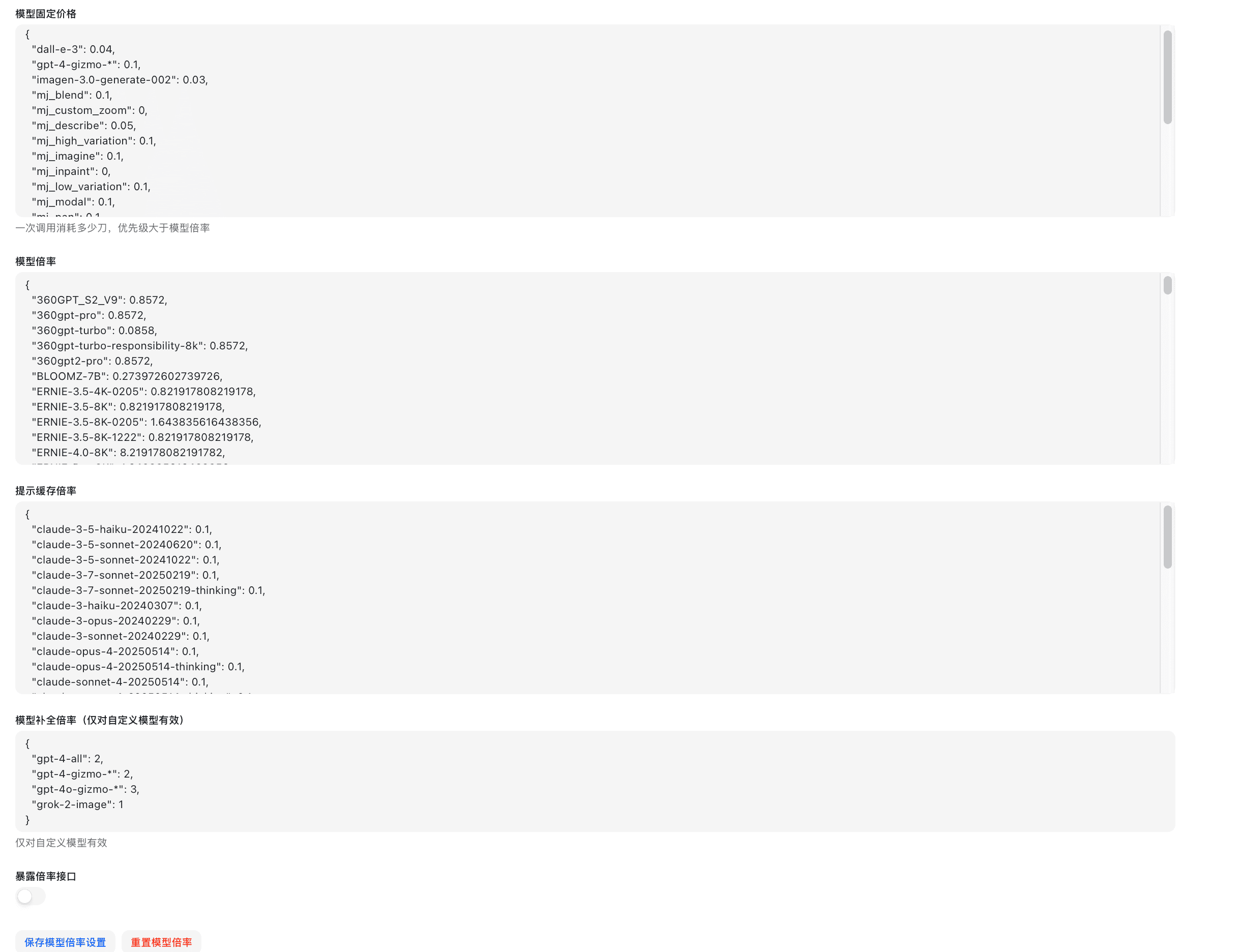
- JSON Format Setting: Directly edit the model ratio JSON configuration
- Visual Editor: Set ratios via a graphical interface
Completion Ratio Settings
The completion ratio is used for additional billing of output tokens, primarily to balance the input and output cost differences of various models.
Default Completion Ratios
| Model Type | Official Price (Input) | Official Price (Output) | Completion Ratio | Description |
|---|---|---|---|---|
| gpt-4o | 2.5$/1M Tokens | 10$/1M Tokens | 4 | Output is 4x input |
| gpt-3.5-turbo | 0.5$/1M Tokens | 1$/1M Tokens | 2 | Output is 2x input |
| gpt-image-1 | 5$/1M Tokens | 40$/1M Tokens | 8 | Output is 8x input |
| gpt-4o-mini | 0.15$/1M Tokens | 0.6$/1M Tokens | 4 | Output is 4x input |
| Other Models | 1 | 1 | 1 | Output is 1x input |
Setup Instructions
- The completion ratio primarily affects the billing of output tokens
- Setting it to 1 means output token billing is the same as input token billing
- Greater than 1 means higher billing for output tokens, less than 1 means lower billing for output tokens
Group Ratio Settings
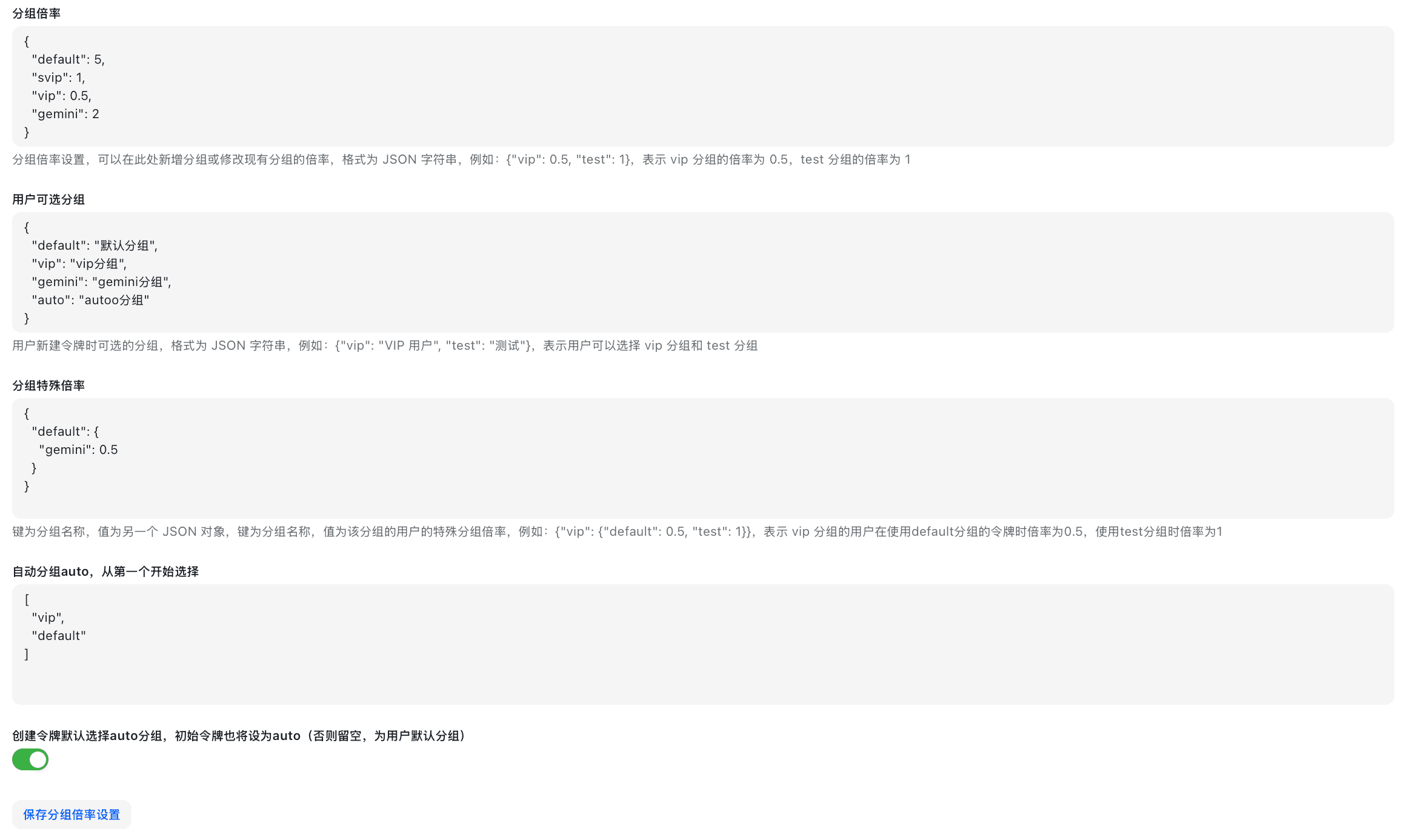
Group ratios allow setting differentiated billing multipliers for different user groups, enabling internal cost allocation, budget control, or enterprise customer billing configuration.
Group Ratio Configuration
{
  "internal-test": 0.5,
  "standard": 1.0,
  "enterprise-client": 0.8,
  "trial": 2.0
}
Group Ratio Priority
- User-specific Ratio: Individual ratio set for a particular user
- Group Ratio: The ratio of the group the user belongs to
- Default Ratio: System default ratio (usually 1.0)
Visual Ratio Settings
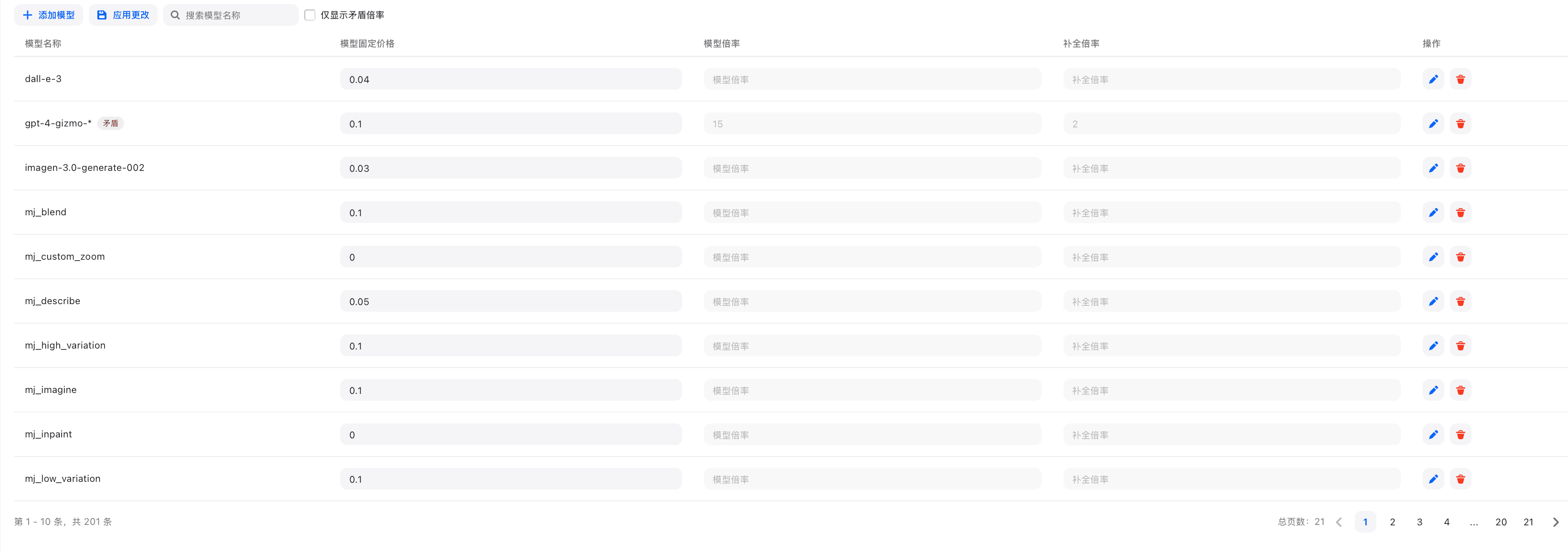
The visual editor provides an intuitive ratio management interface, supporting:
- Batch editing of model ratios
- Real-time preview of ratio configurations
- Conflict detection and alerts
- One-click synchronization of upstream ratios
Models Without Ratio Settings
For models without ratio settings, the system will:
- Self-use Mode: Use the default ratio of 37.5
- Billing Mode: Prompt with "Ratio or price not configured" error
- Automatic Detection: Display unconfigured models in the management interface

Upstream Ratio Synchronization
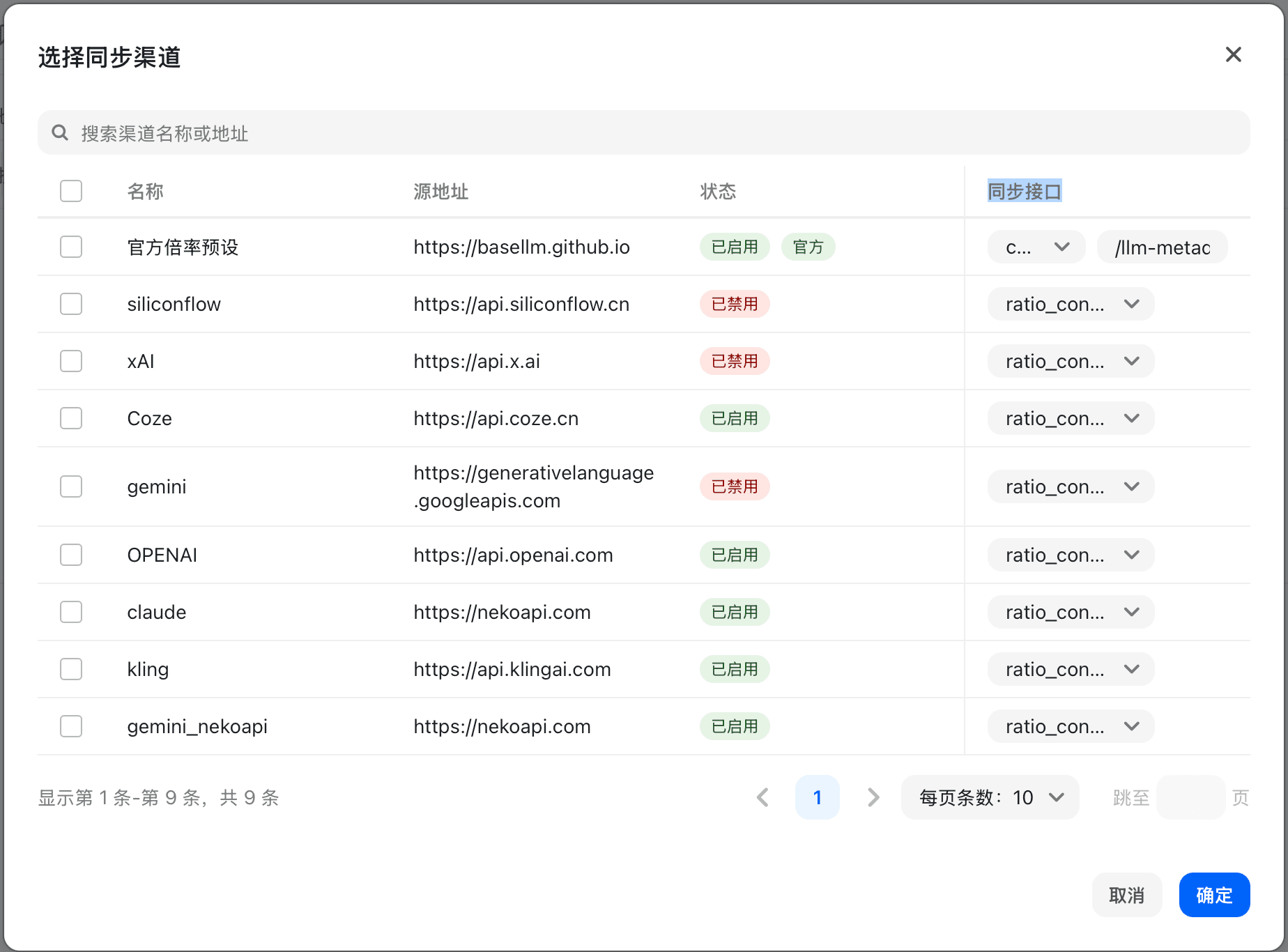
The system supports automatic synchronization of ratio settings from upstream channels:
- Only synchronize legally authorized upstream public or authorized available price/model metadata
- Batch update local ratio configurations
- Stay synchronized with upstream prices
- Supports manual adjustment and override
Frequently Asked Questions
Q: How do I set ratios for new models?
A: You can add new models via the visual editor or directly in the JSON configuration. It is recommended to set a conservative ratio first and adjust it based on actual usage.
Q: How do group ratios take effect?
A: Group ratios are multiplied by model ratios, ultimately affecting the calculation of user quota consumption. A user's actual ratio = Model Ratio × Group Ratio.
Q: What is the purpose of the completion ratio?
A: The completion ratio is mainly used to balance the cost differences between input and output tokens. The output cost of some models is significantly higher than the input cost, requiring adjustment via the completion ratio.
Q: How do I batch set ratios for similar models?
A: You can perform batch operations through the visual editor, or directly add ratio settings for similar models in bulk within the JSON configuration.
Quota Calculation Examples
Example 1: GPT-4 Standard User Conversation
Scenario Parameters:
- Input Tokens: 1,000
- Output Tokens: 500
- Model Ratio: 15
- Completion Ratio: 2
- Group Ratio: 1.0 (Standard User)
Calculation Process:
配额消耗 = (1,000 + 500 × 2) × 15 × 1.0
         = (1,000 + 1,000) × 15
         = 2,000 × 15
         = 30,000 配额点数
Equivalent USD Cost: 30,000 ÷ 500,000 = $0.06
Example 2: GPT-3.5 Internal Test Group Conversation
Scenario Parameters:
- Input Tokens: 2,000
- Output Tokens: 1,000
- Model Ratio: 0.25
- Completion Ratio: 1.33
- Group Ratio: 0.5 (Internal Test Group)
Calculation Process:
配额消耗 = (2,000 + 1,000 × 1.33) × 0.25 × 0.5
         = (2,000 + 1,330) × 0.125
         = 3,330 × 0.125
         = 416.25 配额点数
Equivalent USD Cost: 416.25 ÷ 500,000 = $0.00083
Example 3: Per-call Billing Model (e.g., Midjourney)
Scenario Parameters:
- Model Fixed Price: $0.02
- Group Ratio: 1.0 (Standard User)
- Quota Unit: 500,000
Calculation Process:
配额消耗 = 0.02 × 1.0 × 500,000
         = 10,000 配额点数
Equivalent USD Cost: 10,000 ÷ 500,000 = $0.02
For more billing rules, please refer to Frequently Asked Questions
How is this guide?
Last updated on