
Memoh - Containerized AI Agent Platform
Memoh integration guide — Connect the self-hosted containerized AI agent platform to New API, creating AI bots with long-term memory for Telegram, Discord, Lark, QQ, WeChat, and more.
Memoh is an open-source, self-hosted AI agent platform where each bot runs in its own isolated container with persistent memory and a dedicated filesystem. It supports 9 channels including Telegram, Discord, Lark (Feishu), QQ, Matrix, WeCom, WeChat, Email, and a built-in Web UI, along with MCP tool calling, browser automation, scheduled tasks, and other rich agent capabilities.
- Website: https://memoh.sh
- Documentation: https://docs.memoh.ai
- GitHub: https://github.com/memohai/Memoh
Key Features
- Containerized Isolation: Each bot runs in its own containerd container with a dedicated filesystem and network, supporting snapshots and data import/export
- Memory Engine: LLM-driven fact extraction, hybrid retrieval (dense + sparse + BM25), 24-hour context loading, memory compaction and rebuild
- Multi-Channel Support: Telegram, Discord, Lark (Feishu), QQ, Matrix, WeCom, WeChat, Email, Web UI
- MCP Support: Full MCP protocol support (HTTP / SSE / Stdio / OAuth), with independent MCP connection management per bot
- Browser Automation: Built-in headless browser powered by Playwright, supporting web browsing, form filling, screenshots, and more
- Web Dashboard: Modern management interface built with Vue 3 + Tailwind CSS, featuring streaming chat, tool call visualization, file management, and more
Quick Installation
Memoh is deployed via Docker. One-click install (requires Docker):
curl -fsSL https://memoh.sh | sudo shOr install manually:
git clone --depth 1 https://github.com/memohai/Memoh.git
cd Memoh
cp conf/app.docker.toml config.toml
# Edit the config.toml configuration file
sudo docker compose up -d
After startup, visit http://localhost:8082. Default credentials: admin / admin123.
NewAPI Integration
Memoh supports any OpenAI-compatible model provider, allowing you to use NewAPI to centrally manage and access various AI model services.
Configuration Steps
Obtain a NewAPI API Key
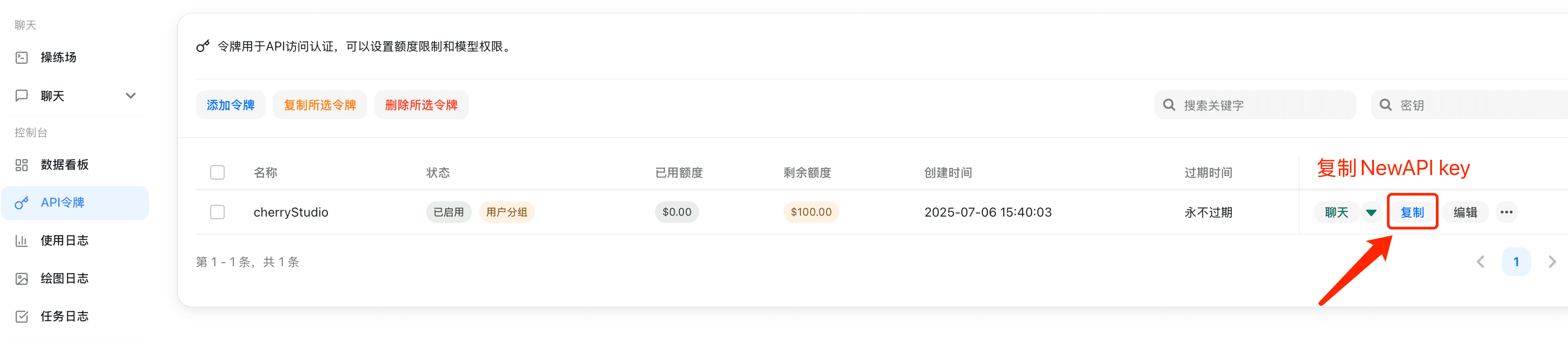
After registering and logging in to NewAPI, click "Console" in the top navigation bar, then click "Token Management", and click the "Add Token" button to create a new API Key. Select the appropriate permissions and click "Create".
Once created, click the copy button to copy the generated API Key.
Add a Model Provider in Memoh
Log in to the Memoh Web dashboard, go to the provider management page, and click NewAPI.
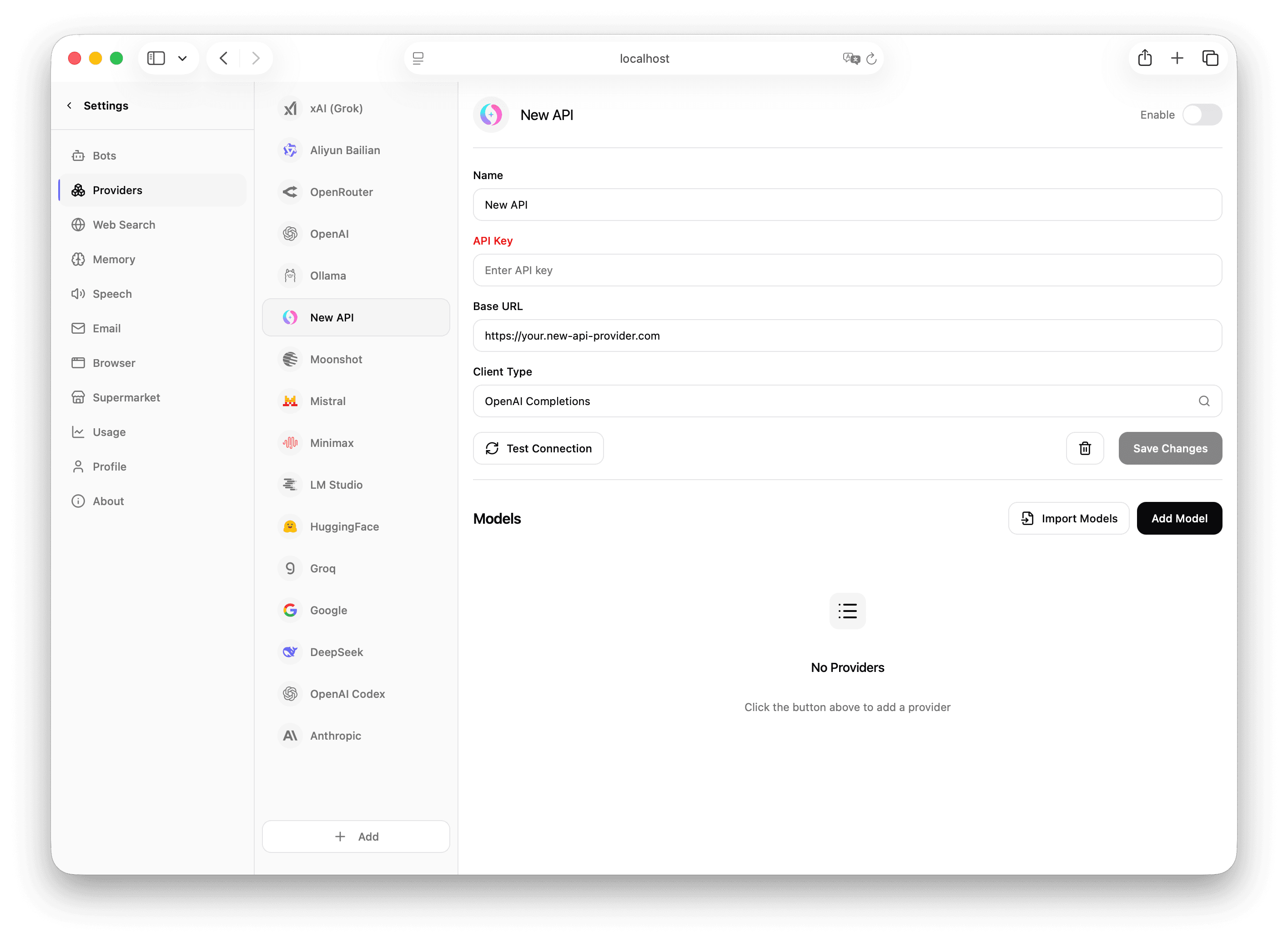
Fill in the following information on the configuration page:
- API Base URL: Enter the NewAPI endpoint URL, e.g.
https://api.example.com/v1(usehttp://localhost:3000/v1for local deployments) - API Key: Paste the API Key copied from NewAPI
Click Save to complete the provider configuration.
Import Models
After configuring the provider, go to the model management page and click auto-import or manually add the models you need.
Configure a Model for Your Bot
Go to the bot settings page, find the model configuration section, switch the default chat model to the one added via the NewAPI provider, and click Save.
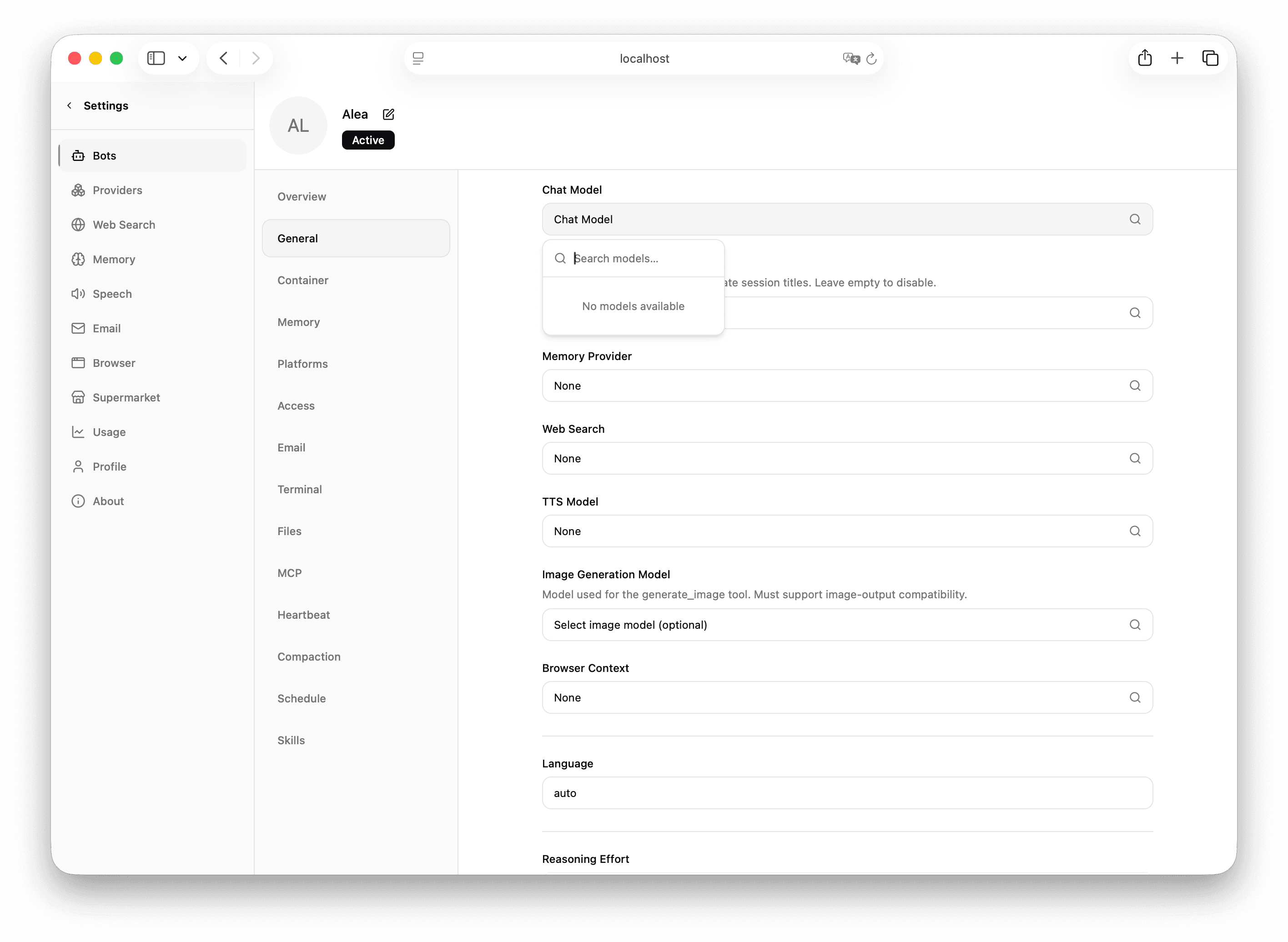
You have now successfully configured NewAPI as the model provider for Memoh. You can chat with AI bots through any of Memoh's channels (Telegram, Discord, Lark, etc.), and all requests will be routed through NewAPI.
How is this guide?
Last updated on
FluentRead - Open Source Translation Plugin
FluentRead configuration guide — open-source browser translation plugin with 20+ engines and AI model support. Connect to New API for immersive bilingual reading.
OpenClaw - Self-hosted AI Assistant Platform
OpenClaw Tutorial — Install OpenClaw, integrate New API, and quickly set up a self-hosted AI assistant. Open-source project, supporting multi-channel integration like Telegram, Discord, WhatsApp.